< Home

Web: Example for Enabling an IPv6 User to Access an IPv4 Server

Dynamic NAT64 mapping applies when the IPv6 network accesses the IPv4 network.

Networking Requirements

As shown in Figure 1, the FW supports the IPv6/IPv4 dual stack and is connected to an IPv6 network and an IPv4 network.

When NAT64 is deployed with DNS64, the DNS64 device provides domain name resolution. The prefix and prefix length set on the DNS64 device are the same as those on the FW.
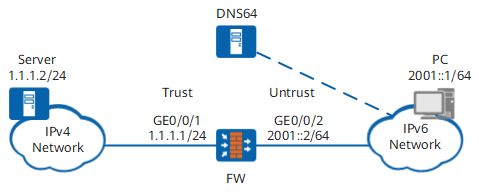
Figure 1 Dynamic NAT64 networking diagram

The PC on the IPv6 network can access the server on the IPv4 network using URL www.example.com.

Procedure

  1. Enable IPv6 and NAT64.
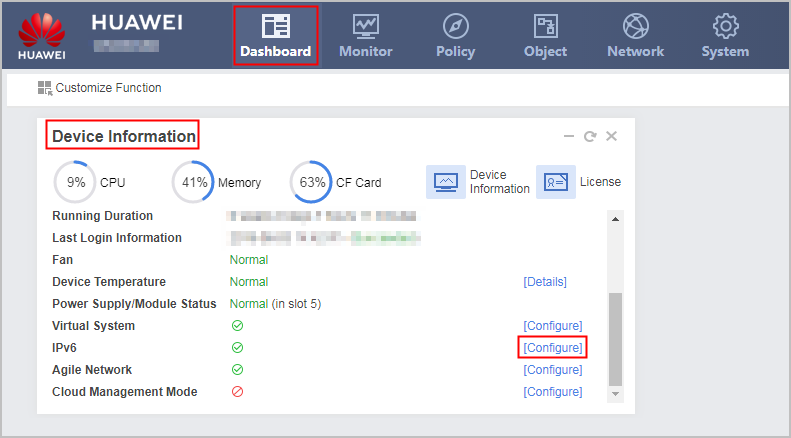
    1. Choose Dashboard > Device Information.

    2. Click Configure on the line of IPv6 and enable IPv6 and NAT64 functions.
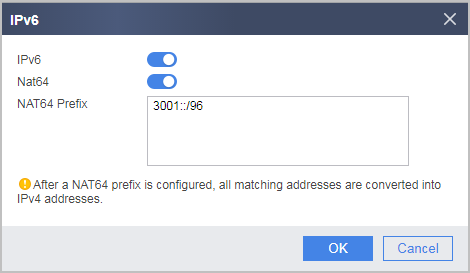
    3. Click Apply.
  2. Set IP addresses for interfaces on the FW and assign the interfaces to security zones.
    1. Set the IP address of GigabitEthernet 0/0/1 and assign the interface to a security zone.

      1. Choose Network > Interface.

      2. In Interface List, click of GigabitEthernet 0/0/1 and set the following parameters.

        Zone

        trust

        IPv4

        IP Address

        1.1.1.1/24

      3. Click OK.

    2. Set the IP address of GigabitEthernet 0/0/2 and assign the interface to a security zone.

      1. Choose Network > Interface.

      2. In Interface List, click on the line of GigabitEthernet 0/0/2 and set the following parameters.

        Zone

        untrust

        IPv6

        IP Address

        2001::2/64

      3. Click OK.

  3. Configure a security policy for traffic between Internet users and intranet servers.

    1. Choose Policy > Security Policy > Security Policy.

    2. In Security Policy List, click Add, select Add Security Policy, and configure a security policy based on the following parameter values.

      Name

      policy_sec_1

      Source Zone

      untrust

      Destination Zone

      trust

      Source Address/Region

      2001::/64

      Action

      Permit

    3. Click OK.

  4. Configure a NAT address pool and a NAT64 policy.

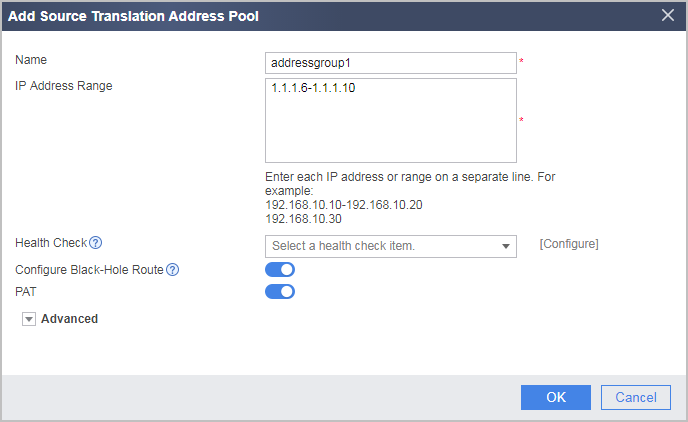
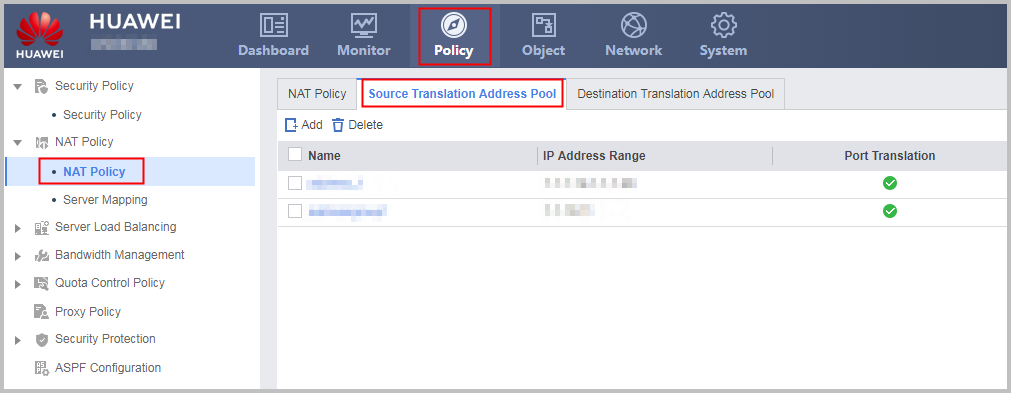
    1. Choose Policy > NAT Policy > NAT Policy > Source Translation Address Pool.

    2. In Source Translation Address Pool List, click Add and configure a NAT address pool based on the following parameter values.

    3. Click OK.

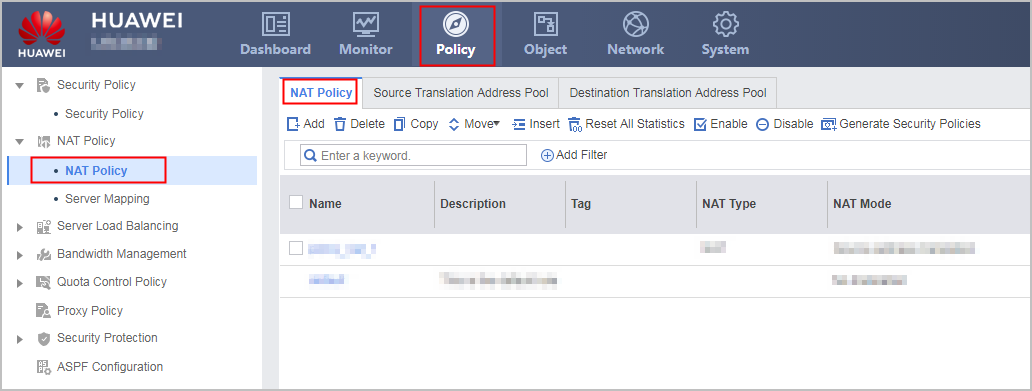
    4. Choose Policy > NAT Policy > NAT Policy > NAT Policy.

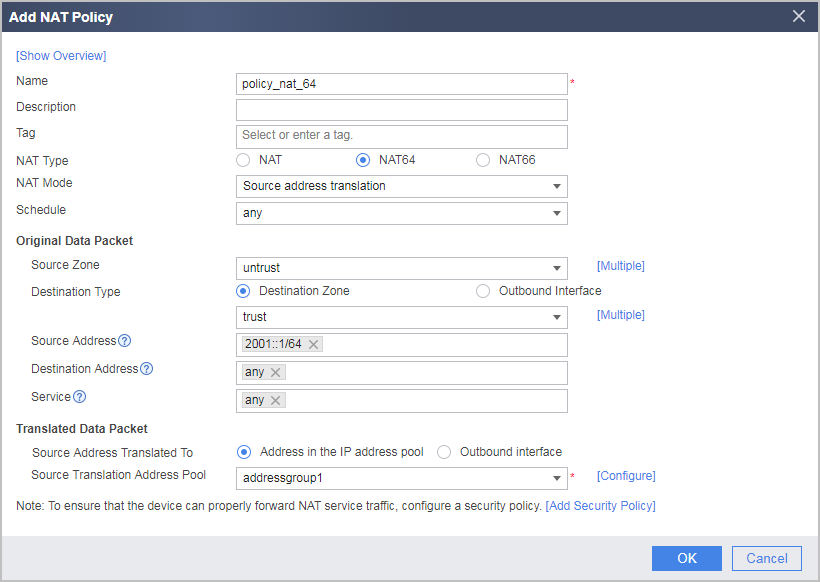
    5. In NAT Policy List, click Add and configure a NAT64 policy based on the following parameter values.

    6. Click OK.

  5. Configure the DNS64 device.

    # Set the IPv6 prefix of the DNS64 device to 3001::/96, which is the same as the NAT64 prefix of the FW.

    # The IP connectivity between the DNS64 device and the PC, and between the DNS64 device and the server is ensured.

  6. Configure the PC IPv6 address, the route and the DNS server. (The method of setting IPv6 address, route and DNS server varies depending on the operating system of the PC. The setting method is omitted here.)

    # Set the PC IPv6 address to 2001::1/24, which is on the same subnet as GigabitEthernet 0/0/2 of the FW.

    # Set a static route from the PC to the FW. The destination address is prefix 3001::/96, and the next-hop address is 2001::2.

    # Set the DNS server of the PC to the IPv6 address of the DNS64 device.

  7. Configure the server IPv4 address. (The method of setting IPv4 address varies depending on the operating system of the server. The setting method is omitted here.)

    # Set the server IPv4 address to 1.1.1.2/24, which is on the same subnet as GigabitEthernet 0/0/1 of the FW.

Configuration Scripts

Configuration script for the FW:

#                                                                               
 sysname FW                                      
#                                                                               
 ipv6
#                                                                               
interface GigabitEthernet 0/0/1                                                  
 ip address 1.1.1.1 255.255.255.0                                               
#                                                                               
interface GigabitEthernet 0/0/2                                                  
 ipv6 enable
 ipv6 address 2001::2/64                                              
#
 nat64 enable
#
nat address-group addressgroup1
 mode pat                                                                        
 section 1 1.1.1.6 1.1.1.10
#                                                                               
firewall zone trust                                                             
 set priority 85                                                                
 add interface GigabitEthernet 0/0/1                                             
#                                                                               
firewall zone untrust                                                             
 set priority 5                                                                
 add interface GigabitEthernet 0/0/2                                             
#  
 nat64 prefix 3001:: 96   
#                                                                               
security-policy                                                                 
  rule name policy_sec_1                                                        
    source-zone untrust                                                           
    destination-zone trust                                                    
    source-address 2001:: 64                                                  
    action permit                                                               
#                                                                                
nat-policy                                                                      
  rule name policy_nat64                                                        
    source-zone untrust                                                           
    destination-zone trust                                                    
    nat-type nat64
    source-address 2001:: 64                                                  
    action source-nat address-group addressgroup1                                          
#                                                                                
return
Copyright © Huawei Technologies Co., Ltd.
< Previous topic Next topic >