CLI: Example for Configuring the SACG Interworking in Standalone In-line Mode
In in-line mode, the SACG is directly connected to the original network in serial or replaces the original core switch or router to implement the SACG interworking function. The in-line mode implements the SACG interworking function and provides other security functions at the same time.
Networking Requirements
The Agile Controller server is deployed on an enterprise network, and the FW is deployed in in-line mode at the egress of this network, as shown in Figure 1. The following requirements should be met:
- Different user roles can access different network resources (configured in the Agile Controller server).
- Once user roles change, available network resources should be updated instantly.
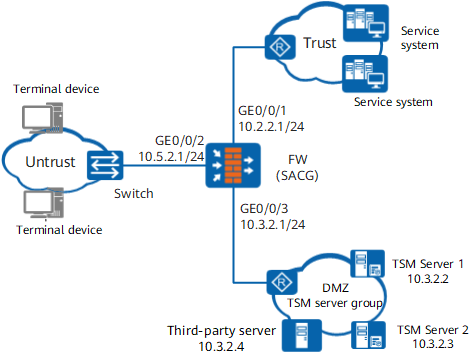
Data Planning
Item |
Data |
Description |
|
|---|---|---|---|
Agile Controller server 1 |
IP Address: 10.3.2.2 Port: 3288 Shared key: TSM_Security |
The port and shared key configured need to be identical with those configured on the Agile Controller server. |
|
Agile Controller server 2 |
IP Address: 10.3.2.3 Port: 3288 Shared key: TSM_Security |
The port and shared key configured need to be identical with those configured on the Agile Controller server. |
|
Third-party server |
IP address: 10.1.4.4 Protocol of packets supported by health check: HTTP Health check destination port: 80 Minimum number of active nodes for health check: 1 |
- |
|
Minimum number of active servers |
1 |
- |
|
Configuration Roadmap
- Configure the Agile Controller server.
- Configure the basic parameters of the interfaces.
- Configure interzone packet filtering to ensure normal communication on the network.
- Add a Agile Controller server.
- Configure the authentication URL.
- Enable SACG, set the minimum number of active servers, and enable the status detection of the server.
- Apply the interworking policy to the interzone.
Procedure
- Set interface IP addresses and add the interfaces to security
zones.
[FW] interface GigabitEthernet 0/0/1
[FW-GigabitEthernet0/0/1] ip address 10.2.2.1 255.255.255.0
[FW-GigabitEthernet0/0/1] quit
[FW] interface GigabitEthernet 0/0/2
[FW-GigabitEthernet0/0/2] ip address 10.5.2.1 255.255.255.0
[FW-GigabitEthernet0/0/2] quit
[FW] interface GigabitEthernet 0/0/3
[FW-GigabitEthernet 0/0/3] ip address 10.3.2.1 255.255.255.0
[FW-GigabitEthernet 0/0/3] quit
[FW] firewall zone trust
[FW-zone-Trust] add interface GigabitEthernet 0/0/1
[FW-zone-Trust] quit
[FW] firewall zone untrust
[FW-zone-Untrust] add interface GigabitEthernet 0/0/2
[FW-zone-Untrust] quit
[FW] firewall zone dmz
[FW-zone-dmz] add interface GigabitEthernet 0/0/3
[FW-zone-dmz] quit
- Configure security policies.

- Configure a security policy between the Local and DMZ security zones so that the Service Controller can deliver rules to the FW.
- Configure a security policy between the Local and Untrust security zones so that the FW can push web pages to users for authentication.
[FW] security-policy
[FW-security-policy] rule name sec_policy01
[FW-security-policy-sec_policy01] source-address 192.168.1.0 mask 255.255.255.0
[FW-security-policy-sec_policy01] source-zone dmz
[FW-security-policy-sec_policy01] destination-zone local
[FW-security-policy-sec_policy01] action permit
[FW-security-policy-sec_policy01] quit
[FW-security-policy] rule name sec_policy02
[FW-security-policy-sec_policy02] source-zone local
[FW-security-policy-sec_policy02] destination-zone untrust
[FW-security-policy-sec_policy02] action permit
[FW-security-policy-sec_policy02] quit
[FW-security-policy] quit
- Configure interworking with the Agile Controller.
# Access the configuration view for interworking between the FW and Agile Controller and specify the default ACL number.
If ACLs 3099 to 3999 exist, delete them before specifying the default ACL number to avoid ACL conflicts on the FW.
[FW] right-manager server-group
[FW-rightm] default acl 3099
# Add a Service Controller on the FW. Two Service Controllers are deployed. Therefore, run the server ip command twice to add them.

The values of port and shared-key in the server ip command must be the same as those on the Service Controller. Otherwise, the SACG cannot be connected to the Service Controller, and the SACG interworking function cannot be used.
[FW-rightm] server ip 10.3.2.2 port 3288 shared-key TSM_Security
[FW-rightm] server ip 10.3.2.3 port 3288 shared-key TSM_Security
# Configure non-agent web authentication. When a terminal on which the SACG agent is not installed attempts to access a network, the FW pushes a web authentication page to the terminal.
[FW-rightm] right-manager authentication url http://10.3.2.2:8080/webauth
[FW-rightm] right-manager authentication url http://10.3.2.3:8080/webauth
- If a terminal uses an agent to access the web server in the post-authentication domain, the FW cannot push a web page to the terminal.
- The web page push configuration applies to all terminal hosts and does not require ACL matching.
- If multiple web pages are configured, the FW selects one of them to push.
# Enable a server group to connect the FW to the Service Controller to send an interworking request. After the connection succeeds, the FW can receive a role and rules of the role from the Agile Controller.
[FW-rightm] right-manager server-group enable# Configure the emergency channel function and set the minimum number of Service Controllers that are connected to the FW to 1. Therefore, if the FW successfully connects to one or more Service Controllers, it can perform Agile Controller detection. If the FW cannot connect to any Service Controller due to the failure of Service Controllers, the emergency channel is enabled so that all terminals are allowed to access controlled networks.
[FW-rightm] right-manager status-detect enable
[FW-rightm] right-manager server-group active-minimun 1
[FW-rightm] quit
# Apply the interworking policy to the inbound direction (Untrust-to-DMZ) of the Untrust zone and DMZ so that hosts can communicate with the pre-authentication domain.
The interworking policy is applied to the inbound direction because the source (host) is in the Untrust zone, the destination (pre-authentication domain) is in the DMZ, and the security level of the Untrust is lower than that of the DMZ.
[FW] firewall interzone dmz untrust
[FW-interzone-dmz-untrust] apply packet-filter right-manager inbound
[FW-interzone-dmz-untrust] quit
# Apply the interworking policy to the inbound direction (Untrust-to-Trust) of the Untrust and Trust security zones so that permit rules of the emergency channel can be delivered to the Untrust-Trust interzone.
The interworking policy is applied to the inbound direction because the source (host) is in the Untrust zone, the destination (pre-authentication domain) is in the Trust zone, and the security level of the Untrust zone is lower than that of the Trust zone.
[FW] firewall interzone trust untrust
[FW-interzone-trust-untrust] apply packet-filter right-manager inbound
[FW-interzone-trust-untrust] quit
- Optional: Configure health check for third-party
servers.
In SACG scenarios, some account and password information is stored on the Agile Controller, and some account and password information is stored on the third-party authentication server. When a user enters the account and password on the client to initiate an identity authentication request, if the account and password are stored on the Agile Controller, the Agile Controller authenticates the user. If the account and password are stored on the third-party authentication server, the AC-Campus will send the account information to the third-party server for authentication. The third-party server sends the authentication result to the AC-Campus. The AC-Campus authorizes the user based on the authentication result.
In the scenario where user authentication is done on the Agile Controller, if the Service Controller detects that the number of active Agile Controller is smaller than the configured smallest value, the emergency channel is enabled. The Service Controller cannot detect whether the third-party authentication server is active. If an exception occurs, user authentication cannot be done on the third-party authentication server. In this case, the FW acting as the SACG needs to check the health of the third-party authentication server. If the health status of the third-party authentication server is Down, the FW enables the emergency channel, ensuring service continuity. After the fault is rectified, the emergency channel is automatically disabled, and the original permission control for the user is restored.
In this example, the IP address of the third-party server in the pre-authentication domain is 10.3.2.4; the port number is 80; the detection protocol is HTTP; and detection packets are sent through GigabitEthernet 0/0/3.
[FW] healthcheck enable
[FW] healthcheck name hchk1
[FW-healthcheck-hchk1] least active-linknumber 1
[FW-healthcheck-hchk1] destination 10.3.2.4 interface GigabitEthernet 0/0/3 protocol http destination-port 80
[FW-healthcheck-hchk1] quit
[FW] right-manager server-group
[FW-rightm] healthcheck hchk1
[FW-rightm] quit
# Return to the user view and save the configurations.
[FW] quit
<FW> save
Verification
Run the display right-manager server-group command on the FW to view the Service controller status.
<FW> display right-manager server-group
Server group state  :  Enable
Server number :       2
Server ip address       Port      State      Master
10.3.2.2             3288      active          Y
10.3.2.3             3288      active          N
The value of State is active, indicating that the Service Controllers are successfully connected and the configuration succeeds.
After the Service Controller whose IP address is 10.3.2.2 is shut down, Master of the Service Controller at 10.3.2.3 is Y, indicating that the connection status is normal and interworking with the Agile Controller can function properly when one or more Service controllers are connected to the FW.
Configuration Scripts
#
sysname FW
#
security-policy
 rule name sec_policy01
 source-address 192.168.1.0 mask 255.255.255.0
 source-zone dmz
 destination-zone local
 action permit

 rule name sec_policy02
 source-zone local
 destination-zone untrust
 action permit
#
interface GigabitEthernet0/0/1
 ip address 10.2.2.1 255.255.255.0
#
interface GigabitEthernet0/0/2
 ip address 10.5.2.1 255.255.255.0
#
interface GigabitEthernet0/0/3
 ip address 10.3.2.1 255.255.255.0
#
firewall zone local
 set priority 100
#
firewall zone trust
 set priority 85
 add interface GigabitEthernet0/0/1
#
firewall zone untrust
 set priority 5
 add interface GigabitEthernet0/0/2
#
firewall zone dmz
 set priority 50
 add interface GigabitEthernet0/0/3
#
right-manager server-group
 healthcheck hchk1
 default acl 3099
 server ip 10.3.2.2 port 3288 shared-key %$%$!g8A4;cd.T(7d@Bdhw#~iI@7%$%$
 server ip 10.3.2.3 port 3288 shared-key %$%$!g8A4;cd.T(7d@Bdhw#~iI@7%$%$
 right-manager server-group enable
 right-manager status-detect enable
 right-manager server-group active-minimun 1
 right-manager authentication url http://10.3.2.2:8080/webauth
 right-manager authentication url http://10.3.2.3:8080/webauth
#
firewall interzone trust untrust
 apply packet-filter right-manager inbound
#
firewall interzone dmz untrust
 apply packet-filter right-manager inbound
#
healthcheck enable
healthcheck name hchk1
least active-linknumber 1
destination 10.3.2.4 interface GigabitEthernet 0/0/3 protocol http destination-port 80
#
return