CLI: Example for Configuring Hot Standby in Load Balancing Mode Where Firewalls Are Deployed in In-path Mode and Connect to Routers in Upstream and Downstream Directions
This section provides a CLI example of configuring hot standby in load balancing mode in which the service interfaces of the firewalls work at Layer 3 and connect to routers in upstream and downstream directions.
Networking Requirements
As shown in Figure 1, the service interfaces of the FWs work at Layer 3 and are directly connected to routers. OSPF runs between the FWs and upstream and downstream routers. The FWs are expected to work in load balancing mode. Normally, both FW_A and FW_B forward traffic. If either FW fails, the other FW forwards all traffic to ensure service continuity.
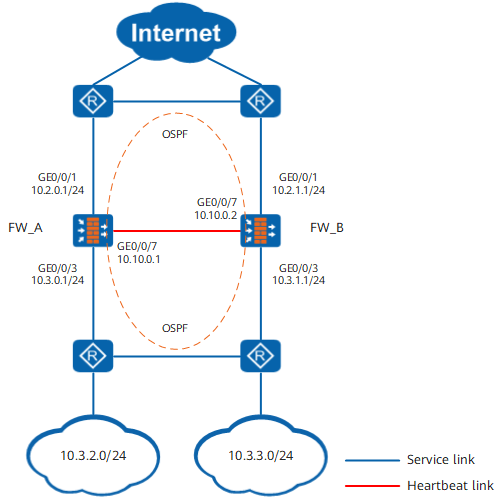
Procedure
- Complete basic network configurations.
FW_A
FW_B
# Set IP addresses for the interfaces on FWs.
<FW_A> system-view
[FW_A] interface GigabitEthernet 0/0/1
[FW_A-GigabitEthernet0/0/1] ip address 10.2.0.1 24
[FW_A-GigabitEthernet0/0/1] quit
[FW_A] interface GigabitEthernet 0/0/3
[FW_A-GigabitEthernet0/0/3] ip address 10.3.0.1 24
[FW_A-GigabitEthernet0/0/3] quit
[FW_A] interface GigabitEthernet 0/0/7
[FW_A-GigabitEthernet0/0/7] ip address 10.10.0.1 24
[FW_A-GigabitEthernet0/0/7] quit
<FW_B> system-view
[FW_B] interface GigabitEthernet 0/0/1
[FW_B-GigabitEthernet0/0/1] ip address 10.2.1.1 24
[FW_B-GigabitEthernet0/0/1] quit
[FW_B] interface GigabitEthernet 0/0/3
[FW_B-GigabitEthernet0/0/3] ip address 10.3.1.1 24
[FW_B-GigabitEthernet0/0/3] quit
[FW_B] interface GigabitEthernet 0/0/7
[FW_B-GigabitEthernet0/0/7] ip address 10.10.0.2 24
[FW_B-GigabitEthernet0/0/7] quit
# Assign the interfaces to security zones on FWs.
[FW_A] firewall zone trust
[FW_A-zone-trust] add interface GigabitEthernet 0/0/3
[FW_A-zone-trust] quit
[FW_A] firewall zone dmz
[FW_A-zone-dmz] add interface GigabitEthernet 0/0/7
[FW_A-zone-dmz] quit
[FW_A] firewall zone untrust
[FW_A-zone-untrust] add interface GigabitEthernet 0/0/1
[FW_A-zone-untrust] quit
[FW_B] firewall zone trust
[FW_B-zone-trust] add interface GigabitEthernet 0/0/3
[FW_B-zone-trust] quit
[FW_B] firewall zone dmz
[FW_B-zone-dmz] add interface GigabitEthernet 0/0/7
[FW_B-zone-dmz] quit
[FW_B] firewall zone untrust
[FW_B-zone-untrust] add interface GigabitEthernet 0/0/1
[FW_B-zone-untrust] quit
# Configure OSPF to ensure IP connectivity on FWs.
[FW_A] ospf 10
[FW_A-ospf-10] area 0
[FW_A-ospf-10-area-0.0.0.0] network 10.2.0.0 0.0.0.255
[FW_A-ospf-10-area-0.0.0.0] network 10.3.0.0 0.0.0.255
[FW_A-ospf-10-area-0.0.0.0] quit
[FW_A-ospf-10] quit
[FW_B] ospf 10
[FW_B-ospf-10] area 0
[FW_B-ospf-10-area-0.0.0.0] network 10.2.1.0 0.0.0.255
[FW_B-ospf-10-area-0.0.0.0] network 10.3.1.0 0.0.0.255
[FW_B-ospf-10-area-0.0.0.0] quit
[FW_B-ospf-10] quit
- Configure hot standby.
FW_A
FW_B
# Configure VGMP groups to monitor upstream and downstream service interfaces on FWs.
[FW_A] hrp track interface GigabitEthernet 0/0/1
[FW_A] hrp track interface GigabitEthernet 0/0/3
[FW_B] hrp track interface GigabitEthernet 0/0/1
[FW_B] hrp track interface GigabitEthernet 0/0/3
# Configure quick session backup on both FWs in case of inconsistent forward and return packet paths.
[FW_A] hrp mirror session enable[FW_B] hrp mirror session enable# Specify the heartbeat interface and enable hot standby on FWs.
[FW_A] hrp interface GigabitEthernet 0/0/7 remote 10.10.0.2
[FW_A] hrp enable
[FW_B] hrp interface GigabitEthernet 0/0/7 remote 10.10.0.1
[FW_B] hrp enable
- Create a security policy on FW_A. After hot standby relationship is established, the security policy on FW_A will be automatically backed up to FW_B.
# Configure security policies to allow FWs and the upstream/downstream routers to exchange OSPF packets.

Controlling function of security policies for OSPF packets are configured by the firewall packet-filter basic-protocol enable command. By default, the function of the firewall packet-filter basic-protocol enable command is enabled. That is, OSPF packets are controlled by security policies. In this case, a security policy must be configured between the security zones where the upstream/downstream service interfaces reside and the local zone to allow OSPF packets to pass. In this example, enabling the firewall packet-filter basic-protocol enable command is used as an example.
HRP_M[FW_A] security-policy
HRP_M[FW_A-policy-security] rule name policy_ospf_1
HRP_M[FW_A-policy-security-rule-policy_ospf_1] source-zone local
HRP_M[FW_A-policy-security-rule-policy_ospf_1] destination-zone trust untrust
HRP_M[FW_A-policy-security-rule-policy_ospf_1] service ospf
HRP_M[FW_A-policy-security-rule-policy_ospf_1] action permit
HRP_M[FW_A-policy-security-rule-policy_ospf_1] quit
HRP_M[FW_A-policy-security] rule name policy_ospf_2
HRP_M[FW_A-policy-security-rule-policy_ospf_2] source-zone trust untrust
HRP_M[FW_A-policy-security-rule-policy_ospf_2] destination-zone local
HRP_M[FW_A-policy-security-rule-policy_ospf_2] service ospf
HRP_M[FW_A-policy-security-rule-policy_ospf_2] action permit
HRP_M[FW_A-policy-security-rule-policy_ospf_2] quit
# Configure a security policy to allow intranet users to access the Internet.
HRP_M[FW_A-policy-security] rule name policy_sec
HRP_M[FW_A-policy-security-rule-policy_sec] source-zone trust
HRP_M[FW_A-policy-security-rule-policy_sec] destination-zone untrust
HRP_M[FW_A-policy-security-rule-policy_sec] source-address 10.3.2.0 24
HRP_M[FW_A-policy-security-rule-policy_sec] source-address 10.3.3.0 24
HRP_M[FW_A-policy-security-rule-policy_sec] action permit
- Configure the routers.
Configure OSPF on the routers to advertise routes. For configuration commands, refer to the related documents of the routers.
Verification
Run the display hrp state verbose command on FW_A and FW_B to check the VGMP group status. If the following information is displayed, hot standby relationship is successfully established.
FW_A |
FW_B |
|---|---|
HRP_M<FW_A> display hrp state verbose Role: active, peer: active Running priority: 45000, peer: 45000 Backup channel usage: 30% Stable time: 1 days, 13 hours, 35 minutes Last state change information: 2018-03-22 16:01:56 HRP core state changed, old_ state = normal(active), new_state = normal(active), local_priority = 45000, peer_priority = 45000. Configuration: hello interval: 1000ms preempt: 60s mirror configuration: off mirror session: on track trunk member: on auto-sync configuration: on auto-sync connection-status: on adjust ospf-cost: on adjust ospfv3-cost: on adjust bgp-cost: on nat resource: off Detail information: GigabitEthernet0/0/1: up GigabitEthernet0/0/3: up ospf-cost: +0 |
HRP_S<FW_B> display hrp state verbose Role: active, peer: active Running priority: 45000, peer: 45000 Backup channel usage: 30% Stable time: 1 days, 13 hours, 35 minutes Last state change information: 2018-03-22 16:01:56 HRP core state changed, old_ state = normal(standby), new_state = normal(active), local_priority = 45000, peer_priority = 45000. Configuration: hello interval: 1000ms preempt: 60s mirror configuration: off mirror session: on track trunk member: on auto-sync configuration: on auto-sync connection-status: on adjust ospf-cost: on adjust ospfv3-cost: on adjust bgp-cost: on nat resource: off Detail information: GigabitEthernet0/0/1: up GigabitEthernet0/0/3: up ospf-cost: +0 |
Configuration Scripts
FW_A |
FW_B |
|---|---|
# hrp enable hrp interface GigabitEthernet 0/0/7 remote 10.10.0.2 hrp mirror session enable hrp track interface GigabitEthernet 0/0/1 hrp track interface GigabitEthernet 0/0/3 # interface GigabitEthernet 0/0/1 ip address 10.2.0.1 255.255.255.0 # interface GigabitEthernet 0/0/3 ip address 10.3.0.1 255.255.255.0 # interface GigabitEthernet 0/0/7 ip address 10.10.0.1 255.255.255.0 # firewall zone trust set priority 85 add interface GigabitEthernet 0/0/3 # firewall zone untrust set priority 5 add interface GigabitEthernet 0/0/1 # firewall zone dmz set priority 50 add interface GigabitEthernet0/0/7 # ospf 10 area 0.0.0.0 network 10.2.0.0 0.0.0.255 network 10.3.0.0 0.0.0.255 # security-policy rule name policy_ospf_1 source-zone local destination-zone trust destination-zone untrust service ospf action permit rule name policy_ospf_2 source-zone trust source-zone untrust destination-zone local service ospf action permit rule name policy_sec source-zone trust destination-zone untrust source-address 10.3.2.0 24 source-address 10.3.3.0 24 action permit |
# hrp enable hrp interface GigabitEthernet 0/0/7 remote 10.10.0.1 hrp mirror session enable hrp track interface GigabitEthernet 0/0/1 hrp track interface GigabitEthernet 0/0/3 # interface GigabitEthernet 0/0/1 ip address 10.2.1.1 255.255.255.0 # interface GigabitEthernet 0/0/3 ip address 10.3.1.1 255.255.255.0 # interface GigabitEthernet 0/0/7 ip address 10.10.0.2 255.255.255.0 # firewall zone trust set priority 85 add interface GigabitEthernet 0/0/3 # firewall zone untrust set priority 5 add interface GigabitEthernet 0/0/1 # firewall zone dmz set priority 50 add interface GigabitEthernet0/0/7 # ospf 10 area 0.0.0.0 network 10.2.1.0 0.0.0.255 network 10.3.1.0 0.0.0.255 # security-policy rule name policy_ospf_1 source-zone local destination-zone trust destination-zone untrust service ospf action permit rule name policy_ospf_2 source-zone trust source-zone untrust destination-zone local service ospf action permit rule name policy_sec source-zone trust destination-zone untrust source-address 10.3.2.0 24 source-address 10.3.3.0 24 action permit |