CLI: Example for Configuring a Branch to Access the Headquarters Through an IPsec Tunnel Using a Domain Name (PPPoE Dial-up)
Networking Requirements
As shown in Figure 1, the headquarters and branch access the Internet through PPPoE dial-up. There are reachable routes between the headquarters and branch. The branch accesses the headquarters through an IPsec tunnel. The public IP addresses of the headquarters and branch are not fixed. Therefore, the Dynamic Domain Name Server (DDNS) function needs to be configured for the branch to use a domain name to access the headquarters through the IPsec tunnel.
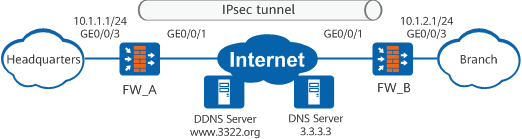
Data Plan
Item |
Data |
Remarks |
|---|---|---|
FW_A |
Interface number: GigabitEthernet 0/0/1 IP address: obtained through auto-negotiation Security zone: Untrust |
- |
Interface number: GigabitEthernet 0/0/3 IP address: 10.1.1.1/24 Security zone: Trust |
- |
|
IPsec configuration Authentication mode: pre-shared key Pre-shared key: Test!1234 Local ID type: IP address Remote ID type: any |
- |
|
FW_B |
Interface number: GigabitEthernet 0/0/1 IP address: obtained through auto-negotiation Security zone: Untrust |
- |
Interface number: GigabitEthernet 0/0/3 IP address: 10.1.2.1/24 Security zone: Trust |
- |
|
IPsec configuration Peer domain name: www.abcd.3322.org Authentication mode: pre-shared key Pre-shared key: Test!1234 Local ID type: IP address Remote ID type: IP address |
- |
|
PPPoE account |
User name: dialeruser Password: Hello123 |
The PPPoE account is an example. Contact your local carrier to obtain your PPPoE account. |
DDNS |
DDNS service provider: www.3322.org Domain name of the DDNS client: www.abcd.3322.org User name and password: Abc and Abc_123 DNS IP address: 3.3.3.3 |
The DDNS configuration items are examples. Contact your DDNS service provider to obtain the DDNS configuration information. |
Configuration Roadmap
The configuration roadmaps for FW_A and FW_B are similar.
- Perform basic interface configurations.
- Configure security policies to allow devices on specified private network segments to exchange packets.
- Configure a route to the peer intranet.
- Configure and apply an IPsec policy, including basic IPsec policy information, data flow to be protected by IPsec, and IPsec proposal negotiation parameters.
- Configure a NAT policy. Internet access data flows need to be translated through NAT, but data flows passing the IPsec tunnel does not. Therefore, distinguish the two types of data flows when configuring NAT.
- Configure the DNS server address on FW_A and FW_B and configure DDNS on FW_A so that FW_B can resolve the domain name of FW_A.
Procedure
- Configure FW_A.
- Configure interfaces.
# Configure a dial-up access group to permit all IPv4 packets.
<sysname> system-view
[sysname] sysname FW_A
[FW_A] dialer-rule 1 ip permit
# Create a dial-up interface and set its parameters.
[FW_A] interface dialer 1
[FW_A-Dialer1] link-protocol ppp
[FW_A-Dialer1] ppp chap user dialeruser
[FW_A-Dialer1] ppp chap password cipher Hello123
[FW_A-Dialer1] ppp pap local-user dialeruser password cipher Hello123
[FW_A-Dialer1] ip address ppp-negotiate
[FW_A-Dialer1] ppp ipcp dns admit-any
[FW_A-Dialer1] dialer user dialeruser
[FW_A-Dialer1] dialer bundle 1
[FW_A-Dialer1] dialer-group 1
[FW_A-Dialer1] quit
# Configure GigabitEthernet 0/0/1
[FW_A] interface GigabitEthernet 0/0/1
[FW_A-GigabitEthernet0/0/1] pppoe-client dial-bundle-number 1 ipv4
[FW_A-GigabitEthernet0/0/1] quit
# Configure GigabitEthernet 0/0/3.
[FW_A] interface GigabitEthernet 0/0/3
[FW_A-GigabitEthernet0/0/3] ip address 10.1.1.1 24
[FW_A-GigabitEthernet0/0/3] quit
# Add GigabitEthernet 0/0/1 and Dialer1 to the Untrust zone.
[FW_A] firewall zone untrust
[FW_A-zone-untrust] add interface dialer 1
[FW_A-zone-untrust] add interface GigabitEthernet 0/0/1
[FW_A-zone-untrust] quit
# Add GigabitEthernet 0/0/3 to the Trust zone.
[FW_A] firewall zone trust
[FW_A-zone-trust] add interface GigabitEthernet 0/0/3
[FW_A-zone-trust] quit
- Configure security policies.
# Configure security policies between the Trust and Untrust zones to allow communication between the headquarters and branch intranets.
[FW_A] security-policy
[FW_A-policy-security] rule name policy_ipsec_1
[FW_A-policy-security-rule-policy_ipsec_1] source-zone trust
[FW_A-policy-security-rule-policy_ipsec_1] destination-zone untrust
[FW_A-policy-security-rule-policy_ipsec_1] source-address 10.1.1.0 24
[FW_A-policy-security-rule-policy_ipsec_1] action permit
[FW_A-policy-security-rule-policy_ipsec_1] quit
[FW_A-policy-security] rule name policy_ipsec_2
[FW_A-policy-security-rule-policy_ipsec_2] source-zone untrust
[FW_A-policy-security-rule-policy_ipsec_2] destination-zone trust
[FW_A-policy-security-rule-policy_ipsec_2] source-address 10.1.2.0 24
[FW_A-policy-security-rule-policy_ipsec_2] destination-address 10.1.1.0 24
[FW_A-policy-security-rule-policy_ipsec_2] action permit
[FW_A-policy-security-rule-policy_ipsec_2] quit
# Configure security policies between the Local and Untrust zones to allow the devices at the two ends of the IPsec tunnel to communicate for tunnel negotiation.

Interzone security policies between the Local and Untrust zones determine whether IKE negotiation packets can pass through the device. In these policies, you can use source and destination addresses as matching criteria and use protocols and ports as additional matching criteria. This example configures source and destination addresses as matching criteria. To use protocols and ports as additional matching criteria, you need to enable the ESP service and UDP port 500. In NAT traversal scenarios, you also need to enable UDP port 4500.
[FW_A-policy-security] rule name policy_ipsec_3
[FW_A-policy-security-rule-policy_ipsec_3] source-zone local
[FW_A-policy-security-rule-policy_ipsec_3] destination-zone untrust
[FW_A-policy-security-rule-policy_ipsec_3] action permit
[FW_A-policy-security-rule-policy_ipsec_3] quit
[FW_A-policy-security] rule name policy_ipsec_4
[FW_A-policy-security-rule-policy_ipsec_4] source-zone untrust
[FW_A-policy-security-rule-policy_ipsec_4] destination-zone local
[FW_A-policy-security-rule-policy_ipsec_4] action permit
[FW_A-policy-security-rule-policy_ipsec_4] quit
[FW_A-policy-security] quit
- Configure a route to the peer intranet.
[FW_A] ip route-static 10.1.2.0 24 Dialer1 - Configure an IPsec policy group and apply it to the interface.
# Define data flows to be protected.
Configure advanced ACL 3000 to permit the users on network segment 10.1.1.0/24 to access network segment 10.1.2.0/24.
[FW_A] acl 3000
[FW_A-acl-adv-3000] rule 5 permit ip source 10.1.1.0 0.0.0.255 destination 10.1.2.0 0.0.0.255
[FW_A-acl-adv-3000] quit
# Configure an IPsec proposal.
[FW_A] ipsec proposal tran1
[FW_A-ipsec-proposal-tran1] encapsulation-mode auto
[FW_A-ipsec-proposal-tran1] esp authentication-algorithm sha2-256
[FW_A-ipsec-proposal-tran1] esp encryption-algorithm aes-256
[FW_A-ipsec-proposal-tran1] quit
# Configure an IKE proposal.
[FW_A] ike proposal 10
[FW_A-ike-proposal-10] authentication-method pre-share
[FW_A-ike-proposal-10] prf hmac-sha2-256
[FW_A-ike-proposal-10] encryption-algorithm aes-256
[FW_A-ike-proposal-10] authentication-algorithm sha2-256
[FW_A-ike-proposal-10] dh group14
[FW_A-ike-proposal-10] integrity-algorithm hmac-sha2-256
[FW_A-ike-proposal-10] quit
# Configure an IKE peer.
[FW_A] ike peer b
[FW_A-ike-peer-b] exchange-mode auto
[FW_A-ike-peer-b] ike-proposal 10
[FW_A-ike-peer-b] remote-id-type none
[FW_A-ike-peer-b] pre-shared-key Test!1234
[FW_A-ike-peer-b] dpd type periodic
[FW_A-ike-peer-b] quit
# Configure an IPsec template named map_temp and numbered 1.
[FW_A] ipsec policy-template map_temp 1
[FW_A-ipsec-policy-templet-map_temp-1] security acl 3000
[FW_A-ipsec-policy-templet-map_temp-1] proposal tran1
[FW_A-ipsec-policy-templet-map_temp-1] ike-peer b
[FW_A-ipsec-policy-templet-map_temp-1] quit
# Reference the IPsec policy template map_temp in the IPsec policy numbered 10 in the IPsec policy group map1.
[FW_A] ipsec policy map1 10 isakmp template map_temp# Apply the IPsec policy group to Dialer1.
[FW_A] interface dialer 1
[FW_A-Dialer1] ipsec policy map1
[FW_A-Dialer1] quit
- Configure a NAT policy.
# Configure the system not to perform NAT on the data flow transmitted over an IPsec tunnel.
[FW_A] nat-policy
[FW_A-policy-nat] rule name no_nat
[FW_A-policy-nat-rule-no_nat] source-zone trust
[FW_A-policy-nat-rule-no_nat] destination-zone untrust
[FW_A-policy-nat-rule-no_nat] source-address 10.1.1.0 0.0.0.255
[FW_A-policy-nat-rule-no_nat] destination-address 10.1.2.0 0.0.0.255
[FW_A-policy-nat-rule-no_nat] action no-nat
[FW_A-policy-nat-rule-no_nat] quit
# Configure the system to perform NAT on all data flows destined for the Internet.
[FW_A-policy-nat] rule name source_nat
[FW_A-policy-nat-rule-source_nat] source-zone trust
[FW_A-policy-nat-rule-source_nat] egress-interface Dialer1
[FW_A-policy-nat-rule-source_nat] action source-nat easy-ip
[FW_A-policy-nat-rule-source_nat] quit
[FW_A-policy-nat] quit
- Configure a DNS server.
[FW_A] dns resolve
[FW_A] dns server 3.3.3.3
[FW_A] dns server unnumbered interface Dialer1
- Configure the DDNS function.
[FW_A] ddns policy abc
[FW_A-ddns-policy-abc] method vendor-specific
[FW_A-ddns-policy-abc] url "http://<username>:<password>@members.3322.org/dyndns/update?system=dyndns&hostname=<h>&myip=<a>" username Abc password Abc_123
[FW_A-ddns-policy-abc] quit
# Apply the DDNS policy to Dialer1.
[FW_A] interface dialer 1
[FW_A-Dialer1] ddns apply policy abc fqdn www.abcd.3322.org
[FW_A-Dialer1] quit
- Configure interfaces.
- Configure FW_B.
- Configure interfaces.
# Configure a dial-up access group to permit all IPv4 packets.
<sysname> system-view
[sysname] sysname FW_B
[FW_B] dialer-rule 10 ip permit
# Create a dial-up interface and set its parameters.
[FW_B] interface dialer 1
[FW_B-Dialer1] link-protocol ppp
[FW_B-Dialer1] ppp chap user dialeruser
[FW_B-Dialer1] ppp chap password cipher Hello123
[FW_B-Dialer1] ppp pap local-user dialeruser password cipher Hello123
[FW_B-Dialer1] ip address ppp-negotiate
[FW_B-Dialer1] ppp ipcp dns admit-any
[FW_B-Dialer1] dialer user dialeruser
[FW_B-Dialer1] dialer bundle 1
[FW_B-Dialer1] dialer-group 1
[FW_B-Dialer1] quit
# Configure GigabitEthernet 0/0/1.
[FW_B] interface GigabitEthernet 0/0/1
[FW_B-GigabitEthernet0/0/1] pppoe-client dial-bundle-number 1 ipv4
[FW_B-GigabitEthernet0/0/1] quit
# Configure GigabitEthernet 0/0/3.
[FW_B] interface GigabitEthernet 0/0/3
[FW_B-GigabitEthernet0/0/3] ip address 10.1.2.1 24
[FW_B-GigabitEthernet0/0/3] quit
# Add GigabitEthernet 0/0/1 and Dialer1 to the Untrust zone.
[FW_B] firewall zone untrust
[FW_B-zone-untrust] add interface dialer 1
[FW_B-zone-untrust] add interface GigabitEthernet 0/0/1
[FW_B-zone-untrust] quit
# Add GigabitEthernet 0/0/3 to the Trust zone.
[FW_B] firewall zone trust
[FW_B-zone-trust] add interface GigabitEthernet 0/0/3
[FW_B-zone-trust] quit
- Configure security policies.
# Configure security policies between the Trust and Untrust zones to allow communication between the headquarters and branch intranets.
[FW_B] security-policy
[FW_B-policy-security] rule name policy_ipsec_1
[FW_B-policy-security-rule-policy_ipsec_1] source-zone trust
[FW_B-policy-security-rule-policy_ipsec_1] destination-zone untrust
[FW_B-policy-security-rule-policy_ipsec_1] source-address 10.1.2.0 24
[FW_B-policy-security-rule-policy_ipsec_1] destination-address 10.1.1.0 24
[FW_B-policy-security-rule-policy_ipsec_1] action permit
[FW_B-policy-security-rule-policy_ipsec_1] quit
[FW_B-policy-security] rule name policy_ipsec_2
[FW_B-policy-security-rule-policy_ipsec_2] source-zone untrust
[FW_B-policy-security-rule-policy_ipsec_2] destination-zone trust
[FW_B-policy-security-rule-policy_ipsec_2] source-address 10.1.1.0 24
[FW_B-policy-security-rule-policy_ipsec_2] destination-address 10.1.2.0 24
[FW_B-policy-security-rule-policy_ipsec_2] action permit
[FW_B-policy-security-rule-policy_ipsec_2] quit
# Configure security policies between the Local and Untrust zones to allow the devices at the two ends of the IPsec tunnel to communicate for tunnel negotiation.
Interzone security policies between the Local and Untrust zones determine whether IKE negotiation packets can pass through the device. In these policies, you can use source and destination addresses as matching criteria and use protocols and ports as additional matching criteria. This example configures source and destination addresses as matching criteria. To use protocols and ports as additional matching criteria, you need to enable the ESP service and UDP port 500. In NAT traversal scenarios, you also need to enable UDP port 4500.
[FW_B-policy-security] rule name policy_ipsec_3
[FW_B-policy-security-rule-policy_ipsec_3] source-zone local
[FW_B-policy-security-rule-policy_ipsec_3] destination-zone untrust
[FW_B-policy-security-rule-policy_ipsec_3] action permit
[FW_B-policy-security-rule-policy_ipsec_3] quit
[FW_B-policy-security] rule name policy_ipsec_4
[FW_B-policy-security-rule-policy_ipsec_4] source-zone untrust
[FW_B-policy-security-rule-policy_ipsec_4] destination-zone local
[FW_B-policy-security-rule-policy_ipsec_4] action permit
[FW_B-policy-security-rule-policy_ipsec_4] quit
[FW_B-policy-security] quit
- Configure a route to the peer intranet.
[FW_B] ip route-static 10.1.1.0 24 Dialer1 - Configure an IPsec policy group and apply it to the interface.
# Define data flows to be protected.
Configure advanced ACL 3000 to permit the users on network segment 10.1.1.0/24 to access network segment 10.1.2.0/24.
[FW_B] acl 3000
[FW_B-acl-adv-3000] rule 5 permit ip source 10.1.2.0 0.0.0.255 destination 10.1.1.0 0.0.0.255
[FW_B-acl-adv-3000] quit
# Configure an IPsec proposal.
[FW_B] ipsec proposal tran1
[FW_B-ipsec-proposal-tran1] encapsulation-mode auto
[FW_B-ipsec-proposal-tran1] esp authentication-algorithm sha2-256
[FW_B-ipsec-proposal-tran1] esp encryption-algorithm aes-256
[FW_B-ipsec-proposal-tran1] quit
# Configure an IKE proposal.
[FW_B] ike proposal 10
[FW_B-ike-proposal-10] authentication-method pre-share
[FW_B-ike-proposal-10] prf hmac-sha2-256
[FW_B-ike-proposal-10] encryption-algorithm aes-256
[FW_B-ike-proposal-10] authentication-algorithm sha2-256
[FW_B-ike-proposal-10] dh group14
[FW_B-ike-proposal-10] integrity-algorithm hmac-sha2-256
[FW_B-ike-proposal-10] quit
# Configure an IKE peer.
[FW_B] ike peer a
[FW_B-ike-peer-a] exchange-mode auto
[FW_B-ike-peer-a] ike-proposal 10
[FW_B-ike-peer-a] remote-id-type none
[FW_B-ike-peer-a] remote-address host-name www.abcd.3322.org
[FW_B-ike-peer-a] pre-shared-key Test!1234
[FW_B-ike-peer-a] dpd type periodic
[FW_B-ike-peer-a] quit
# Configure an IPsec policy.
[FW_B] ipsec policy map1 10 isakmp
[FW_B-ipsec-policy-isakmp-map1-10] security acl 3000
[FW_B-ipsec-policy-isakmp-map1-10] proposal tran1
[FW_B-ipsec-policy-isakmp-map1-10] ike-peer a
[FW_B-ipsec-policy-isakmp-map1-10] sa trigger-mode auto
[FW_B-ipsec-policy-isakmp-map1-10] tunnel local applied-interface
[FW_B-ipsec-policy-isakmp-map1-10] quit
# Apply the IPsec policy group map1 to Dialer1.
[FW_B] interface dialer 1
[FW_B-Dialer1] ipsec policy map1
[FW_B-Dialer1] quit
- Configure a NAT policy.
# Configure the system not to perform NAT on the data flow transmitted over an IPsec tunnel.
[FW_B] nat-policy
[FW_B-policy-nat] rule name no_nat
[FW_B-policy-nat-rule-no_nat] source-zone trust
[FW_B-policy-nat-rule-no_nat] destination-zone untrust
[FW_B-policy-nat-rule-no_nat] source-address 10.1.2.0 0.0.0.255
[FW_B-policy-nat-rule-no_nat] destination-address 10.1.1.0 0.0.0.255
[FW_B-policy-nat-rule-no_nat] action no-nat
[FW_B-policy-nat-rule-no_nat] quit
# Configure the system to perform NAT on all data flows destined for the Internet.
[FW_B-policy-nat] rule name source_nat
[FW_B-policy-nat-rule-source_nat] source-zone trust
[FW_B-policy-nat-rule-source_nat] egress-interface Dialer1
[FW_B-policy-nat-rule-source_nat] action source-nat easy-ip
[FW_B-policy-nat-rule-source_nat] quit
[FW_B-policy-nat] quit
- Configure a DNS server.
[FW_B] dns resolve
[FW_B] dns server 3.3.3.3
[FW_B] dns server unnumbered interface Dialer1
- Configure interfaces.
Verification
- Access a host or server on the headquarters network from a host on the branch network.
- Run the display ike sa and display ipsec sa brief commands on both FW_A and FW_B to check SA establishment.
Take FW_B as an example. If the following information is displayed, the IKE and IPsec SAs are successfully established.
<FW_B> display ike sa IKE SA information : Conn-ID Peer VPN Flag(s) Phase RemoteType RemoteID ------------------------------------------------------------------------------ 16782416 1.1.3.1:500 RD|A v2:2 IP 1.1.3.1 16782415 1.1.3.1:500 RD|A v2:1 IP 1.1.3.1 Number of IKE SA : 2 ------------------------------------------------------------------------------ Flag Description: RD--READY ST--STAYALIVE RL--REPLACED FD--FADING TO--TIMEOUT HRT--HEARTBEAT LKG--LAST KNOWN GOOD SEQ NO. BCK--BACKED UP M--ACTIVE S--STANDBY A--ALONE NEG--NEGOTIATING<FW_B> display ipsec sa brief Current ipsec sa num:2 Number of SAs:2 Src address Dst address SPI VPN Protocol Algorithm ------------------------------------------------------------------------------- 1.1.5.1 1.1.3.1 3923280450 ESP E:AES-256 A:SHA2-256-128 1.1.3.1 1.1.5.1 787858613 ESP E:AES-256 A:SHA2-256-128
Configuration Files
- FW_A
#
sysname FW_A
#
dialer-rule 1 ip permit
#
dns resolve
dns server 3.3.3.3
dns server unnumbered interface Dialer1
#
acl number 3000
 rule 5 permit ip source 10.1.1.0 0.0.0.255 destination 10.1.2.0 0.0.0.255
#
ddns policy abc
 method vendor-specific
 url "http://<username>:<password>@members.3322.org/dyndns/update?system=dyndns&hostname=<h>&myip=<a>" username Abc password %^%#gzt[,mZH10\QB_,*>}ATLh`^2H/;=H^1Z8."'rz/%^%#
#
ipsec proposal tran1
 encapsulation-mode auto
 esp authentication-algorithm sha2-256
 esp encryption-algorithm aes-256
#
ike proposal 10
 authentication-method pre-share
 prf hmac-sha2-256
 encryption-algorithm aes-256
 authentication-algorithm sha2-256
 dh group14
 integrity-algorithm hmac-sha2-256
#
ike peer b
 exchange-mode auto
 pre-shared-key %^%#Qo)RI7!]ZQFUVw>!CSW.i/p+.(tO`7Tt4,M7n'JV%^%#
 ike-proposal 10
 remote-id-type none
 dpd type periodic
#
ipsec policy-template map_temp 1
 security acl 3000
 proposal tran1
 ike-peer b
#
ipsec policy map1 10 isakmp template map_temp
#
interface Dialer1
 link-protocol ppp
 ppp chap user dialeruser
 ppp chap password cipher %$%$T%xn-20xeLvZ@^A**F=@XV(0%$%$
 ppp pap local-user dialeruser password cipher %$%$yQ*kY[h]-LNlhzEX&A%1tCj+%$%$
 ppp ipcp dns admit-any
 ip address ppp-negotiate
 dialer user dialeruser
 dialer bundle 1
 dialer-group 1
 ddns apply policy abc fqdn www.abcd.3322.org
 ipsec policy map1
#
interface GigabitEthernet0/0/1
 pppoe-client dial-bundle-number 1 ipv4
 undo shutdown
#
interface GigabitEthernet0/0/3
 undo shutdown
 ip address 10.1.1.1 255.255.255.0
#
firewall zone trust
 set priority 85
 add interface GigabitEthernet0/0/3
#
firewall zone untrust
 set priority 5
 add interface Dialer1
 add interface GigabitEthernet0/0/1
#
ip route-static 10.1.2.0 255.255.255.0 Dialer1
#
security-policy
 rule name policy_ipsec_1
  source-zone trust
  destination-zone untrust
  source-address 10.1.1.0 mask 255.255.255.0
  action permit
 rule name policy_ipsec_2
  source-zone untrust
  destination-zone trust
  source-address 10.1.2.0 mask 255.255.255.0
  destination-address 10.1.1.0 mask 255.255.255.0
  action permit
 rule name policy_ipsec_3
  source-zone local
  destination-zone untrust
  action permit
 rule name policy_ipsec_4
  source-zone untrust
  destination-zone local
  action permit
#
nat-policy
 rule name no_nat
  source-zone trust
  destination-zone untrust
  source-address 10.1.1.0 mask 255.255.255.0
  destination-address 10.1.2.0 mask 255.255.255.0
  action no-nat
 rule name source_nat
  source-zone trust
  egress-interface Dialer1
  action source-nat easy-ip
#
return
- FW_B
#
sysname FW_B
#
dialer-rule 1 ip permit
#
dns resolve
dns server 3.3.3.3
dns server unnumbered interface Dialer1
#
acl number 3000
 rule 5 permit ip source 10.1.2.0 0.0.0.255 destination 10.1.1.0 0.0.0.255
#
ipsec proposal tran1
 encapsulation-mode auto
 esp authentication-algorithm sha2-256
 esp encryption-algorithm aes-256
#
ike proposal 10
 authentication-method pre-share
 prf hmac-sha2-256
 encryption-algorithm aes-256
 authentication-algorithm sha2-256
 dh group14
 integrity-algorithm hmac-sha2-256
#
ike peer a
 exchange-mode auto
 pre-shared-key %^%#Qo)RI7!]ZQFUVw>!CSW.i/p+.(tO`7Tt4,M7n'JV%^%#
 ike-proposal 10
 remote-id-type none
 remote-address host-name www.abcd.3322.org
 dpd type periodic
#
ipsec policy map1 10 isakmp
 security acl 3000
 proposal tran1
 ike-peer a
 sa trigger-mode auto
 tunnel local applied-interface
#
interface Dialer1
 link-protocol ppp
 ppp chap user dialeruser
 ppp chap password cipher %$%$T%xn-20xeLvZ@^A**F=@XV(0%$%$
 ppp pap local-user dialeruser password cipher %$%$yQ*kY[h]-LNlhzEX&A%1tCj+%$%$
 ppp ipcp dns admit-any
 ip address ppp-negotiate
 dialer user dialeruser
 dialer bundle 1
 dialer-group 1
 ipsec policy map1
#
interface GigabitEthernet0/0/1
 pppoe-client dial-bundle-number 1 ipv4
 undo shutdown
#
interface GigabitEthernet0/0/3
 undo shutdown
 ip address 10.1.2.1 255.255.255.0
#
firewall zone trust
 set priority 85
 add interface GigabitEthernet0/0/3
#
firewall zone untrust
 set priority 5
 add interface Dialer1
 add interface GigabitEthernet0/0/1
#
ip route-static 10.1.1.0 255.255.255.0 Dialer1
#
security-policy
 rule name policy_ipsec_1
  source-zone trust
  destination-zone untrust
  source-address 10.1.2.0 mask 255.255.255.0
  destination-address 10.1.1.0 mask 255.255.255.0
  action permit
 rule name policy_ipsec_2
  source-zone untrust
  destination-zone trust
  source-address 10.1.1.0 mask 255.255.255.0
  destination-address 10.1.2.0 mask 255.255.255.0
  action permit
 rule name policy_ipsec_3
  source-zone local
  destination-zone untrust
  action permit
  rule name policy_ipsec_4
  source-zone untrust
  destination-zone local
  action permit
#
nat-policy
 rule name no_nat
  source-zone trust
  destination-zone untrust
  source-address 10.1.2.0 mask 255.255.255.0
  destination-address 10.1.1.0 mask 255.255.255.0
  action no-nat
 rule name source_nat
  source-zone trust
  egress-interface Dialer1
  action source-nat easy-ip
#
return