Web: Example for Logging in to the Web UI Using HTTPS (Default Certificate)
This section provides an example of how to configure HTTPS using the web and log in to the web UI.
Context
If the client logs in to the device using HTTPS, the device sends a default or specified certificate to the client. If the device sends a default certificate to the client, the client cannot verify the certificate and is prone to attacks. You are advised to use the specified certificate for security. For details, see CLI: Example for Logging In to the Web UI Using HTTPS (Specified Certificate).
Networking Requirements
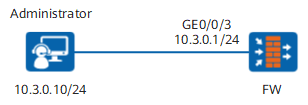
Figure 1 shows how to configure local authentication administrator webadmin that can use HTTPS to log in to the web UI on the FW.
Data Planning
Item |
Data |
Description |
|---|---|---|
User name |
webadmin |
- |
Password |
Myadmin@123 |
- |
Authentication mode |
Local authentication |
- |
Role |
service-admin |
service-admin is a user-defined role and has permissions only on the network, policy, and object. |
Trusted host |
10.3.0.0/24 |
The administrator area is limited by IP address. |
Service Type |
WEB |
- |
Web service timeout period |
5 minutes |
- |
Procedure
- Configure the login interface.

If you use the default settings of management interface to log in to the device, skip this step.
Because the default IP address of the management interface has been set to 192.168.0.1, the interface has been added to the Trust zone, and the administrator is allowed to log in to the device using HTTPS.
- Click
 for interface GE0/0/3 and set the parameters as follows:
Zone
trust
Connection Type
Static IP
IP Address
10.3.0.1/255.255.255.0
Management Access
HTTPS
- Click
- Optional: Create an administrator role for administrator.
Ignore this step if the default administrator role is used.
- Choose .
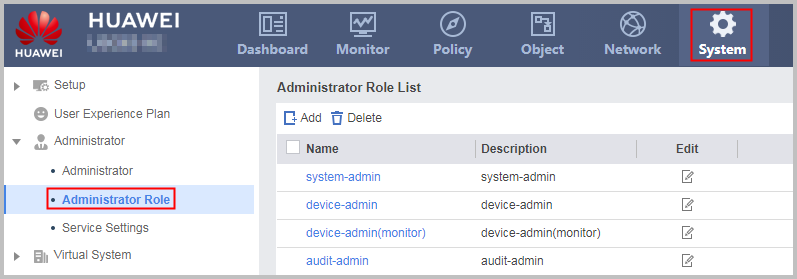
- Choose .
- Create an administrator.
- Choose .
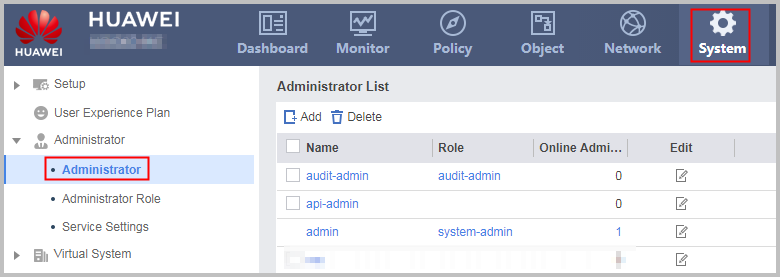
- Choose .
- Set the web service timeout period.
- Choose .
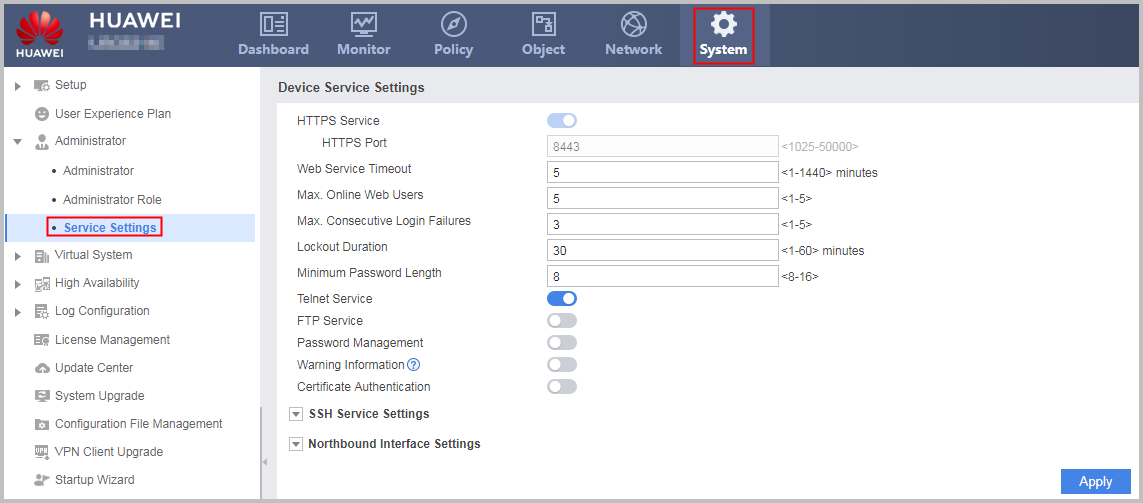
- Choose .
- In the upper right of the page, click Save Then click OK in the dialog box that is displayed.
- Verify the login to the Web UI.
Configuration Scripts
#
interface GigabitEthernet0/0/3
 ip address 10.3.0.1 255.255.255.0
 service-manage https permit
#
firewall zone trust
 set priority 85
 add interface GigabitEthernet0/0/3
#
acl number 2001
 rule 5 permit source 10.3.0.0 0.0.0.255
 rule 10 deny
#
 web-manager security enable
 web-manager timeout 5
#
aaa
 authentication-scheme admin_local
#
manager-user webadmin
 password cipher %@%@*y:3*ZN}.%%qcL1cC|@XBVMDyDwlB.Wq'6JF(iOz2D8>A\SN%@%@
 service-type web
 level 15
 acl-number 2001
 authentication-scheme  admin_local
#
 bind manager-user webadmin role service-admin
role service-admin
  description policy_object_network_readwrite_and_other_modules_none
 dashboard none
 monitor none
 system none
 network read-write
 object read-write
 policy read-write
#
return