Web: Example for Configuring User-Specific PBR
This section provides an example for configuring user-specific PBR to allow users to access the Internet through different links.
Networking Requirements
An enterprise has three major departments, namely, the president's department, marketing department, and R&D department. As shown in Figure 1, the FW is deployed at the intranet egress. Two links, ISP-A and ISP-B, connect to the Internet. ISP-A provides quick and stable Internet services but requires high charge. ISP-B requires low charge but provides slow Internet service.
Requirements are as follows:
- The president's department and marketing department require quick Internet service and therefore access the Internet through ISP-A.
- The R&D department has low requirements on the Internet service speed and therefore access the Internet through ISP-B.
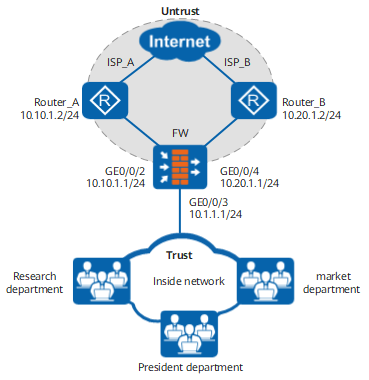

This example focuses on the configuration related to PBR. Configure other data such as NAT based on the actual networking.
Procedure
- Set an IP address for each interface and assign the interfaces to security zones.
Choose , configure an IP address for the interface, and assign the interface to a security zone.
GigabitEthernet 0/0/2
Zone
untrust
IP Address
10.10.1.1/24
GigabitEthernet 0/0/3
Zone
trust
IP Address
10.1.1.1/24
GigabitEthernet 0/0/4
Zone
untrust
IP Address
10.20.1.1/24
- Configure a security policy between the Trust and Untrust zones to allow intranet users to access extranet resources. It is assumed that the intranet user network segment is 10.1.1.0/24.
Choose and click Add Security Policy to create a security policy.
Name
policy_sec_trust_untrust
Source Zone
trust
Destination Zone
untrust
Source Address/Region
10.1.1.0/24
Action
Permit
- Configure IP-link to detect link status.
- Choose and select Enable for IP-Link Function.
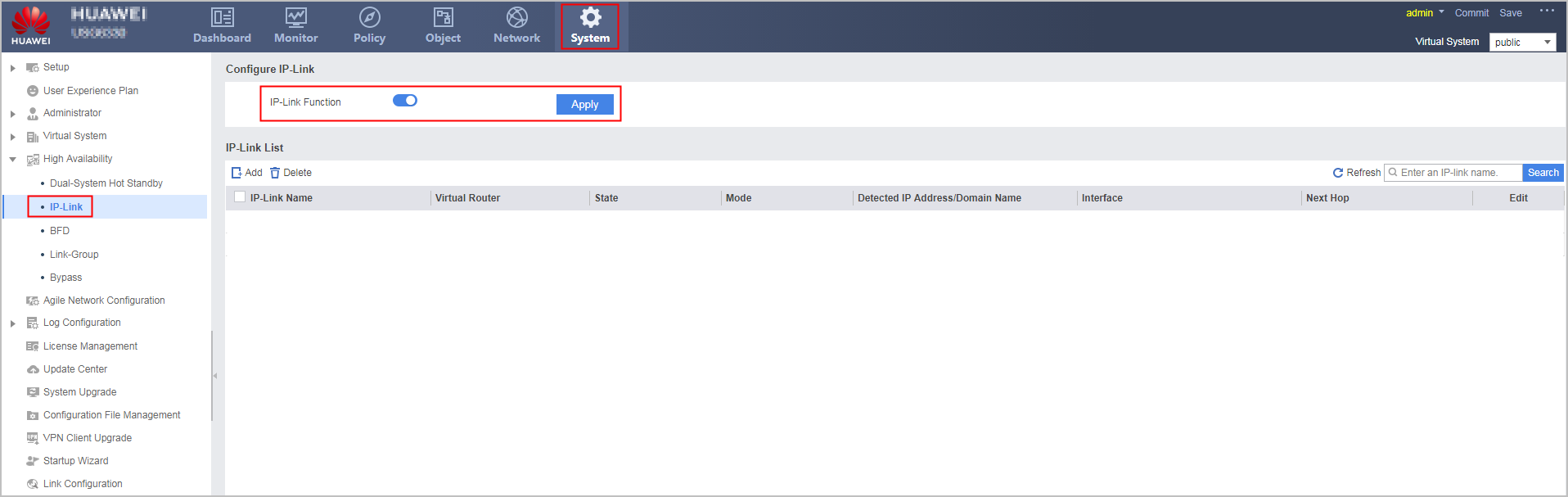
- In IP-Link List, click Add and set the following parameters.
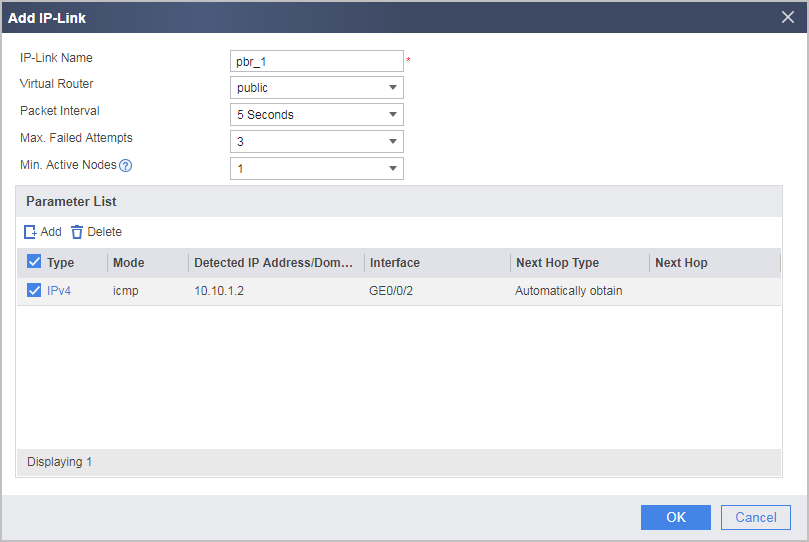
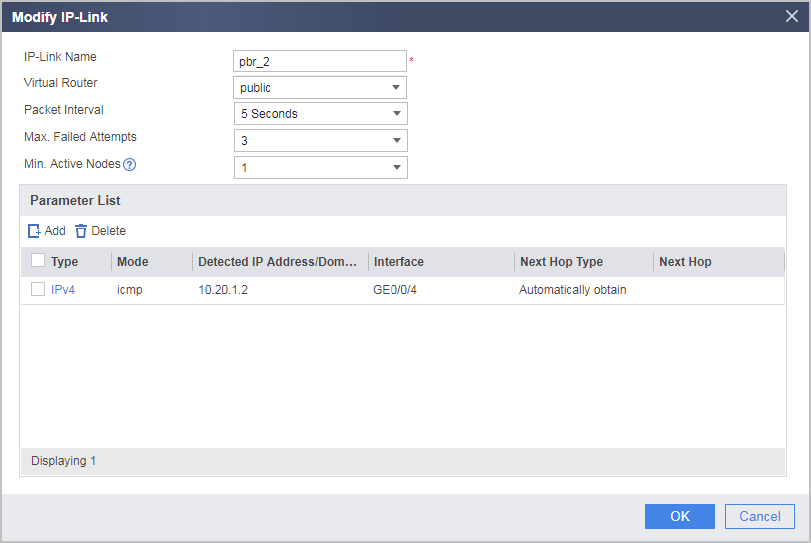
- Choose and select Enable for IP-Link Function.
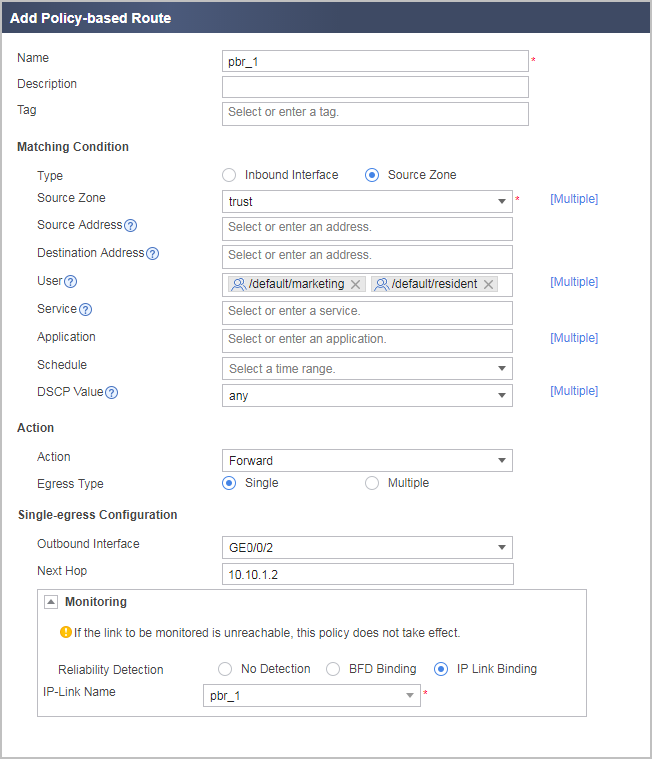
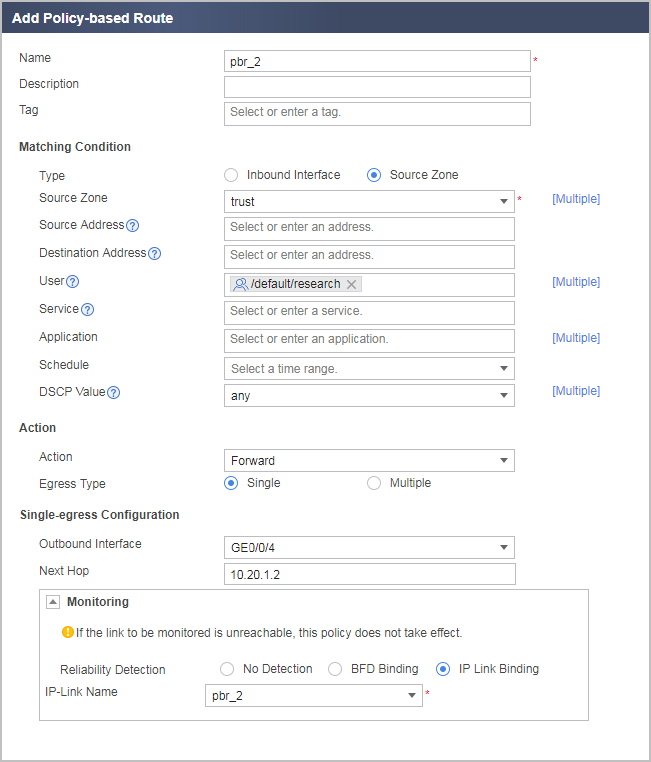
- Create PBR rules pbr_1 and pbr_2, so that the packets from the marketing and president's departments are sent from GE0/0/2 to the Internet through ISP-A link, and the packets from the R&D department are sent from GE0/0/4 to the Internet through ISP-B link.
Users in the marketing department belong to user group marketing, users in the president's department belong to user group president, and users in the R&D department belong to user group research. All users need to be authenticated to access network resources. The configurations of the user groups and authentication policies are omitted.
Ensure that the FW has the route configuration that guides the transmission of traffic from the president's, marketing, and R&D departments even if PBR is unavailable.
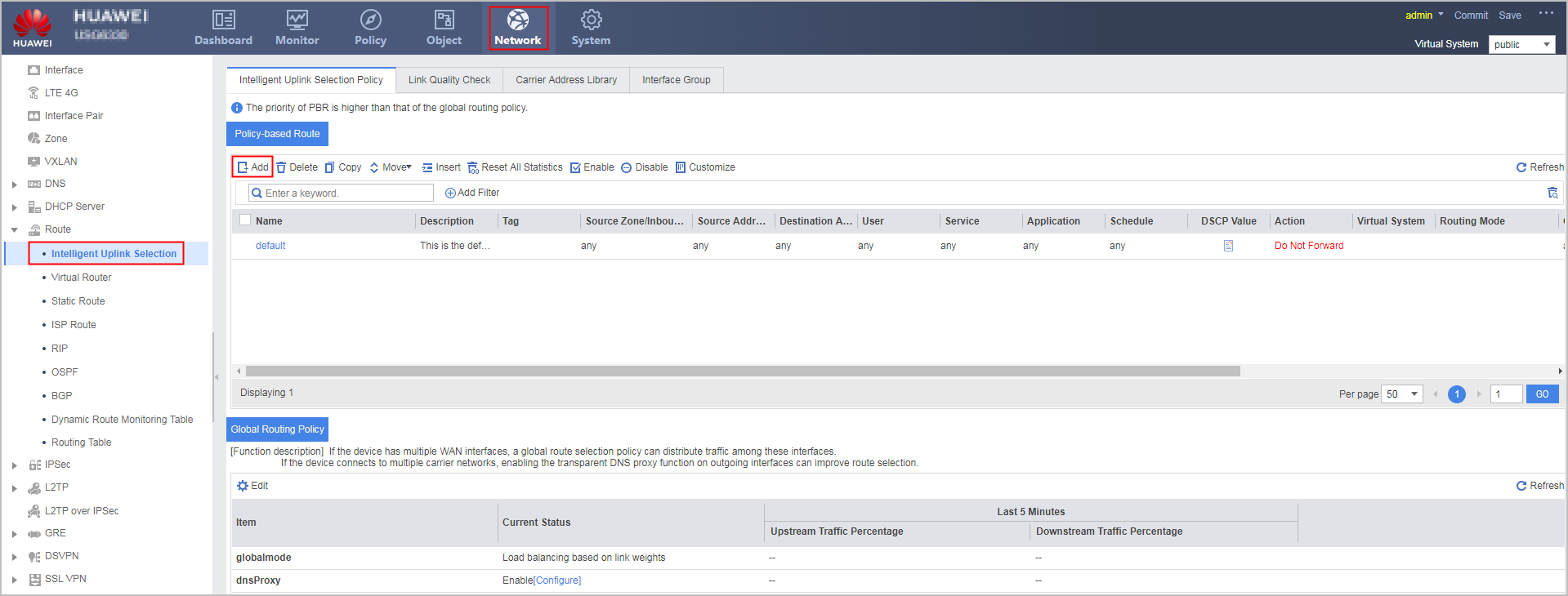
Choose . In the Policy-based Route area, click Add.
Configuration Scripts
#
interface GigabitEthernet0/0/2
 ip address 10.10.1.1 255.255.255.0
#
interface GigabitEthernet0/0/3
 ip address 10.1.1.1 255.255.255.0
#
interface GigabitEthernet0/0/4
 ip address 10.20.1.1 255.255.255.0
#
firewall zone trust
 set priority 85
 add interface GigabitEthernet0/0/3
#
firewall zone untrust
 set priority 5
 add interface GigabitEthernet0/0/2
 add interface GigabitEthernet0/0/4
#
security-policy
 rule name policy_sec_trust_untrust
  source-zone trust
  destination-zone untrust
  source-address 10.1.1.0 24
  action permit
#
 ip-link check enable
 ip-link name pbr_1
  destination 10.10.1.2 interface GigabitEthernet 0/0/2
 ip-link name pbr_2
  destination 10.20.1.2 interface GigabitEthernet 0/0/4
#
policy-based-route
 rule name pbr_1
  description pbr_1
  source-zone trust
  track ip-link pbr_1
  user user-group /default/marketing
  user user-group /default/president
  action pbr egress-interface GigabitEthernet0/0/2 next-hop 10.10.1.2
 rule name pbr_2
  description pbr_2
  source-zone trust
  track ip-link pbr_2
  user user-group /default/research
  action pbr egress-interface GigabitEthernet0/0/4 next-hop 10.20.1.2
#
return