DHCP Server Allocating Network Parameters to New DHCP Clients
Network Parameter Allocation Without a DHCP Relay Agent
A DHCP client exchanges DHCP messages with a DHCP server during its first entry to a network to obtain network parameters, as shown in Figure 1.

DHCP messages are transmitted using the User Datagram Protocol (UDP). A DHCP client uses UDP port 67 to send messages to a DHCP server, and a DHCP server uses UDP port 68 to send messages a DHCP client.
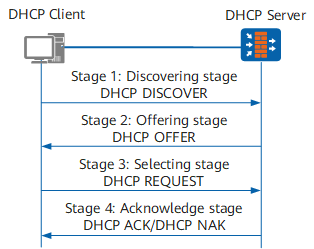
Discovery stage: The DHCP client detects DHCP servers.
Because the DHCP client does not know the IP addresses of DHCP servers, it broadcasts a DHCP Discover message (with destination IP address 255.255.255.255) to detect DHCP servers. All DHCP servers on the same network segment as the DHCP client can receive the DHCP Discover message. Information carried in a DHCP Discover message includes the client's MAC address (chaddr field), parameter request list (Option 55 field, indicating the network parameters required by the client), and broadcast flag (flags field, indicating whether the response should be unicast or broadcast).
The options field in a DHCP Discover message defines network parameters that a client requires. Each option identifies a parameter. For example, Option 3 indicates the requested gateway address. (A client adds Option 3 in the Option 55 field when it requests the gateway address.) Option 53 indicates the DHCP message type (such as Discover message). Options are classified into well-known and self-defined options. For more information about well-known DHCP options, see RFC 2132. Vendors can define their own options, for example, Option 43 is defined to indicate vendor-specific information. For details on options, see Format and Functions of the Options Field.
The flags field is defined in RFC 2131. The leftmost bit of this field indicates whether the server is required to send the DHCP Offer/ACK message in unicast or broadcast mode. The value 0 indicates the unicast mode, and the value 1 indicates the broadcast mode.
Offer stage: A DHCP server offers network parameters to the DHCP client.
All DHCP servers on the same network segment as the DHCP client can receive the DHCP Discover message. Each DHCP server may have multiple address pools to manage network parameters including allocatable IP addresses. A DHCP server selects an address pool on the same network segment as the IP address of the interface receiving the DHCP Discover message, and from the address pool selects an idle IP address. The DHCP server then sends a DHCP Offer message carrying the allocated IP address (in the yiaddr field) to the DHCP client. The DHCP Offer message also carries other network parameters such as the IP address lease.
In most cases, an address pool specifies the leases of the IP addresses it contains. If the DHCP Discover message carries an expected lease, the DHCP server compares the expected lease with the shorter of the two leases to the DHCP client.
IP addresses in an address pool are added to different IP address lists based on the IP address status:- Unallocated IP addresses are added to the allocatable IP address list.
- Allocated IP addresses are added to the in-use IP address list.
- Conflicting IP addresses are added to the conflicting IP address list.
- IP addresses that cannot be allocated are added to the unallocatable IP address list.
The IP address allocation order cannot be modified.
- IP address statically bound to the MAC address of the client on the DHCP server
- IP address specified in the Option 50 field (requested IP address) in the DHCP Discover message
- IP address in idle status that is found when the DHCP server searches IP addresses in a random order in an address pool.
If the DHCP server does not find any allocatable IP address, it searches for the expired and conflicting IP addresses in turn, and then allocates a valid IP address to the client. If no IP address can be allocated, the DHCP client sends a DHCP Discover message again to apply for an IP address after timeout interval for waiting for a response from the server expires.
The FW can exclude certain IP addresses that cannot be allocated through DHCP from address pools. For example, if 192.168.1.100/24 has been manually configured for a DNS server, the DHCP server excludes this IP address from the address pool on network segment 192.168.1.0/24 so that it is not allocated through DHCP. This helps prevent IP address conflicts.
To prevent a newly allocated IP address from conflicting with IP addresses of other clients on the network, the DHCP server sends an ICMP Echo Request packet before sending a DHCP Offer message. The DHCP server uses this packet to check whether the IP address to be allocated conflicts with other clients' IP addresses. The source and destination IP addresses of the ICMP Echo Request packet are the DHCP server's IP address and the IP address to be allocated, respectively. If the DHCP server receives no ICMP Echo Reply packet within the detection period, no client is using this IP address, and the DHCP server can allocate it. If the DHCP server receives an ICMP Echo Reply packet within the detection period, this IP address has been used by another client, and the DHCP server lists this IP address as a conflicting IP address. The DCHP server then waits for the next DHCP Discover message to start the IP address selection process again.
The IP address allocated in this stage may not be the final IP address used by the client. This is because the IP address may be allocated to another client if the DHCP server receives no response 16 seconds after the DHCP Offer message is sent. The IP address for the client can be determined only after the request and acknowledge stages.
Request stage: The DHCP client selects an IP address.
When multiple DHCP servers send DHCP Offer messages to the DHCP client, the client accepts only the first received DHCP Offer message. The client then broadcasts a DHCP Request message carrying the selected DHCP server identifier (Option 54) and IP address (Option 50, with the IP address specified in the yiaddr field of the accepted DHCP Offer message).
The DHCP Request message notifies all the DHCP servers of the IP address that the DHCP client has selected. Then the other servers can allocate IP addresses to other clients. The unselected IP addresses offered by other servers are then free to be allocated to other clients.
Acknowledgment stage: The DHCP server acknowledges the IP address offered to the client.
After receiving the DHCP Request message, the DHCP server sends a DHCP ACK message to the client, carrying the IP address specified in the Option 50 field of the Request message.
After receiving the DHCP ACK message, the DHCP client broadcasts gratuitous ARP packets to check whether any other terminal is using the IP address allocated by the DHCP server. If no response is received within the specified time, the DHCP client can use the IP address. However, if the DHCP client receives a response within the specified time, this IP address has been used by another terminal. In this case, the client then sends a DHCP Decline message to the DHCP server and applies for a new IP address. The DHCP server lists this IP address as a conflicting IP address. A conflicting IP address is allocated only when no idle IP address exists in the address pools, minimizing IP address conflicts.
Occasionally, the DHCP server may fail to allocate the IP address specified in the Option 50 field because, for example, an error occurs during negotiation or it takes a long time to receive the DHCP Request message. In this case, the DHCP server replies with a DHCP NAK message to notify the DHCP client that the requested IP address cannot be allocated. The DHCP client then sends a DHCP Discover message to apply for a new IP address.
Network Parameter Allocation with DHCP Relay Agents
A DHCP client exchanges DHCP messages with the DHCP relay agent and DHCP server in four stages during its first entry to a network to obtain network parameters, as shown in Figure 2. The interaction between the DHCP client and server is similar to that described in Network Parameter Allocation Without a DHCP Relay Agent. The following describes the working mechanism of the DHCP relay agent.
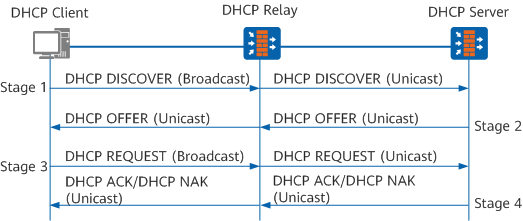
Discovery stage
A DHCP client broadcasts a DHCP Discover message on a local network.
When receiving a DHCP Discover message broadcast by a DHCP client, the DHCP relay agent performs the following steps:
Check whether the value of the hops field exceeds 32. If so, the DHCP relay agent discards the message. If not, the DHCP relay agent increases this value by 1 and proceeds to the next step.
The hops field indicates the number of DHCP relay agents that a DHCP message has passed through. This field is set to 0 by a DHCP client or a server. Its value is incremented by 1 each time the message passes through a DHCP relay agent. This field can limit the number of DHCP relay agents that a DHCP message can pass through. Currently, the FW supports a maximum of 32 DHCP relay agents are allowed between a DHCP client and server.
Check whether the value of the giaddr field is 0. If so, the DHCP relay agent sets the giaddr field to the IP address of the interface receiving the DHCP Discover message. If not, the DHCP relay agent does not change the field and proceeds to the next step.
The giaddr field indicates the gateway IP address. If the DHCP server and client are located on different network segments, the first DHCP relay agent fills its own IP address in this field and forwards the message to the DHCP server. Other DHCP relay agents on the path forward the message without changing this field. The DHCP server determines which network segment the client resides based on the giaddr field, and allocates an IP address on this network segment to the client.
Change the destination IP address of the DHCP Discover message to the IP address of the DHCP server or the next-hop DHCP relay agent, and change the source IP address to the IP address of the interface connecting the DHCP relay agent to the client. The message is then sent to the DHCP server or the next-hop DHCP relay agent through unicast routing.
After the process mentioned above, the DHCP relay forwards the unicast packets to the specific DHCP server on the other network or the next DHCP relay.
If there are multiple DHCP relay agents between the DHCP client and server, each DHCP relay agent processes the DHCP Discover message using the same method.
Offer stage
After receiving a DHCP Discover message, the DHCP server selects an address pool on the same network segment as that specified in the giaddr field and allocates an IP address and other network parameters from the address pool. The sequence in which an IP address is selected is the same as that described in Network Parameter Allocation Without a DHCP Relay Agent. The DHCP server then unicasts a DHCP Offer message to the DHCP relay agent specified in the giaddr field.
When receiving the DHCP Offer message, the DHCP relay agent performs the following steps:Check the value of the giaddr field. If this value is the IP address of the interface receiving the DHCP Offer message, the DHCP relay agent discards the message. Otherwise, the DHCP relay agent proceeds to the next step.
- Check the value of the Flags field. If this value is 1, the DHCP relay agent broadcasts a DHCP Offer message to the DHCP client. Otherwise, the DHCP relay agent unicasts a DHCP Offer message.
Request stage
The DHCP client broadcasts DHCP Request messages to the DHCP relay agent as a response. After receiving the messages, the DHCP relay agent processes the messages as described in the first step and then unicasts them to the DHCP server.
Acknowledgment stage
The DHCP server sends DHCP ACK or DHCP NAK messages to the DHCP client through the DHCP relay agent. After receiving the messages, the DHCP relay agent processes the messages as described in the second step and sends them to the DHCP client.