CLI: Example for Configuring Intrusion Prevention
This section provides an example for configuring intrusion prevention. Intrusion prevention protects intranet PCs and web servers from Internet attacks.
Networking Requirements
As shown in Figure 1, an enterprise deploys a FW as the security gateway at the network border. In the networking:
- An intranet user can access the intranet FTP server and Internet web server.
- The intranet FTP server provides services for both intranet and Internet users.
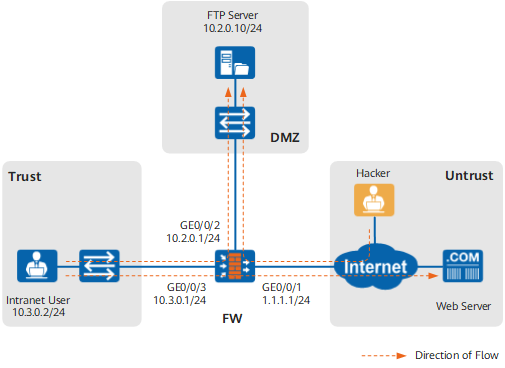
The enterprise wants to enable intrusion prevention on the FW to meet the following requirements:
-
Protect intranet users from attacks, such as an attacker launched from a website with malicious code, when the users access the Internet web server.
Protect the intranet FTP server.
Prevent Internet and intranet users from launching attacks on the intranet FTP server.
An attack matching the signature with ID 74320 occurs frequently in logs and must be blocked.
Data Planning
Based on the previous enterprise requirements, the intrusion prevention information to be configured is as follows:
Attacks on the enterprise include common worms, Trojan horses, and botnets, and the severity of these attacks in signatures is High.
-
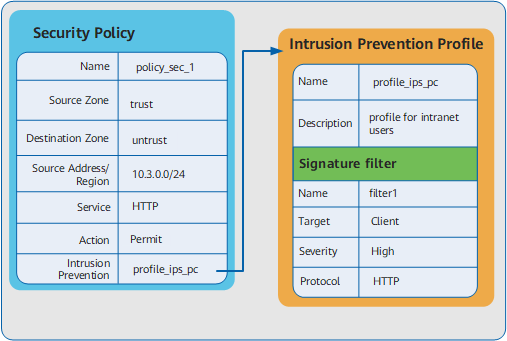
Configure security policies for the direction from the Trust zone to the Untrust zone.
Attacks are caused by intranet users' access to the Internet web server and the target is the intranet users acting as a client. Therefore, set the protocol to HTTP, object to Client, and severity to High for the signature filter.
The data planning for protecting intranet users is shown in Figure 2z.
Protect the intranet FTP server.
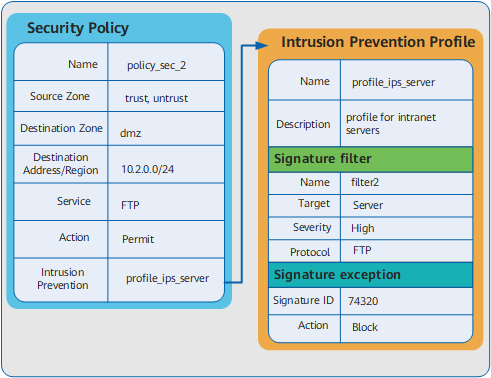
Configure security policies for the directions from the Untrust zone to the DMZ zone and from the Trust zone to the DMZ zone.
Attacks on the FTP server. Therefore, set the protocol to FTP, object to Server, and severity to High for the signature filter.
Add the signature with ID 74320 to the exception signatures and set the action to Block.
The data planning for protecting intranet FTP server is shown in Figure 3.
Configuration Roadmap
The configuration roadmap is as follows:- Set the interface IP addresses and add the interfaces to corresponding security zones as required.
- Configure intrusion prevention profile profile_ips_pc to protect intranet users. Then configure a signature filter to meet the requirement.
- Configure intrusion prevention profile profile_ips_server to protect intranet servers. Then configure a signature filter and add signatures as exceptions.
- Create security policy policy_sec_1 and reference profile profile_ips_pc to protect intranet users from Internet attacks.
- Create security policy policy_sec_2 and reference profile profile_ips_server to protect intranet servers from intranet and Internet attacks.
Procedure
- Set an IP address for each interface, assign interfaces
to security zones, and complete basic parameter settings.
[FW] interface GigabitEthernet 0/0/1
[FW-GigabitEthernet0/0/1] ip address 1.1.1.1 255.255.255.0
[FW-GigabitEthernet0/0/1] quit
[FW] interface GigabitEthernet 0/0/2
[FW-GigabitEthernet0/0/2] ip address 10.2.0.1 255.255.255.0
[FW-GigabitEthernet0/0/2] quit
[FW] interface GigabitEthernet 0/0/3
[FW-GigabitEthernet0/0/3] ip address 10.3.0.1 255.255.255.0
[FW-GigabitEthernet0/0/3] quit
[FW] firewall zone trust
[FW-zone-trust] add interface GigabitEthernet 0/0/3
[FW-zone-trust] quit
[FW] firewall zone dmz
[FW-zone-dmz] add interface GigabitEthernet 0/0/2
[FW-zone-dmz] quit
[FW] firewall zone untrust
[FW-zone-untrust] add interface GigabitEthernet 0/0/1
[FW-zone-untrust] quit
- Configure intrusion prevention profile profile_ips_pc to protect intranet users.
[FW] profile type ips name profile_ips_pc
[FW-profile-ips-profile_ips_pc] description profile for intranet users
[FW-profile-ips-profile_ips_pc] collect-attack-evidence enable
[FW-profile-ips-profile_ips_pc] signature-set name filter1
[FW-profile-ips-profile_ips_pc-sigset-filter1] target client
[FW-profile-ips-profile_ips_pc-sigset-filter1] severity high
[FW-profile-ips-profile_ips_pc-sigset-filter1] protocol HTTP
[FW-profile-ips-profile_ips_pc-sigset-filter1] quit
[FW-profile-ips-profile_ips_pc] quit
- Create intrusion prevention profile profile_ips_server to protect the intranet FTP server. Configure signature 74320 as an exception signature and set the
action to block.
[FW] profile type ips name profile_ips_server
[FW-profile-ips-profile_ips_server] description profile for intranet servers
[FW-profile-ips-profile_ips_server] collect-attack-evidence enable
[FW-profile-ips-profile_ips_server] signature-set name filter2
[FW-profile-ips-profile_ips_server-sigset-filter2] target server
[FW-profile-ips-profile_ips_server-sigset-filter2] severity high
[FW-profile-ips-profile_ips_server-sigset-filter2] protocol FTP
[FW-profile-ips-profile_ips_server-sigset-filter2] quit
[FW-profile-ips-profile_ips_server] exception ips-signature-id 74320 action block
[FW-profile-ips-profile_ips_server] quit
- Commit the configuration information.
[FW] engine configuration commit - Configure a security policy between the Trust and Untrust
zones and reference intrusion prevention profile profile_ips_pc.
[FW] security-policy
[FW-policy-security] rule name policy_sec_1
[FW-policy-security-rule-policy_sec_1] source-zone trust
[FW-policy-security-rule-policy_sec_1] destination-zone untrust
[FW-policy-security-rule-policy_sec_1] source-address 10.3.0.0 24
[FW-policy-security-rule-policy_sec_1] profile ips profile_ips_pc
[FW-policy-security-rule-policy_sec_1] action permit
[FW-policy-security-rule-policy_sec_1] quit
- Configure security policies for the Trust -> DMZ and Untrust
-> DMZ interzones and reference intrusion prevention profile profile_ips_server.
[FW-policy-security] rule name policy_sec_2
[FW-policy-security-rule-policy_sec_2] source-zone trust untrust
[FW-policy-security-rule-policy_sec_2] destination-zone dmz
[FW-policy-security-rule-policy_sec_2] destination-address 10.2.0.0 24
[FW-policy-security-rule-policy_sec_2] profile ips profile_ips_server
[FW-policy-security-rule-policy_sec_2] action permit
[FW-policy-security-rule-policy_sec_2] quit
[FW-policy-security] quit
- Save the configuration information to upload the configuration
file including the above-mentioned configurations automatically for
the next startup.
[FW] quit
<FW> save
Configuration Scripts
#
interface GigabitEthernet 0/0/1
 ip address 1.1.1.1 255.255.255.0
#
interface GigabitEthernet 0/0/2
 ip address 10.2.0.1 255.255.255.0
#
interface GigabitEthernet 0/0/3
 ip address 10.3.0.1 255.255.255.0
#
firewall zone trust
 add interface GigabitEthernet 0/0/3
#
firewall zone untrust
 add interface GigabitEthernet 0/0/1
#
firewall zone dmz
 add interface GigabitEthernet 0/0/2
#
profile type ips name profile_ips_pc
 description profile for intranet users
 collect-attack-evidence enable
 signature-set name filter1
  target client
  severity high
  protocol HTTP
#
profile type ips name profile_ips_server
 description profile for intranet servers
 collect-attack-evidence enable
 signature-set name filter2
  target server
  severity high
  protocol FTP
 exception ips-signature-id 74320 action block
#
security-policy
 rule name policy_sec_1
  source-zone trust
  destination-zone untrust
  source-address 10.3.0.0 24
  profile ips profile_ips_pc
  action permit
 rule name policy_sec_2
  source-zone trust
  source-zone untrust
  destination-zone dmz
  destination-address 10.2.0.0 24
  profile ips profile_ips_server
  action permit

# The following configuration is used to perform a one-time operation and not stored in the configuration profile.
 engine configuration commit