< Home

CLI: Example for Configuring File Blocking

File blocking is configured on an enterprise's gateway to reduce the risks of virus infections and prevent information leaks.

Networking Requirements

As shown in Figure 1, the FW is deployed at the network border of the enterprise as a security gateway. In addition to maintaining normal network operation, the networking solution must meet the following requirements:

  • Prevent information leaks.

    The FW prevents employees from uploading document files, code files (such as C, CPP, VBS and JAVA files), and compressed files to the intranet server or the Internet.

  • Reduce the risks of virus infections.

    The FW prohibits employees from downloading executable files from the Internet and prevents users on the Internet from uploading executable files to the intranet server.

  • Prevent non-work-related downloads.

    The FW prevents non-work-related file downloads from the Internet to ensure high productivity.
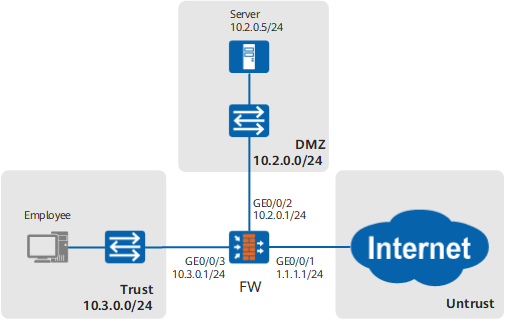
Figure 1 Networking diagram of file blocking

Data Planning

Users in this example are already added to the FW, and the authentication configuration is complete.

Item

Data

Description

policy_sec_user1

  • Name: policy_sec_user1
  • Source Zone: trust
  • Destination Zone: untrust
  • User: user
  • Action: Permit
  • File Blocking: profile_file_user1

Security policy policy_sec_user1 allows employees to access the Internet and references file blocking profile profile_file_user1 to prohibit employees from uploading document files, code files, and compressed files to the Internet and downloading executable files and videos from the Internet.

policy_sec_user2

  • Name: policy_sec_user2
  • Source Zone: trust
  • Destination Zone: dmz
  • Destination Address/Region: 10.2.0.5/24
  • User: user
  • Action: Permit
  • File Blocking: profile_file_user2

Security policy policy_sec_user2 allows employees to access the intranet server and references file blocking profile profile_file_user2 to prohibit employees from uploading document files, code files, and compressed files to the intranet server.

policy_sec_internet

  • Name: policy_sec_internet
  • Source Zone: untrust
  • Destination Zone: dmz
  • Destination Address/Region: 10.2.0.5/24
  • Action: Permit
  • File Blocking: profile_file_internet

Security policy policy_sec_internet allows Internet users to access the intranet server and references file blocking profile profile_file_internet to prevent Internet users from uploading executable files to the intranet server.

profile_file_user1

  • Name: rule1
  • File Type: Document File, Compressed File, and Code File
  • Direction: Upload
  • Action: Block

rule1 in file blocking profile profile_file_user1 prohibits the upload of document files, code files, and compressed files.

  • Name: rule2
  • File Type: Executable File, Video and Audio File
  • Direction: Download
  • Action: Block

rule2 in file blocking profile profile_file_user1 prohibits the download of executable files, videos, and audios.

profile_file_user2

  • Name: rule1
  • File Type: Document File, Compressed File, and Code File
  • Direction: Upload
  • Action: Block

rule1 in file blocking profile profile_file_user2 prohibits the upload of document files, code files, and compressed files.

profile_file_internet

  • Name: rule1
  • File Type: Executable File
  • Direction: Upload
  • Action: Block

rule1 in file blocking profile profile_file_internet prohibits the upload of executable files.

Configuration Roadmap

  1. Set the interface IP address and add the interface to a security zone.
  2. Create a file blocking profile.
  3. Configure security policies and IP connectivity and reference file blocking profiles to filter files.

Procedure

  1. Set the interface IP address and add the interface to a security zone.
    1. Set an IP address for interface GigabitEthernet 0/0/1 and assign the interface to the untrust zone.

      <FW> system-view
      [FW] interface GigabitEthernet 0/0/1
      [FW-GigabitEthernet0/0/1] ip address 1.1.1.1 24
      [FW-GigabitEthernet0/0/1] quit
      [FW] firewall zone untrust
      [FW-zone-untrust] add interface GigabitEthernet 0/0/1
      [FW-zone-untrust] quit
      

    2. Set an IP address for interface GigabitEthernet 0/0/3 and add the interface to the trust zone.

      [FW] interface GigabitEthernet 0/0/3
      [FW-GigabitEthernet0/0/3] ip address 10.3.0.1 24
      [FW-GigabitEthernet0/0/3] quit
      [FW] firewall zone trust
      [FW-zone-trust] add interface GigabitEthernet 0/0/3
      [FW-zone-trust] quit
      

    3. Set an IP address for interface GigabitEthernet 0/0/2 and add the interface to the dmz.

      [FW] interface GigabitEthernet 0/0/2
      [FW-GigabitEthernet0/0/2] ip address 10.2.0.1 24
      [FW-GigabitEthernet0/0/2] quit
      [FW] firewall zone dmz
      [FW-zone-dmz] add interface GigabitEthernet 0/0/2
      [FW-zone-dmz] quit
      

  2. Create a file blocking profile.
    1. Create file blocking profile profile_file_user1 to prohibit the upload of document files, code files, and decompressed files as well as the downloading of executable files, audios, and videos from the Internet.

      [FW] profile type file-block name profile_file_user1
      [FW-profile-file-block-profile_file_user1] rule name rule1
      [FW-profile-file-block-profile_file_user1-rule-rule1] application all
      [FW-profile-file-block-profile_file_user1-rule-rule1] file-type pre-defined name DOC PPT XLS MSOFFICE DOCX PPTX XLSX PDF VSD MPP
      [FW-profile-file-block-profile_file_user1-rule-rule1] file-type pre-defined name ODS ODT ODP EML UOF RAR TAR ZIP GZIP CAB
      [FW-profile-file-block-profile_file_user1-rule-rule1] file-type pre-defined name BZ2 Z 7ZIP JAR C CPP JAVA VBS
      [FW-profile-file-block-profile_file_user1-rule-rule1] direction upload
      [FW-profile-file-block-profile_file_user1-rule-rule1] action block
      [FW-profile-file-block-profile_file_user1-rule-rule1] quit
      [FW-profile-file-block-profile_file_user1] rule name rule2
      [FW-profile-file-block-profile_file_user1-rule-rule2] application all
      [FW-profile-file-block-profile_file_user1-rule-rule2] file-type pre-defined name EXE MSI RPM OCX A ELF DLL PE SYS MDI
      [FW-profile-file-block-profile_file_user1-rule-rule2] file-type pre-defined name MOV MPEG AVI RMVB ASF SWF MP3 MP4 MIDI
      [FW-profile-file-block-profile_file_user1-rule-rule2] direction download
      [FW-profile-file-block-profile_file_user1-rule-rule2] action block
      [FW-profile-file-block-profile_file_user1-rule-rule2] quit
      [FW-profile-file-block-profile_file_user1] quit
      

    2. Create file blocking profile profile_file_user2 to prohibit the upload of document files, code files, and decompressed files.

      [FW] profile type file-block name profile_file_user2
      [FW-profile-file-block-profile_file_user2] rule name rule1
      [FW-profile-file-block-profile_file_user2-rule-rule1] application all
      [FW-profile-file-block-profile_file_user2-rule-rule1] file-type pre-defined name DOC PPT XLS MSOFFICE DOCX PPTX XLSX PDF VSD MPP
      [FW-profile-file-block-profile_file_user2-rule-rule1] file-type pre-defined name ODS ODT ODP EML UOF RAR TAR ZIP GZIP CAB
      [FW-profile-file-block-profile_file_user2-rule-rule1] file-type pre-defined name BZ2 Z 7ZIP JAR C CPP JAVA VBS
      [FW-profile-file-block-profile_file_user2-rule-rule1] direction upload
      [FW-profile-file-block-profile_file_user2-rule-rule1] action block
      [FW-profile-file-block-profile_file_user2-rule-rule1] quit
      [FW-profile-file-block-profile_file_user2] quit
      

    3. Create file blocking profile profile_file_internet to prohibit the upload of executable files.

      [FW] profile type file-block name profile_file_internet
      [FW-profile-file-block-profile_file_internet] rule name rule1
      [FW-profile-file-block-profile_file_internet-rule-rule1] application all
      [FW-profile-file-block-profile_file_internet-rule-rule1] file-type pre-defined name EXE MSI RPM OCX A ELF DLL PE SYS
      [FW-profile-file-block-profile_file_internet-rule-rule1] direction upload
      [FW-profile-file-block-profile_file_internet-rule-rule1] action block
      [FW-profile-file-block-profile_file_internet-rule-rule1] quit
      [FW-profile-file-block-profile_file_internet] quit

  3. Configure security policies and reference profiles.
    1. Configure security policy policy_sec_user1 for the trust -> untrust interzone and reference the profile_file_user1 profile.

      [FW] security-policy
      [FW-policy-security] rule name policy_sec_user1
      [FW-policy-security-rule-policy_sec_user1] description Allows employees to access the Internet.
      [FW-policy-security-rule-policy_sec_user1] source-zone trust
      [FW-policy-security-rule-policy_sec_user1] destination-zone untrust
      [FW-policy-security-rule-policy_sec_user1] user user-group /default/user
      [FW-policy-security-rule-policy_sec_user1] profile file-block profile_file_user1
      [FW-policy-security-rule-policy_sec_user1] action permit
      [FW-policy-security-rule-policy_sec_user1] quit

    2. Configure security policy policy_sec_user2 for the trust -> dmz interzone and reference the profile_file_user2 profile.

      [FW-policy-security] rule name policy_sec_user2
      [FW-policy-security-rule-policy_sec_user2] description Allows employees to access the intranet server.
      [FW-policy-security-rule-policy_sec_user2] source-zone trust
      [FW-policy-security-rule-policy_sec_user2] destination-zone dmz
      [FW-policy-security-rule-policy_sec_user2] destination-address 10.2.0.5 24
      [FW-policy-security-rule-policy_sec_user2] user user-group /default/user
      [FW-policy-security-rule-policy_sec_user2] profile file-block profile_file_user2
      [FW-policy-security-rule-policy_sec_user2] action permit
      [FW-policy-security-rule-policy_sec_user2] quit
      

    3. Configure security policy policy_sec_internet for the untrust -> dmz interzone and reference the profile_file_internet profile.

      [FW-policy-security] rule name policy_sec_internet
      [FW-policy-security-rule-policy_sec_internet] description Allows Internet users to access the intranet server.
      [FW-policy-security-rule-policy_sec_internet] source-zone untrust
      [FW-policy-security-rule-policy_sec_internet] destination-zone dmz
      [FW-policy-security-rule-policy_sec_internet] destination-address 10.2.0.5 24
      [FW-policy-security-rule-policy_sec_internet] profile file-block profile_file_internet
      [FW-policy-security-rule-policy_sec_internet] action permit
      [FW-policy-security-rule-policy_sec_internet] quit
      

  4. Commit the content security profiles.

    [FW] engine configuration commit
    Info: The operation may last for several minutes, please wait.
    Info: DLP submitted configurations successfully.
    Info: Finish committing engine compiling.
    

Verification

  1. If employees on the intranet can access the Internet and the intranet server, but they can neither upload document files, code files, or compressed files, nor download executable files or videos, profiles policy_sec_user1 and policy_sec_user2 are successfully configured.
  2. If Internet users can access the intranet server but cannot upload executable files to the intranet server, profile policy_sec_internet is successfully configured.

Configuration Scripts

#                                                                               
profile type file-block name profile_file_user1                                 
 rule name rule1                                                                
  file-type pre-defined name DOC PPT XLS MSOFFICE DOCX PPTX XLSX PDF VSD MPP    
  file-type pre-defined name ODS ODT ODP EML UOF RAR TAR ZIP GZIP CAB           
  file-type pre-defined name BZ2 C CPP JAVA                                     
  application all                                                               
  direction upload                                                              
  action block                                                                  
 rule name rule2                                                                
  file-type pre-defined name EXE MSI RPM OCX A ELF DLL PE MDI MOV               
  file-type pre-defined name MPEG AVI RMVB ASF SWF MP3 MP4 MIDI                 
  application all                                                               
  direction download                                                            
  action block                                                                  
profile type file-block name profile_file_user2                                 
 rule name rule1                                                                
  file-type pre-defined name DOC PPT XLS MSOFFICE DOCX PPTX XLSX PDF VSD MPP    
  file-type pre-defined name ODS ODT ODP EML UOF RAR TAR ZIP GZIP CAB           
  file-type pre-defined name BZ2 C CPP JAVA                                     
  application all                                                               
  direction upload                                                              
  action block                                                                  
profile type file-block name profile_file_internet                              
 rule name rule1                                                                
  file-type pre-defined name EXE MSI RPM OCX A ELF DLL PE                       
  application all                                                               
  direction upload                                                              
  action block                                                                  
#                                                                               
interface GigabitEthernet0/0/1             
 ip address 1.1.1.1 255.255.255.0                                        
#                                                                               
interface GigabitEthernet0/0/2      
 ip address 10.2.0.1 255.255.255.0                                        
#                                                                               
interface GigabitEthernet0/0/3        
 ip address 10.3.0.1 255.255.255.0                                        
#                                                                               
firewall zone trust                                                             
 add interface GigabitEthernet0/0/3        
#                                                                               
firewall zone dmz                                                           
 add interface GigabitEthernet0/0/2        
#                                                                               
firewall zone untrust                                                           
 add interface GigabitEthernet0/0/1             
#                                                                               
security-policy      
 rule name policy_sec_user1                                                     
  description Allows employees to access the Internet.                          
  source-zone trust                                                             
  destination-zone untrust                                                      
  user user-group /default/user                
  profile file-block profile_file_user1                                         
  action permit                                                                 
 rule name policy_sec_user2                                                     
  description Allows employees to access the intranet server.                   
  source-zone trust                                                             
  destination-zone dmz                                                          
  destination-address 10.2.0.0 24                                               
  user user-group /default/user               
  profile file-block profile_file_user2                                         
  action permit                                                                 
 rule name policy_sec_internet                                                  
  description Allows Internet users to access the intranet server.              
  source-zone untrust                                                           
  destination-zone dmz                                                          
  destination-address 10.2.0.0 24                                               
  profile file-block profile_file_internet                                      
  action permit                                                                 
Copyright © Huawei Technologies Co., Ltd.
< Previous topic Next topic >
