< Home

CLI: Example for Configuring Data Filtering

This section provides an example for configuring data filtering on the enterprise gateway to prevent confidential information leaks and transmission of illegal information.

Networking Requirements

As shown in Figure 1, an enterprise deploys the FW as the security gateway at the network border. Employees in both the R&D and finance departments reside in the trust zone. Intranet servers are deployed in the dmz. Internet users reside in the untrust zone.

The enterprise requires that employees can access networks properly, confidential information must be prevented from leaks, and illegal information must be prevented from transmission within the enterprise.
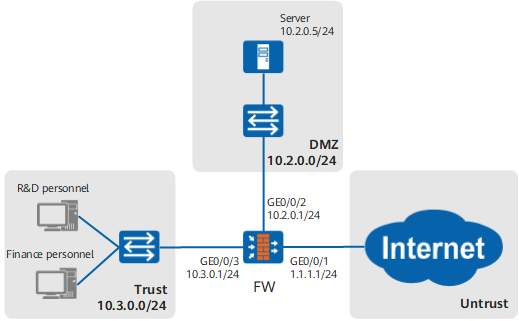
Figure 1 Networking diagram of data filtering

Data Planning

Users in this example are already added to the FW and the authentication configuration is complete.

Item

Data

Description

Security policy for R&D personnel

  • Name: policy_sec_research
  • Source Zone: trust
  • Destination Zone: untrust
  • User: research
  • Action: permit
  • Data Filtering: profile_data_research

Security policy policy_sec_research allows R&D personnel to access the Internet. Data filtering profile profile_data_research is referenced to filter files to be uploaded to the Internet, mails to be sent to the Internet, messages to be posted on forums and microblogs, requested web pages, and searched content of the R&D personnel.

Security policy for finance personnel

  • Name: policy_sec_finance
  • Source Zone: trust
  • Destination Zone: untrust
  • User: finance
  • Action: permit
  • Data Filtering: profile_data_finance

Security policy policy_sec_finance allows finance personnel to access the Internet. Data filtering profile profile_sec_finance is referenced to filter files uploaded to the Internet, mails sent to the Internet, messages posted on forums and microblogs, browsed web pages, and searched content of the finance personnel.

Security policy for Internet users

  • Name: policy_sec_internet
  • Source Zone: untrust
  • Destination Zone: dmz
  • Destination Address/Region: 10.2.0.5/24
  • Action: permit
  • Data Filtering: profile_data_internet

Security policy policy_sec_internet allows Internet users to access intranet servers. Data filtering profile profile_sec_internet is referenced to filter files downloaded from and uploaded to intranet servers.

Data filtering profile for R&D personnel

Name: profile_data_research

Data filtering profile profile_data_research must be referenced in security policy policy_sec_research.

  • Name: rule1
  • Keyword Group: keyword1
  • Application: all
  • File Type: all
  • Direction: Upload
  • Action: Block

Rule rule1 blocks the content containing keyword group keyword1 from being uploaded and searched.

  • Name: rule2
  • Keyword Group: keyword3
  • Application: HTTP
  • File Type: TEXT/HTML
  • Direction: Download
  • Action: Block

Rule rule2 blocks the web pages containing keyword group keyword3.

Data filtering profile for finance personnel

Name: profile_data_finance

Data filtering profile profile_data_finance must be referenced in security policy policy_sec_finance.

  • Name: rule1
  • Keyword Group: keyword2
  • Application: all
  • File Type: all
  • Direction: Upload
  • Action: Block

Rule rule1 blocks the content containing keyword group keyword2 from being uploaded and searched.

  • Name: rule2
  • Keyword Group: keyword3
  • Application: HTTP
  • File Type: TEXT/HTML
  • Direction: Download
  • Action: Block

Rule rule2 blocks the web pages containing keyword group keyword3.

Data filtering profile for Internet users

Name: profile_data_internet

Data filtering profile profile_data_internet must be referenced in security policy policy_sec_internet.

  • Name: rule1
  • Keyword Group: keyword2
  • Application: all
  • File Type: all
  • Direction: Download
  • Action: Block

Rule rule1 blocks the content containing keyword group keyword2 from being downloaded.

  • Name: rule2
  • Keyword Group: keyword3
  • Application: all
  • File Type: all
  • Direction: Upload
  • Action: Block

Rule rule2 blocks the content containing keyword group keyword3 from being uploaded.

keyword1

Predefined keyword: confidentiality (the weight is set to 1)

-

User-defined keyword:

  • Enterprise confidentiality

    • Name: enterprise confidentiality
    • Matching Mode: Text
    • Text: enterprise confidentiality
    • Weight: 1
  • Illegal information

    • Name: illegal information
    • Matching Mode: Text
    • Text: illegal information
    • Weight: 1

You can define the keywords based on the actual condition. The following uses "enterprise confidentiality" as an example.

"Illegal information" includes keywords of illegal information defined by your enterprise, and may contain pornographic, violent, and politically sensitive content. You can define the keywords based on the actual condition. The following uses "illegal information" as an example.

keyword2

Predefined keywords (the weight is set to 1): bank card numbers, credit card numbers, social security numbers, ID card numbers, and confidentiality keywords.

-

User-defined keyword:

  • Enterprise confidentiality

    • Name: enterprise confidentiality
    • Matching Mode: Text
    • Text: enterprise confidentiality
    • Weight: 1
  • Illegal information

    • Name: illegal information
    • Matching Mode: Text
    • Text: illegal information
    • Weight: 1

You can define the keywords based on the actual condition. The following uses "enterprise confidentiality" as an example.

"Illegal information" includes keywords of illegal information defined by your enterprise, and may contain pornographic, violent, and politically sensitive content. You can define the keywords based on the actual condition. The following uses "illegal information" as an example.

keyword3

User-defined keyword: Illegal information

  • Name: illegal information
  • Matching Mode: Text
  • Text: illegal information
  • Weight: 1

-

Configuration Roadmap

  1. Specify IP addresses and security zones for interfaces to complete basic parameter settings.
  2. Create keyword groups keyword1, keyword2, and keyword3 to be referenced in data filtering profiles in the follow-up procedures.
  3. Create data filtering profiles for R&D personnel, finance personnel, and Internet users. Reference the keyword groups when you create data filtering profiles.
  4. Configure security policies for R&D personnel, finance personnel, and Internet users. Ensure that the network is reachable and reference the data filtering profiles.

Procedure

  1. Specify IP addresses and security zones for interfaces to complete basic parameter settings.
    1. Set an IP address for interface GigabitEthernet 0/0/1 and assign the interface to the untrust zone.

      <FW> system-view
      [FW] interface GigabitEthernet 0/0/1
      [FW-GigabitEthernet0/0/1] ip address 1.1.1.1 24
      [FW-GigabitEthernet0/0/1] quit
      [FW] firewall zone untrust
      [FW-zone-untrust] add interface GigabitEthernet 0/0/1
      [FW-zone-untrust] quit
      

    2. Set an IP address for interface GigabitEthernet 0/0/2 and add the interface to the dmz.

      [FW] interface GigabitEthernet 0/0/2
      [FW-GigabitEthernet0/0/2] ip address 10.2.0.1 24
      [FW-GigabitEthernet0/0/2] quit
      [FW] firewall zone dmz
      [FW-zone-dmz] add interface GigabitEthernet 0/0/2
      [FW-zone-dmz] quit
      

    3. Set an IP address for interface GigabitEthernet 0/0/3 and add the interface to the trust zone.

      [FW] interface GigabitEthernet 0/0/3
      [FW-GigabitEthernet0/0/3] ip address 10.3.0.1 24
      [FW-GigabitEthernet0/0/3] quit
      [FW] firewall zone trust
      [FW-zone-trust] add interface GigabitEthernet 0/0/3
      [FW-zone-trust] quit
      

  2. Create a keyword group.
    1. Configure keyword group keyword1.

      [FW] keyword-group name keyword1
      [FW-keyword-group-keyword1] pre-defined-keyword name confidentiality weight 1
      [FW-keyword-group-keyword1] user-defined-keyword name "Enterprise confidentiality"
      [FW-keyword-group-keyword1-keyword-Enterprise confidentiality] expression match-mode text "Enterprise confidentiality"
      [FW-keyword-group-keyword1-keyword-Enterprise confidentiality] weight 1
      [FW-keyword-group-keyword1-keyword-Enterprise confidentiality] quit
      [FW-keyword-group-keyword1] user-defined-keyword name "Illegal information"
      [FW-keyword-group-keyword1-keyword-Illegal information] expression match-mode text "Illegal information"
      [FW-keyword-group-keyword1-keyword-Illegal information] weight 1
      [FW-keyword-group-keyword1-keyword-Illegal information] quit
      [FW-keyword-group-keyword1] quit

    2. Configure keyword group keyword2.

      [FW] keyword-group name keyword2
      [FW-keyword-group-keyword2] pre-defined-keyword name bank-card-number weight 1
      [FW-keyword-group-keyword2] pre-defined-keyword name credit-card-number weight 1
      [FW-keyword-group-keyword2] pre-defined-keyword name social-security-number weight 1
      [FW-keyword-group-keyword2] pre-defined-keyword name id-card-number weight 1
      [FW-keyword-group-keyword2] pre-defined-keyword name confidentiality weight 1
      [FW-keyword-group-keyword2] user-defined-keyword name expression match-mode text "Illegal information"
      [FW-keyword-group-keyword2-keyword-Enterprise confidentiality] expression match-mode text "Enterprise confidentiality"
      [FW-keyword-group-keyword2-keyword-Enterprise confidentiality] weight 1
      [FW-keyword-group-keyword2-keyword-Enterprise confidentiality] quit
      [FW-keyword-group-keyword2] user-defined-keyword name "Illegal information"
      [FW-keyword-group-keyword2-keyword-Illegal information] expression match-mode text "Illegal information"
      [FW-keyword-group-keyword2-keyword-Illegal information] weight 1
      [FW-keyword-group-keyword2-keyword-Illegal information] quit
      [FW-keyword-group-keyword2] quit
      

    3. Configure keyword group keyword3.

      [FW] keyword-group name keyword3
      [FW-keyword-group-keyword3] user-defined-keyword name "Illegal information"
      [FW-keyword-group-keyword3-keyword-Illegal information] expression match-mode text "Illegal information"
      [FW-keyword-group-keyword3-keyword-Illegal information] weight 1
      [FW-keyword-group-keyword3-keyword-Illegal information] quit
      [FW-keyword-group-keyword3] quit

  3. Create data filtering profiles.
    1. Create data filtering profile profile_data_research for R&D personnel.

      [FW] profile type data-filter name profile_data_research
      [FW-profile-data-filter-profile_data_research] rule name rule1
      [FW-profile-data-filter-profile_data_research-rule-rule1] keyword-group name keyword1
      [FW-profile-data-filter-profile_data_research-rule-rule1] application all
      [FW-profile-data-filter-profile_data_research-rule-rule1] file-type all
      [FW-profile-data-filter-profile_data_research-rule-rule1] direction upload
      [FW-profile-data-filter-profile_data_research-rule-rule1] action block
      [FW-profile-data-filter-profile_data_research-rule-rule1] quit
      [FW-profile-data-filter-profile_data_research] rule name rule2
      [FW-profile-data-filter-profile_data_research-rule-rule2] keyword-group name keyword3
      [FW-profile-data-filter-profile_data_research-rule-rule2] application type HTTP
      [FW-profile-data-filter-profile_data_research-rule-rule2] file-type name TEXT/HTML
      [FW-profile-data-filter-profile_data_research-rule-rule2] direction download
      [FW-profile-data-filter-profile_data_research-rule-rule2] action block 
      [FW-profile-data-filter-profile_data_research-rule-rule2] quit
      [FW-profile-data-filter-profile_data_research] quit
      

    2. Create data filtering profile profile_data_finance for finance personnel.

      [FW] profile type data-filter name profile_data_finance
      [FW-profile-data-filter-profile_data_finance] rule name rule1
      [FW-profile-data-filter-profile_data_finance-rule-rule1] keyword-group name keyword2
      [FW-profile-data-filter-profile_data_finance-rule-rule1] application all
      [FW-profile-data-filter-profile_data_finance-rule-rule1] file-type all
      [FW-profile-data-filter-profile_data_finance-rule-rule1] direction upload
      [FW-profile-data-filter-profile_data_finance-rule-rule1] action block 
      [FW-profile-data-filter-profile_data_finance-rule-rule1] quit
      [FW-profile-data-filter-profile_data_finance] rule name rule2
      [FW-profile-data-filter-profile_data_finance-rule-rule2] keyword-group name keyword3
      [FW-profile-data-filter-profile_data_finance-rule-rule2] application type HTTP
      [FW-profile-data-filter-profile_data_finance-rule-rule2] file-type name TEXT/HTML
      [FW-profile-data-filter-profile_data_finance-rule-rule2] direction download
      [FW-profile-data-filter-profile_data_finance-rule-rule2] action block 
      [FW-profile-data-filter-profile_data_finance-rule-rule2] quit
      [FW-profile-data-filter-profile_data_finance] quit
      

    3. Create data filtering profile profile_data_internet for Internet users.

      [FW] profile type data-filter name profile_data_internet
      [FW-profile-data-filter-profile_data_internet] rule name rule1
      [FW-profile-data-filter-profile_data_internet-rule-rule1] keyword-group name keyword2
      [FW-profile-data-filter-profile_data_internet-rule-rule1] application all
      [FW-profile-data-filter-profile_data_internet-rule-rule1] file-type all
      [FW-profile-data-filter-profile_data_internet-rule-rule1] direction download
      [FW-profile-data-filter-profile_data_internet-rule-rule1] action block 
      [FW-profile-data-filter-profile_data_internet-rule-rule1] quit
      [FW-profile-data-filter-profile_data_internet] rule name rule2
      [FW-profile-data-filter-profile_data_internet-rule-rule2] keyword-group name keyword3
      [FW-profile-data-filter-profile_data_internet-rule-rule2] application all
      [FW-profile-data-filter-profile_data_internet-rule-rule2] file-type all
      [FW-profile-data-filter-profile_data_internet-rule-rule2] direction upload
      [FW-profile-data-filter-profile_data_internet-rule-rule2] action block
      [FW-profile-data-filter-profile_data_internet-rule-rule2] quit
      [FW-profile-data-filter-profile_data_internet] quit
      

  4. Configure security policies and reference data filtering profiles in the security policies.
    1. Configure security policy policy_sec_research for R&D personnel and reference the profile_data_research profile.

      [FW] security-policy
      [FW-policy-security] rule name policy_sec_research
      [FW-policy-security-rule-policy_sec_research] source-zone trust
      [FW-policy-security-rule-policy_sec_research] destination-zone untrust
      [FW-policy-security-rule-policy_sec_research] user user-group /default/research
      [FW-policy-security-rule-policy_sec_research] profile data-filter profile_data_research
      [FW-policy-security-rule-policy_sec_research] action permit
      [FW-policy-security-rule-policy_sec_research] quit
      

    2. Configure security policy policy_sec_finance for finance personnel and reference the profile_data_finance profile.

      [FW-policy-security] rule name policy_sec_finance
      [FW-policy-security-rule-policy_sec_finance] source-zone trust
      [FW-policy-security-rule-policy_sec_finance] destination-zone untrust
      [FW-policy-security-rule-policy_sec_finance] user user-group /default/finance
      [FW-policy-security-rule-policy_sec_finance] profile data-filter profile_data_finance
      [FW-policy-security-rule-policy_sec_finance] action permit
      [FW-policy-security-rule-policy_sec_finance] quit
      

    3. Configure security policy policy_sec_internet for Internet users and reference the profile_data_internet profile.

      [FW-policy-security] rule name policy_sec_internet
      [FW-policy-security-rule-policy_sec_internet] source-zone untrust
      [FW-policy-security-rule-policy_sec_internet] destination-zone dmz
      [FW-policy-security-rule-policy_sec_internet] destination-address 10.2.0.5 24
      [FW-policy-security-rule-policy_sec_internet] profile data-filter profile_data_internet
      [FW-policy-security-rule-policy_sec_internet] action permit
      [FW-policy-security-rule-policy_sec_internet] quit
      [FW-policy-security] quit
      

  5. Commit the content security profiles.

    [FW] engine configuration commit
    Info: The operation may last for several minutes, please wait.
    Info: DLP submitted configurations successfully.
    Info: Finish committing engine compiling.

Verification

  1. When R&D personnel on an intranet attempt to send content containing confidential enterprise information to the Internet or browse or search for content containing illegal information, the device blocks the content.
  2. When finance personnel on an intranet attempt to send content containing confidential enterprise or employee information to the Internet or browse or search for content containing illegal information, the device blocks the content.
  3. When Internet users attempt to download files containing confidential enterprise or employee information from intranet servers, the download fails. When Internet users attempt to upload files containing illegal information to intranet servers, the upload fails.

Configuration Scripts

#                                                                               
sysname FW           
#                                                                               
interface GigabitEthernet0/0/1   
 undo shutdown
 ip address 1.1.1.1 255.255.255.0
#                                                                               
interface GigabitEthernet0/0/2   
 undo shutdown
 ip address 10.2.0.1 255.255.255.0
#                                                                               
interface GigabitEthernet0/0/3   
 undo shutdown
 ip address 10.3.0.1 255.255.255.0
#                                                                               
firewall zone trust                                                             
 add interface GigabitEthernet0/0/3
#                                                                               
firewall zone dmz                                                           
 add interface GigabitEthernet0/0/2
#                                                                               
firewall zone untrust                                                           
 add interface GigabitEthernet0/0/1
#
keyword-group name keyword1                                                     
 pre-defined-keyword name confidentiality weight 1                              
 user-defined-keyword name "Enterprise confidentiality"                          
  expression match-mode text "Enterprise confidentiality"                      
  weight 1                                                                      
 user-defined-keyword name "Illegal information"                              
  expression match-mode text "Illegal information"                             
  weight 1                                                                      
keyword-group name keyword2                                                     
 pre-defined-keyword name bank-card-number weight 1                             
 pre-defined-keyword name credit-card-number weight 1                           
 pre-defined-keyword name social-security-number weight 1                       
 pre-defined-keyword name id-card-number weight 1                               
 pre-defined-keyword name confidentiality weight 1                              
 user-defined-keyword name "Enterprise confidentiality"                        
  expression match-mode text "Enterprise confidentiality"                      
  weight 1                                                                      
 user-defined-keyword name "Illegal information"                                  
  expression match-mode text "Illegal information"                              
  weight 1                                                                      
keyword-group name keyword3                                                     
 user-defined-keyword name "Illegal information"                             
  expression match-mode text "Illegal information"                        
  weight 1                                                                      
profile type data-filter name profile_data_research                             
 rule name rule1                                                                
  keyword-group name keyword1                                                   
  file-type all                                                                 
  application all                                                               
  direction upload                                                              
  action block                                                                  
 rule name rule2                                                                
  keyword-group name keyword3                                                   
  file-type name TEXT/HTML                                                      
  application type HTTP                                                         
  direction download                                                            
  action block                                                                  
profile type data-filter name profile_data_finance                              
 rule name rule1                                                                
  keyword-group name keyword2                                                   
  file-type all                                                                 
  application all                                                               
  direction upload                                                              
  action block                                                                  
 rule name rule2                                                                
  keyword-group name keyword3                                                   
  file-type name TEXT/HTML                                                      
  application type HTTP                                                         
  direction download                                                            
  action block                                                                  
profile type data-filter name profile_data_internet                             
 rule name rule1                                                                
  keyword-group name keyword2                                                   
  file-type all                                                                 
  application all                                                               
  direction download                                                            
  action block                                                                  
 rule name rule2                                                                
  keyword-group name keyword3                                                   
  file-type all                                                                 
  application all                                                               
  direction upload                                                              
  action block                                                                  
#                                                                               
security-policy                                                                 
 rule name policy_sec_research                                                  
  source-zone trust                                                             
  destination-zone untrust                                                      
  user user-group /default/research            
  profile data-filter profile_data_research                                     
  action permit                                                                 
 rule name policy_sec_finance                                                   
  source-zone trust                                                             
  destination-zone untrust                                                      
  user user-group /default/finance           
  profile data-filter profile_data_finance                                      
  action permit                                                                 
 rule name policy_sec_internet                                                 
  source-zone untrust                                                           
  destination-zone dmz                                                          
  destination-address 10.2.0.0 24                                               
  profile data-filter profile_data_internet                                     
  action permit                                                                 
Copyright © Huawei Technologies Co., Ltd.
< Previous topic Next topic >
