CLI: Example for Implementing URL Filtering on Decrypted HTTPS Traffic
This section provides an example for configuring SSL-encrypted traffic detection to decrypt HTTPS traffic into HTTP traffic and then implement URL filtering on the HTTP traffic.
Networking Requirements
As shown in Figure 1, the FW is deployed at the network border as the enterprise's gateway to implement URL filtering on HTTPS requests sent by users to access the Internet.
An enterprise allows employees to access most websites except pornographic and illegal websites. In addition, the enterprise wants to:
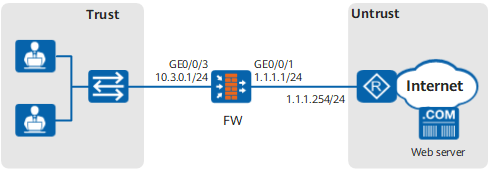
Configuration Roadmap
- Set the IP address and security zone of the interface.
Create the URL filtering profile url_profile_01.
- Add www.example1.com and www.example2.com to the whitelist. Employees can access the whitelisted websites.
- Add www.example3.com and www.example4.com to the blacklist. Employees are not allowed to access the blacklisted websites.
- Set the URL filtering level to Medium to block access requests for pornographic and illegal websites.
- Configure a security policy and reference the URL filtering profile url_profile_01 to control the URL access requests of the enterprise employees.
- Configure SSL-encrypted traffic detection to decrypt HTTPS traffic.
- Configure the SSL decryption certificate and import and install the SSL decryption certificate to the intranet PC.
- Optional: Import the CA certificate of the certificate authority trusted by the enterprise and specify the imported CA certificate as the server CA certificate. The FW checks whether the server certificate is trusted based on the server CA certificate.
Note that over 100 common server CA certificates have been preset on the FW by default, which can be used to verify most server certificates. Generally, these default CA certificates are enough and you do not need to import other CA certificates. In some cases, however, if the preset CA certificates cannot verify the peer server certificates, you need to import other CA certificates. This section describes how to import a CA certificate as a configuration step.
- Configure the detection profile and SSL-encrypted traffic detection policy.
Procedure
- Set the IP address and security zone of the interface.
- Configure URL filtering profiles.
[FW] profile type url-filter name url_profile_01
[FW-profile-url-filter-url_profile_01] add whitelist url www.example1.com
[FW-profile-url-filter-url_profile_01] add whitelist url www.example2.com
[FW-profile-url-filter-url_profile_01] add blacklist url www.example3.com
[FW-profile-url-filter-url_profile_01] add blacklist url www.example4.com
[FW-profile-url-filter-url_profile_01] category pre-defined control-level medium
[FW-profile-url-filter-url_profile_01] quit

If you want to deny URLs outside the whitelist, you can set the default action to deny so that the FW uses the default action when the remote query service is unavailable. In this manner, URLs outside the whitelist can be denied.
If you want to permit URLs outside the blacklist, you can set the default action to permit so that the FW uses the default action when the remote query service is unavailable. In this manner, URLs outside the blacklist can be permitted.
- Reference URL filtering profiles in security policies.
[FW] security-policy
[FW-policy-security] rule name policy_sec_01
[FW-policy-security-rule-policy_sec_01] source-zone trust
[FW-policy-security-rule-policy_sec_01] destination-zone untrust
[FW-policy-security-rule-policy_sec_01] source-address 10.3.0.0 mask 255.255.255.0
[FW-policy-security-rule-policy_sec_01] action permit
[FW-policy-security-rule-policy_sec_01] profile url-filter url_profile_01
[FW-policy-security-rule-policy_sec_01] quit
[FW-policy-security] quit
- Configure SSL-encrypted traffic detection.
- Configure an SSL decryption certificate and import and install the SSL decryption certificates on an intranet PC.
Configure an RSA key pair for the SSL decryption certificate.
[FW] pki rsa built-in-ca ssl-server-ca create exportable Info: The name of the new key-pair will be: ssl-server-ca The size of the public key ranges from 2048 to 4096. Input the bits in the modules:2048 Generating key-pairs... ............................................+++ ...................................................+++-
[FW] pki entity ssl-server-ca
[FW-pki-entity-ssl-server-ca] common-name ssl-server-ca
[FW-pki-entity-ssl-server-ca] fqdn www.example.com
[FW-pki-entity-ssl-server-ca] locality trust-Network
[FW-pki-entity-ssl-server-ca] country CN
[FW-pki-entity-ssl-server-ca] quit
Generate an SSL decryption certificate and mark it as trusted.
[FW] pki generate built-in-ca certificate rsa-key-pair ssl-server-ca entity ssl-server-ca
 Please enter the file name for built in CA certificate <length 1-64>: ssl-server-ca.cer
 Info: Generate built in CA certificate successfully.
[FW] pki import-certificate built-in-ca filename ssl-server-ca.cer
 Info: Succeeded in importing the built in CA certificate.
[FW] app-proxy built-in-ca trust filename ssl-server-ca.cer
Export the trusted certificate and key pair.
[FW] pki export built-in-ca rsa-key-pair ssl-server-ca and-certificate ssl-server-ca.cer pem ssl-server-ca.pem password Mypassword@123
[FW] quit
The password specified here is used to protect the key file in the certificate. You are required to enter this password when you install the certificate later.
- Use FTP to download the exported certificate file, send it to intranet users, and require the users to install it on their PCs and trust it. For how to install the trusted certificate, see Installing an SSL Decryption Certificate on a Client. If the certificate is not installed, normal access may be blocked.
- Configure an SSL decryption certificate and import and install the SSL decryption certificates on an intranet PC.
- Commit the content security profiles.
[FW] engine configuration commit
Info: The operation may last for several minutes, please wait.
Info: URL submitted configurations successfully.
Info: Finish committing engine compiling.
Verification
Employees can access most websites, but not pornographic and illegal websites. They receive push information when their access is blocked.
By viewing the URL log URL/4/FILTER, you can see that the filtering type of the URL log generated when the FW blocked the employees' access to websites is Pre-defined.
Employees can access www.example1.com and www.example2.com but cannot access www.example3.com or www.example4.com. They receive push information when their access is blocked.
By viewing the URL log URL/4/FILTER, you can see that the filtering type of the URL log generated when the FW blocked or permitted the employees' access to websites is Blacklist or Whitelist, respectively.
Configuration Scripts
#
sysname FW
#
 app-proxy built-in-ca trust filename ssl-server-ca
 app-proxy ca trust filename server_ca.cer
#
pki entity ssl-server-ca
 common-name ssl-server-ca
 fqdn www.example.com
 locality Trust Network
 country CN
#
interface GigabitEthernet0/0/1
 undo shutdown
 ip address 1.1.1.1 255.255.255.0
#
interface GigabitEthernet0/0/3
 undo shutdown
 ip address 10.3.0.1 255.255.255.0
#
firewall zone trust
 set priority 85
 add interface GigabitEthernet0/0/3
#
firewall zone untrust
 set priority 5
 add interface GigabitEthernet0/0/1
#
profile type url-filter name url_profile_01
 add blacklist url www.example3.com
 add blacklist url www.example4.com
 add whitelist url www.example1.com
 add whitelist url www.example2.com
 category pre-defined control-level medium
#
security-policy
 rule name policy_sec_01
  source-zone trust
  destination-zone untrust
  source-address 10.3.0.1 mask 255.255.255.0
  profile url-filter url_profile_01
  action permit
#
profile type decryption name ssl_profile
  detect type outbound
#
decryption-policy
 rule name ssl_policy
  source-zone trust
  destination-zone untrust
  source-address 10.3.0.1 24
  service https
  action decrypt profile ssl_profile
#
return