CLI: Configuring the Safe Search Function
Networking Requirements
As shown in Figure 1, the FW serves as the enterprise gateway at the border of the enterprise network. The enterprise attempts to regulate employees' Internet access behavior and forcibly enable safe search on their search requests.
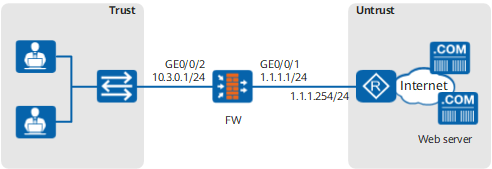
Configuration Roadmap
- Set interface IP addresses and assign the interfaces to security zones.
- Create the URL filtering profile profile_safe_search and enable the safe search function.
- Configure the security policy and reference the URL filtering profile profile_safe_search.
- Configure SSL-encrypted traffic detection to decrypt HTTPS traffic.
- Configure the SSL decryption certificate and import and install the SSL decryption certificate to the intranet PC.
- Optional: Import the CA certificate of the certificate authority trusted by the enterprise and specify the imported CA certificate as the server CA certificate. The FW checks whether the server certificate is trusted based on the server CA certificate.
Note that over 100 common server CA certificates have been preset on the FW by default, which can be used to verify most server certificates. Generally, these default CA certificates are enough and you do not need to import other CA certificates. In some cases, however, if the preset CA certificates cannot verify the peer server certificates, you need to import other CA certificates. This section describes how to import a CA certificate as a configuration step.
- Configure the detection profile and SSL-encrypted traffic detection policy.
- Configure the TCP proxy policy.
Procedure
- Configure interface IP addresses and security zones.
Set an IP address for GE0/0/1 and assign the interface to the Untrust zone.
<FW> system-view
[FW] interface GigabitEthernet 0/0/1
[FW-GigabitEthernet0/0/1] ip address 1.1.1.1 24
[FW-GigabitEthernet0/0/1] quit
[FW] firewall zone untrust
[FW-zone-untrust] add interface GigabitEthernet 0/0/1
[FW-zone-untrust] quit
Set an IP address for GE0/0/2 and assign the interface to the Trust zone.
[FW] interface GigabitEthernet 0/0/2
[FW-GigabitEthernet0/0/2] ip address 10.3.0.1 24
[FW-GigabitEthernet0/0/2] quit
[FW] firewall zone trust
[FW-zone-trust] add interface GigabitEthernet 0/0/2
[FW-zone-trust] quit
- Create the URL filtering profile profile_safe_search and enable the safe search function.
[FW] profile type url-filter name profile_safe_search
[FW-profile-url-filter-profile_safe_search] category pre-defined control-level medium
[FW-profile-url-filter-profile_safe_search] safe-search enable
[FW-profile-url-filter-profile_safe_search] quit
- Configure the security policy and reference the URL filtering profile profile_safe_search.
[FW] security-policy
[FW-policy-security] rule name secpolicy-trust2untrust
[FW-policy-security-rule-secpolicy-trust2untrust] source-zone trust
[FW-policy-security-rule-secpolicy-trust2untrust] destination-zone untrust
[FW-policy-security-rule-secpolicy-trust2untrust] source-address 10.3.0.1 mask 255.255.255.0
[FW-policy-security-rule-secpolicy-trust2untrust] service http
[FW-policy-security-rule-secpolicy-trust2untrust] service https
[FW-policy-security-rule-secpolicy-trust2untrust] profile url-filter profile_safe_search
[FW-policy-security-rule-secpolicy-trust2untrust] action permit
[FW-policy-security-rule-secpolicy-trust2untrust] quit
[FW-policy-security] quit
- Configure an SSL decryption certificate and import and install the SSL decryption certificates on an intranet PC.
- Export the trusted certificate and key pair.
[FW] pki export built-in-ca rsa-key-pair ssl-server-ca and-certificate ssl-server-ca.cer pem ssl-server-ca.pem password Mypassword@123
[FW] quit

The password specified here is used to protect the key file in the certificate. You are required to enter this password when you install the certificate later.
- Export the trusted certificate and key pair.
- Optional: Import the CA certificates of the certificate authorities that the enterprise trusts and specify them for server certificate verification.
- Configure the profile of SSL encrypted traffic detection.
[FW] profile type decryption name Profile_safesearch
[FW-profile-decryption-profile-Profile_safesearch] detect type outbound
[FW-profile-decryption-profile-Profile_safesearch] quit
- Configure the SSL encrypted traffic detection policy.
[FW] decryption-policy
[FW-policy-decryption] rule name Policy_safesearch
[FW-policy-decryption-rule-Policy_safesearch] source-zone trust
[FW-policy-decryption-rule-Policy_safesearch] destination-zone untrust
[FW-policy-decryption-rule-Policy_safesearch] source-address 10.3.0.1 mask 255.255.255.0
[FW-policy-decryption-rule-Policy_safesearch] service https
[FW-policy-decryption-rule-Policy_safesearch] action decrypt profile Profile_safesearch
[FW-policy-decryption-rule-Policy_safesearch] quit
[FW-policy-decryption] quit
- Configure the TCP proxy.
For HTTP search requests, you need to configure a TCP proxy policy.
[FW] proxy-policy
[FW-policy-proxy] rule name proxy-safesearch
[FW-policy-proxy-rule-proxy-safesearch] source-zone trust
[FW-policy-proxy-rule-proxy-safesearch] destination-zone untrust
[FW-policy-proxy-rule-proxy-safesearch] source-address 10.3.0.1 mask 255.255.255.0
[FW-policy-proxy-rule-proxy-safesearch] service http
[FW-policy-proxy-rule-proxy-safesearch] action tcp-proxy
[FW-policy-proxy-rule-proxy-safesearch] quit
[FW-policy-proxy] quit
- Commit the configurations.
[FW] engine configuration commit
Info: The operation may last for several minutes, please wait.
Info: URL submitted configurations successfully.
Info: Finish committing engine compiling.
Verification
- If employees use search engines Bing, Google, Yahoo, Yandex, and YouTube to search for sexual and porn content, the search results are filtered. Sexual or potentially offensive content was significantly reduced.
- URL log file URL/4/FILTER contains logs with the type field being Safe search, indicating that the results of employees' search requests are filtered by by search engines after the device adds the safe search parameter to the search request.
Configuration Scripts
#
sysname FW
#
 app-proxy built-in-ca trust filename ssl-server-ca
 app-proxy ca trust filename server_ca.cer
#
pki entity ssl-server-ca
 common-name ssl-server-ca
 fqdn www.example.com
 locality Trust Network
 country CN
#
interface GigabitEthernet0/0/1
 undo shutdown
 ip address 1.1.1.1 255.255.255.0
#
interface GigabitEthernet0/0/2
 undo shutdown
 ip address 10.3.0.1 255.255.255.0
#
firewall zone trust
 set priority 85
 add interface GigabitEthernet0/0/2
#
firewall zone untrust
 set priority 5
 add interface GigabitEthernet0/0/1
#
profile type url-filter name profile_safe_search
 category pre-defined control-level medium
 safe-search enable
#
security-policy
 rule name secpolicy-trust2untrust
  source-zone trust
  destination-zone untrust
  source-address 10.3.0.1 mask 255.255.255.0
  service http
  service https
  profile url-filter profile_safe_search
  action permit
#
proxy-policy
 rule name proxy-safesearch
  source-zone trust
  destination-zone untrust
  source-address 10.3.0.1 mask 255.255.255.0
  service http
  action tcp-proxy
#
profile type decryption name Profile_safesearch
  detect type outbound
#
decryption-policy
 rule name Policy_safesearch
  source-zone trust
  destination-zone untrust
  source-address 10.3.0.1 mask 255.255.255.0
  service https
  action decrypt profile Profile_safesearch
#
return