Cloud access security awareness can be configured on enterprises'
security gateways to control enterprise cloud applications in a refined
and differentiated manner.
Networking Requirements
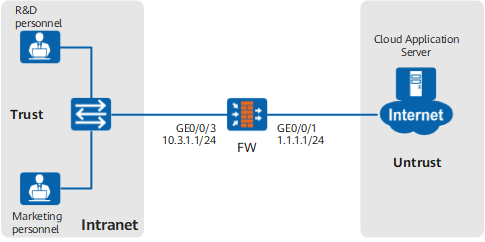
As shown in Figure 1, the FW serves as the enterprise egress gateway. Employees are classified
into R&D employees and marketing ones. User groups research and marketing are created for R&D and marketing employees,
respectively, and the authentication configuration is complete. Cloud
access security awareness must be configured on the FW to control the use of enterprise cloud application DingTalk:
R&D employees can use DingTalk for instant messaging
but cannot transfer files or browsing, preventing disclosure of key
information.
Marketing employees can use DingTalk for instant messaging
and browsing but cannot transfer files.
Figure 1 Networking diagram of cloud access security awareness
Data Planning
Item
|
Data
|
Description
|
Cloud access security awareness
profile
|
|
To control the use of enterprise cloud application DingTalk by R&D employees.
|
|
|
To control the use of enterprise cloud application DingTalk by marketing employees.
|
Security policy
|
Name: policy_sec_research
Source zone: trust
Destination zone: untrust
Employee: research (R&D user group)
Action: permit
Cloud Access Security Awareness: profile_casa_research
|
Allow R&D employees to access the Internet and reference
the cloud access security awareness profile profile_casa_research to control the use of enterprise cloud application DingTalk by R&D employees.
|
Name: policy_sec_marketing
Source zone: trust
Destination zone: untrust
Employee: marketing (marketing user group)
Action: permit
Cloud Access Security Awareness: profile_casa_marketing
|
Allow marketing employees to access the Internet and reference
the cloud access security awareness profile profile_casa_marketing to control the use of enterprise cloud application DingTalk by marketing employees.
|
Procedure
- Set the IP address and security zone of the interface.
- Set an IP address for interface GigabitEthernet 0/0/1 and assign the interface
to the untrust zone.
<FW> system-view
[FW] interface GigabitEthernet 0/0/1
[FW-GigabitEthernet0/0/1] ip address 1.1.1.1 24
[FW-GigabitEthernet0/0/1] quit
[FW] firewall zone untrust
[FW-zone-untrust] add interface GigabitEthernet 0/0/1
[FW-zone-untrust] quit
- Set an IP address for interface GigabitEthernet 0/0/3 and add the interface
to the trust zone.
[FW] interface GigabitEthernet 0/0/3
[FW-GigabitEthernet0/0/3] ip address 10.3.1.1 24
[FW-GigabitEthernet0/0/3] quit
[FW] firewall zone trust
[FW-zone-trust] add interface GigabitEthernet 0/0/3
[FW-zone-trust] quit
- Create cloud access security awareness profiles profile_casa_research for R&D employees and profile_casa_marketing for marketing
employees.
- Create cloud access security awareness profile profile_casa_research for R&D employees.
[FW] profile type casa name profile_casa_research
[FW-profile-casa-profile_casa_research] application name DingTalk_FileTransfer action block
[FW-profile-casa-profile_casa_research] application name DingTalk_Browsing action block
[FW-profile-casa-profile_casa_research] quit
- Create cloud access security awareness profile profile_casa_marketing for marketing employees.
[FW] profile type casa name profile_casa_marketing
[FW-profile-casa-profile_casa_marketing] application name DingTalk_FileTransfer action block
[FW-profile-casa-profile_casa_marketing] quit
- Configure security policies.
- Create security policy policy_sec_research and
reference the user and the cloud access security awareness profile
to control the use of DingTalk by R&D employees.
[FW] security-policy
[FW-policy-security] rule name policy_sec_research
[FW-policy-security-rule-policy_sec_research] source-zone trust
[FW-policy-security-rule-policy_sec_research] destination-zone untrust
[FW-policy-security-rule-policy_sec_research] user user-group /default/research
[FW-policy-security-rule-policy_sec_research] profile casa profile_casa_research
[FW-policy-security-rule-policy_sec_research] action permit
[FW-policy-security-rule-policy_sec_research] quit
- Create security policy policy_sec_marketing and
reference the user and the cloud access security awareness profile
to control the use of DingTalk by marketing employees.
[FW-policy-security] rule name policy_sec_marketing
[FW-policy-security-rule-policy_sec_marketing] source-zone trust
[FW-policy-security-rule-policy_sec_marketing] destination-zone untrust
[FW-policy-security-rule-policy_sec_marketing] user user-group /default/marketing
[FW-policy-security-rule-policy_sec_marketing] profile casa profile_casa_marketing
[FW-policy-security-rule-policy_sec_marketing] action permit
[FW-policy-security-rule-policy_sec_marketing] quit
[FW-policy-security] quit
- Commit the content security profiles.
[FW] engine configuration commit
Info: The operation may last for several minutes, please wait.
Info: Casa submitted configurations successfully.
Info: Finish committing engine compiling.
Verification
After the configuration is
complete, use DingTalk on an R&D employee's PC and a marketing
employee's PC. If the access requests are controlled as configured,
the profiles and security policies have taken effect. If not, check
the configuration.
Configuration Scripts
The following lists
related scripts of this configuration example.
#
 sysname FW
#
interface GigabitEthernet0/0/1
 undo shutdown
 ip address 1.1.1.1 255.255.255.0
#
interface GigabitEthernet0/0/3
 undo shutdown
 ip address 10.3.1.1 255.255.255.0
#
firewall zone trust
 set priority 85
 add interface GigabitEthernet0/0/3
#
firewall zone untrust
 set priority 5
 add interface GigabitEthernet0/0/1
#
profile type casa name profile_casa_research
 application name DingTalk_FileTransfer action block
 application name DingTalk_Browsing action block
#
profile type casa name profile_casa_marketing
 application name DingTalk_FileTransfer action block
#
security-policy
 rule name policy_sec_research
  source-zone trust
  destination-zone untrust
  user user-group /default/research
  profile casa profile_casa_research
  action permit
 rule name policy_sec_marketing
  source-zone untrust
  destination-zone trust
  user user-group /default/marketing
  profile casa profile_casa_marketing
  action permit
#
return