Configuring a User-Defined Application
This section describes how to configure a user-defined application.
Context
Generally, the service awareness signature database of the system can identify various common applications. For applications that are not included in the predefined applications, you can create new applications based on the signatures of the applications.
You can create rules by 3-tuple, keyword, or both. The 3-tuple includes the IP address, protocol, and port of the server. The keyword refers to the feature of data packets or data flows of an application. The feature can uniquely identify the application.
If the IP address, protocol, and port of the server are fixed, you can create rules by 3-tuple. If they are not fixed, create rules by keyword. If the server uses one port to provide two or more types of services, create rules by 3-tuple and keyword.
If you need to create the same user-defined application on multiple FWs, create the user-defined application on one FW, export it, and import it to other FWs.
Procedure
- Choose .
- Click Add.
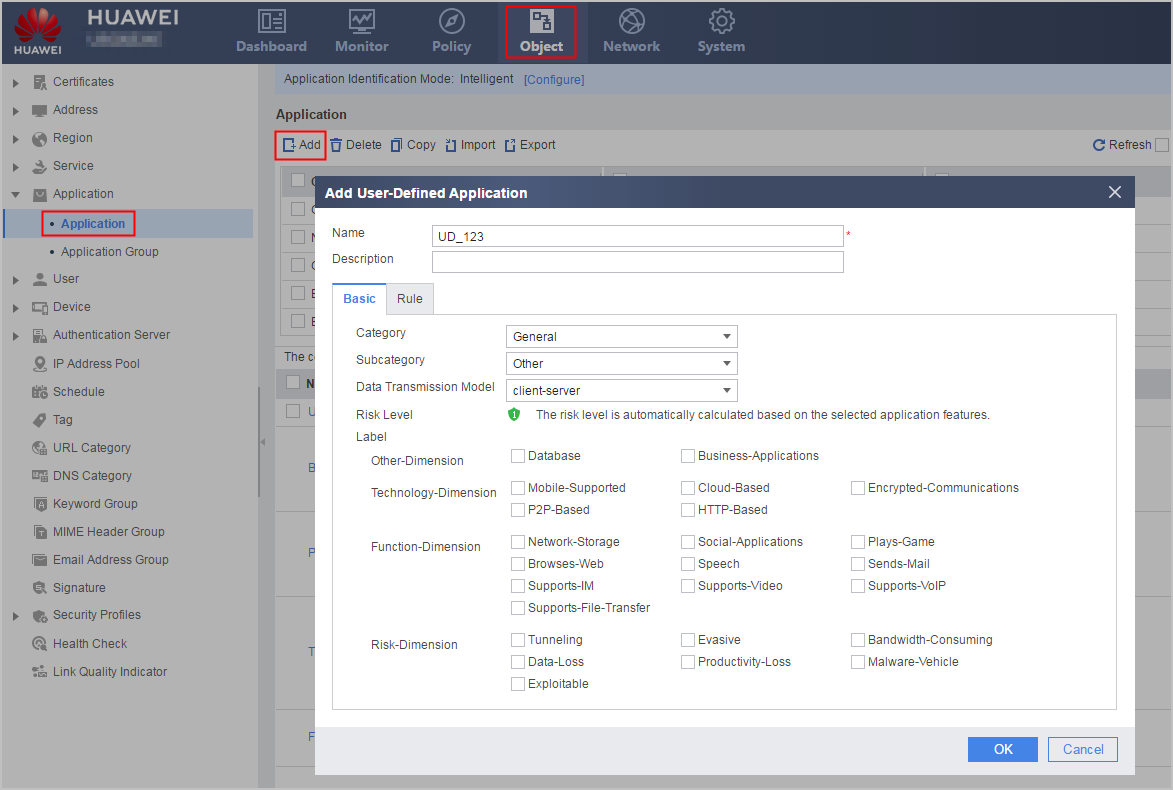
- Set parameters for the user-defined application.
Parameter
Description
Name
Name of the application.
The name of the user-defined application must start with UD_.
Description
Description of the application.
To clearly describe the usage of applications, you are advised to enter a meaningful description for each application.
Basic attributes
Category
Category of the application.
Subcategory
Subcategory of the application.
Data Transmission Model
Model for transmitting data of the application.
Risk Level
The system automatically calculates the risk level after you select the risk-dimension feature labels of the application.
Application Features
Labels of four dimensions.
- Set the rule of the user-defined application.
- Click Add.
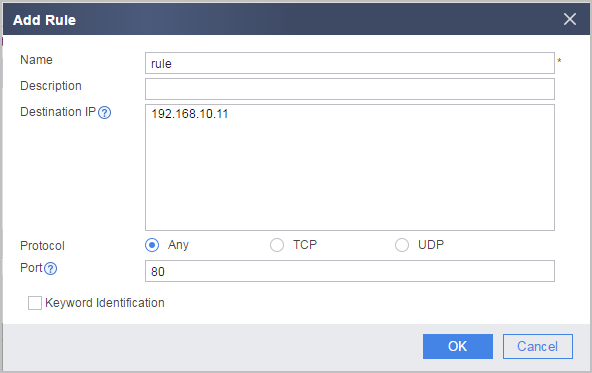
- Click Add.
- Click OK.
- Optional: Export user-defined applications.
- Click Export.
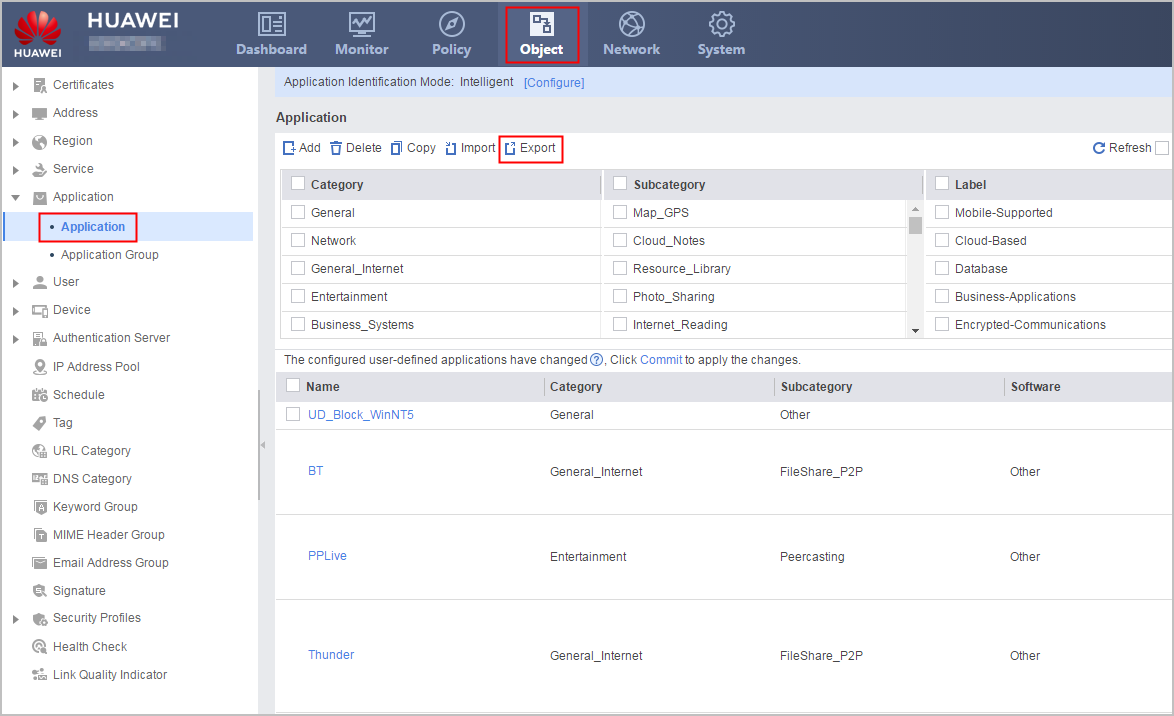
- Click Export.
- Optional: Import user-defined applications.
- Click Import.
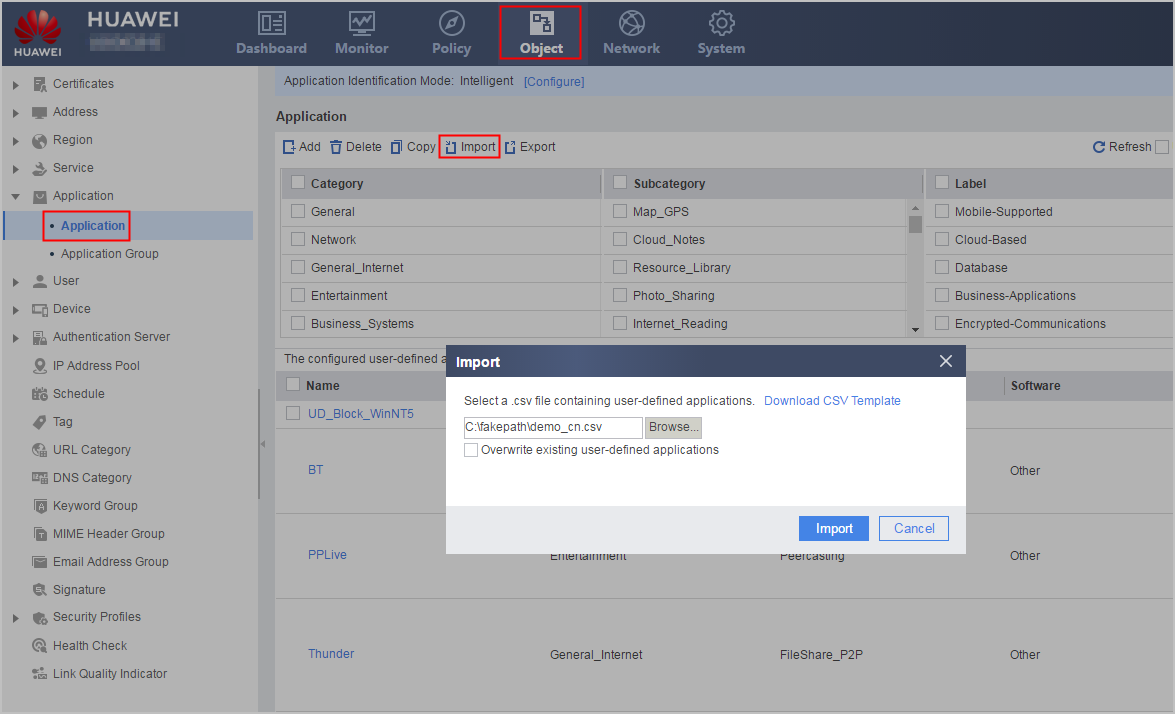
- Optional: Select Overwrite existing user-defined applications to override the application if the name of the imported user-defined application is the same as an existing one. Otherwise, the user-defined application fails to be imported.

If you select Overwrite existing user-defined applications when the name of the imported user-defined application is the same as that of an existing user-defined application in the system and the user-defined application has been referenced in a security policy, the import fails. You must cancel the reference of the user-defined application to the security policy and then import the user-defined application again.
The format of imported user-defined application files must be the same as that of exported user-defined application files. If you need to modify a user-defined application, modify it on the web interface instead of in the exported user-defined application file.
- Click Import.
- Click Commit to commit the imported applications.
Configurations such as creating, modifying, or deleting an application do not take effect immediately. You need to click Commit on the upper right of the web interface to activate the configuration. The activation takes a long time. Therefore, you are advised to submit the configuration after all operations on the application are complete.
Metacharacters in User-Defined Applications
This section describes how to use metacharacters in regular expressions when you configure a user-defined application rule.
Note the following items when you configure regular expressions for user-defined applications:
- Regular expressions in user-defined application rules are case-sensitive.
- The character string must start with three consecutive exact characters. For example, character string abcd* meets the requirement, but ab* does not meet the requirement because * is not an exact character.
- {} can be applied only to {n, m} and {n}.
- A comma (,) can be used only in {} or follow a backslash (\) if the comma appears in any other place.
- Modifiers include +, *, ?, and {} and follow normal characters.
- (), [], and {} must be used in pair.
- When the protocol type is TCP/UDP and the protocol field is General-payload, there are some restrictions on the regular expression. For example, abc* does not meet the requirement.
- When the protocol type is TCP and the protocol field is HTTP.Body or General-payload or the protocol type is UDP and the protocol field is General-payload, do not use the regular expression in {m} or {m,n} in case of three consecutive characters (some of these characters are repeated). For example, use abccccc instead of abc{5} and use the comment string format of abc{0,6} after identifying the number of repeated characters.
The common requirements on the regular expressions of user-defined applications are provided, which are subject to the actual situation.
Metacharacter |
Meaning |
Remarks |
|---|---|---|
^ |
Matches the beginning of the entered string in single line mode. Matches all strings behind newline character \n in multi-line mode. |
For example, if the entered regular expression is ^abcdefg and a packet containing the abcdefg\nabcdefgxxx field is detected:
|
$ |
Matches the end of the entered string in single line mode. Matches the string prior to \n. |
For example, if the entered regular expression is abcdefg$ and a packet contains a defabcdefg\nxxabcdefg field, the regular expression matches the following bold characters:
|
[] |
Matches any single character that is contained within the brackets. An hyphen (-) can be used to specify a range of characters. Special characters listed in Table 2 are not supported. |
|
() |
Indicates the beginning and end of a subexpression. |
|
. |
Matches any single character, but not \n. |
For example, regular expression abcdefg.h matches abcdefgah, abcdefgbh, and abcdefgch, but not abcdefgaah. |
| |
Indicates that characters on both sides of the vertical bar (|) are logically ORed. |
Characters or expressions must be added on both sides of the vertical bar (|). For example, regular expression ab| is incorrect. For example, regular expression abcdefg(a|b) matches abcdefga or abcdefgb. |
\ |
Indicates an escape character. |
Added prior to metacharacters to be matched. For example, regular expression \\ matches a backslash (\).
|
- |
An hyphen (-) can be used to specify a range of characters. |
For example, regular expression abcdefg[a-c] can match abcdefga, abcdefgb, and abcdefgc. |
* |
Matches zero or more occurrences of the preceding character in the target object. |
The following restrictions apply to the preceding character or character string:
For example, regular expression abcdefg* matches abcdef, abcdefg, and abcdefggg. |
+ |
Matches one or more occurrences of the preceding character in the target object. |
Requirements are as follows:
For example, regular expression abcdefg+ matches abcdefg, abcdefgg, and abcdefggg. |
? |
Matches zero or one occurrence of the preceding character. |
For example, regular expression abcdefg? matches abcdef, and abcdefg. ?? and ?+ are not supported. |
{n} |
Matches a specific number (n) of instances of the preceding character. |
Requirements are as follows:
For example, regular expression abcdefg{3} matches abcdefggg. |
{n,m} |
Matches a specific range (n through m) of instances of the preceding character. |
Requirements are as follows:
For example, regular expression abcdefg{0,8} has a minimum of 0 gs and a maximum of 8 gs. |
Pattern |
Meaning |
Remarks |
|---|---|---|
\a |
Bell character (hex 07) |
- |
\d |
Decimal digits 0 through 9 |
Matches 0, 1, 2, 3, 4, 5, 6,7, 8, and 9. |
\D |
Characters except for decimal digits |
- |
\e |
Escape character (hex 1B) |
- |
\f |
Form feed character (hex 0C) |
- |
\h |
SPACE or TAB character |
Only the USG6510E/6510E-POE, USG6530E, USG6515E/6550E/6560E/6580E and USG6525E/6555E/6565E/6575E-B/6585E/6605E-B do not support \h. |
\H |
Characters except for SPACE and TAB characters |
Only the USG6510E/6510E-POE, USG6530E, USG6515E/6550E/6560E/6580E and USG6525E/6555E/6565E/6575E-B/6585E/6605E-B do not support \H. |
\n |
Newline character (hex 0A) |
- |
\r |
Carriage return (CR) character (hex 0D) |
- |
\s |
SPACE, TAB, carriage return (CR), or line feed (LF) character |
- |
\S |
Characters except for SPACE, TAB, CR, and LF characters |
- |
\t |
Tab character (hex 09) |
- |
\v |
CR or LF character |
- |
\V |
Characters except for CR and LF characters |
- |
\w |
underscore (_), a-z, A-Z, 0-9 |
- |
\W |
Characters except for underscore (_), a-z, A-Z, and 0-9 |
- |
\xhh |
Hexadecimal digits hh |
For example, \x5A matches Z, \x20 matches a space, and \x22 matches straight quotation marks. |