Blocking P2P Traffic
This section describes how to apply the application identification function on the FW to block the P2P traffic of intranet users.
Faced Problems
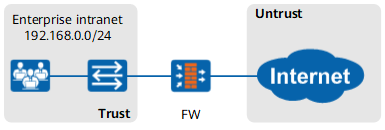
As shown in Figure 1, an enterprise deploys the FW as a gateway to connect the intranet to the Internet.
Intranet users use the P2P software to watch online videos and share files, consuming lots of network bandwidth resources and affecting the working efficiency.
Solution
With the application identification function, the FW can identify the P2P online video and P2P file sharing traffic. Set the applications to P2P online video and P2P file sharing and the action to deny in the security policy to block the P2P traffic from intranet users.
Click Add, select Add Security Policy. Set matching conditions for the security policy as required and set the action to deny.
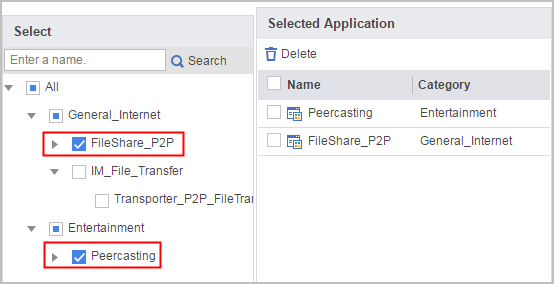
Set the application matching condition to PeerCasting and FileShare_P2P in the security policy.
Set security policy parameters as follows:
Name policy1 Source Zone trust Destination Zone untrust Source Address/Region 192.168.0.0/255.255.255.0 Application PeerCasting
FileShare_P2P
Action Deny - Click OK.
Verification
Intranet users cannot use the P2P software to watch online videos or share files.
Configuration Scripts
The configuration script related to the example is as follows:
#
security-policy
 rule name policy1
  source-zone trust
  destination-zone untrust
  source-address 192.168.0.0 mask 255.255.255.0
  application category Entertainment sub-category PeerCasting
  application category General_Internet sub-category FileShare_P2P
  action deny
#