Automatic Activation of the License
No license file (*.dat) needs to be applied for during automatic online activation.You only need to find the license authorization certificate in your accessories delivered with the device to obtain the entitlement ID.

To implement online automatic activation, you need to configure the DNS server and enable the DNS service.
- Log in to the web UI and choose .
The supported license resources vary with models. The screenshot in this section is for reference only. License control items support details, please refer to theLicense Control Items.
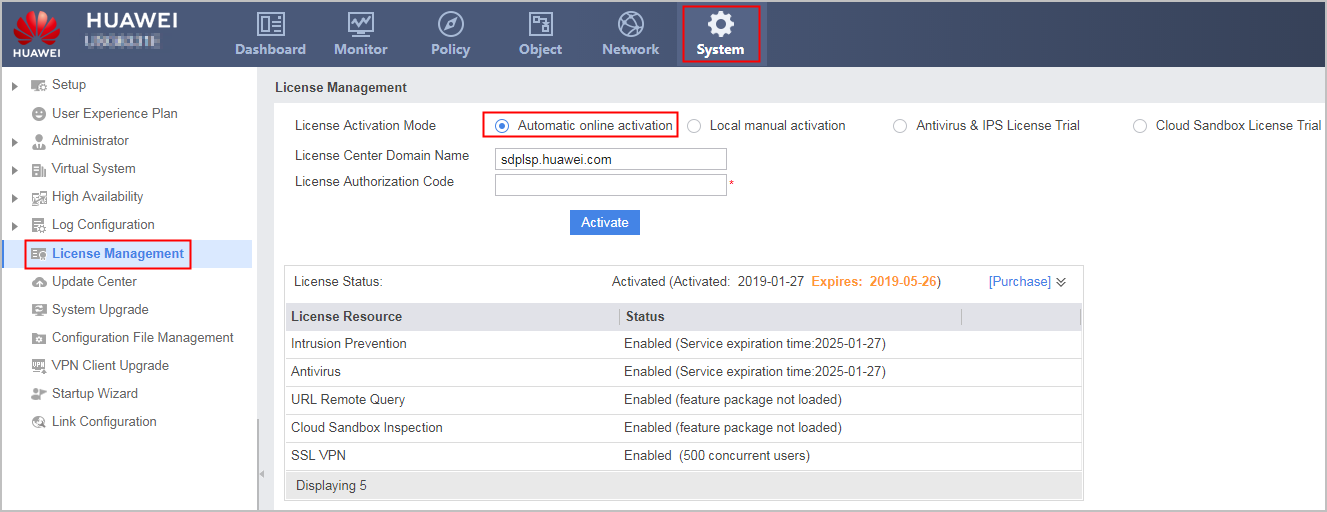
- Select Automatic online activation for License Activation Mode, fill in License Center Domain Name and License Authorization Code, and click Activate. The license is activated.
The domain name of the license center is sdplsp.huawei.com.
License entitlement ID: Enter the authorization code ( Entitlement ID ) on the license authorization certificate.
After you click the Activate, the device sends the ESN and license entitlement ID to the license center.