Implementation Mechanism
This section describes the common concepts and principles of SLB.
Principles
Common concepts of SLB are as follows:
Real server: a server that processes traffic. Service requests from clients are ultimately processed by real servers.
Real server group: a cluster of real servers. Each real server group provides a specific type of service.
Virtual server: the logical form of a real server group. Each client actually accesses a virtual server.
HTTP scheduling policy: The FW distributes service traffic to real servers according to the configured scheduling policy. Only HTTP and HTTPS (SSL uninstallation is configured) support the policy.
Load balancing algorithm: an algorithm that the FW uses to distribute traffic to real servers. Traffic distribution results vary according to algorithms.
Sticky session: a function that enables the FW to allocate the traffic from one client within a specific period of time to the same real server.
Service health check: a process that the FW checks server status to enhance service stability.
SLB distributes traffic by flow. It is performed each time a flow reaches the FW. A flow can be considered as a session or connection established on the FW. "Per flow" means that all packets in a flow are distributed to and processed by a server. After a session ages, the new session is regarded as a new flow even if the network parameters, such as the source and destination IP addresses, of the traffic are unchanged.
As shown in Figure 1, the FW performs SLB on the service request from client 1 and sends it to a server in a server cluster. R1 to Rx are a group of real servers that provide the same service. The group formed by them is grp1. The service request from client 1 is finally processed by a real server in grp1. grp1 is logically abstracted as a high-performance and high-reliability virtual server, vs1, to facilitate management and protection of real servers. Client 1 accesses the IP address of vs1 but does not know that its service request is processed by a real server.

Unless otherwise specified, servers mentioned in this section are real servers.
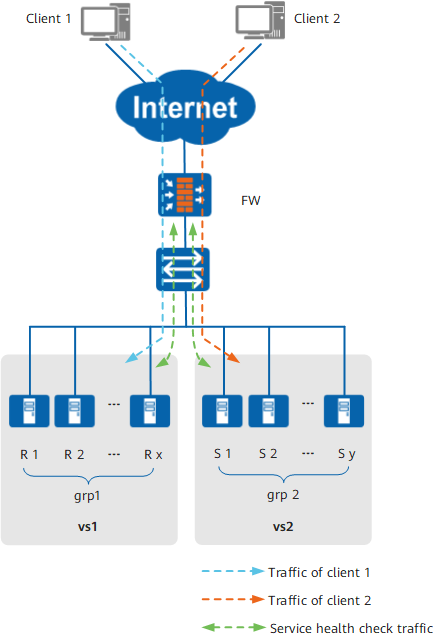
The core of SLB is HTTP Scheduling Policy, Load Balancing Algorithms, Sticky Session, and Service Health Check.
If multiple real server groups are available, the FW selects a real server group according the refined traffic matching requirement and HTTP scheduling policy, and distributes the traffic to the server group.
The HTTP scheduling policy is supported only when the packet transmission protocol is HTTP or HTTPS (SSL uninstallation is required).
When the server group has multiple available real servers, the FW uses a load balancing algorithm to select a real server and forwards traffic to this server. The selection of load balancing algorithm determines the ultimate load balancing effect; therefore, you need to select an appropriate algorithm based on the application scenario and service characteristics.
A client and a real server may need multiple connections to fulfill one task. The sticky session function helps the FW allocate the connections of the client to the real server.
As shown in Figure 1, the FW uses the health check function to consecutively send probe packets to each real server and monitor and record the health status of the servers. Before forwarding the traffic of client 1, the FW determines whether to distribute traffic to a real server based on the server status. Only servers functioning properly can participate in traffic distribution. The FW, however, still sends probe packets to faulty servers. Once a faulty server is restored, the FW allows it to join traffic distribution. In this way, traffic can be forwarded to servers functioning properly, and request failures will not occur.
Forwarding Process
As shown in Figure 2, when a client accesses virtual server vserver 1, the FW uses SLB, selects vserver 1 to process service traffic, and translates the destination IP address and port of packets. If the reply packet sent from the real server reaches the FW, the FW translates the source IP address and port of packets.
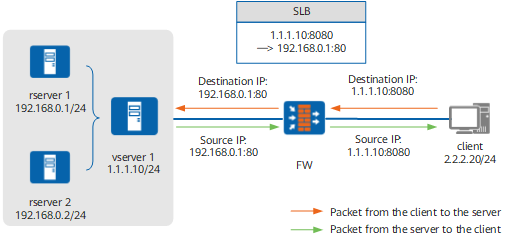
The SLB function uses the server map table and the session table to complete mapping between the virtual server and real server. After SLB is configured, the FW generates a static SLB server map entry, which ages out immediately upon the disabling of SLB. The typical SLB-type static server map entry is as follows. Table 1 lists the descriptions of the output information.
[sysname] display firewall server-map static
 Current Total Server-map : 1
 Type: SLB,  ANY -> 1.1.1.10:8000[grp1/1],  Zone:---,  protocol:tcp
 Vpn: public -> public
Item |
Description |
|---|---|
Type: SLB |
The type of the server map entry is SLB. |
ANY |
Source device IP address. The FW has no limit on the devices accessing the virtual server. |
1.1.1.10:8000 |
IP address and port number of a virtual server. |
grp1/1 |
Name and ID of the real server group associated with the virtual server. |
Zone |
Security zone. The security zone of the SLB-type static server map entry is always empty. |
protocol |
Protocol type of a virtual server. |
Vpn: public -> public |
Virtual system information of the source device and virtual server. The FW does not support cross-virtual system access to the virtual server. |
If the FW receives service traffic that matching the static SLB server map, the FW establishes a session entry, which ages out automatically if the entry is not matched for a long time. A typical session entry is as follows:
[sysname] display firewall session table verbose
 Current total sessions: 1
 http: VPN: public --> public  ID: a7b2679b4a4c03388d54ca6f81126
 Zone: untrust --> trust Slot: 2 CPU: 3 TTL: 00:00:10 Left: 00:00:03
 Interface: GigabitEthernet0/0/3 NextHop: 192.168.0.11
 <--packets: 908 bytes: 7548 -->packets: 23 bytes: 306
 2.2.2.20:51886 --> 1.1.1.10:8000[192.168.0.1:80] PolicyName: policy_example
Figure 3 shows the process of SLB forwards a packet.
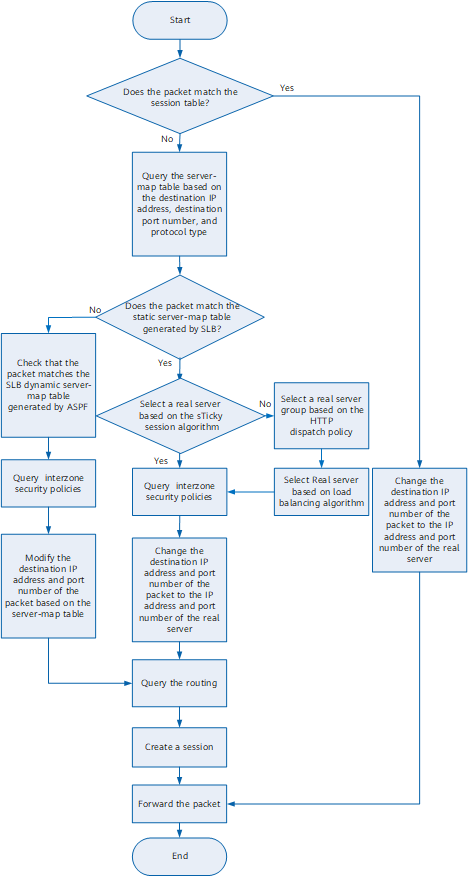
The description about the forwarding process is as follows:
After receiving a packet, the FW searches for a mapping session table. If the table exists, the FW modifies the destination IP address and port number of the packet based on the table and forwards the packet to the associated real server. If the table does not exist, the FW searches the server map entry based on the destination IP address, destination port number, and protocol type of the packet.
SLB generates a static server map entry for a single-channel protocol. In the case of a multi-channel protocol (FTP only), SLB generates a dynamic server map entry using ASPF.
If a single-channel protocol is used, when a request packet from a client matches a static server map entry, the FW first checks whether a real server can be selected based on the sticky session table or cookies. If so, the FW selects a real server and changes the destination IP address and port of the request packet to the IP address and port of the real server. If not, the FW selects a real server based on the preset load balancing algorithm and changes the destination IP address and port of the request packet to the IP address and port of the real server.
If a multi-channel protocol is used, the FW changes the destination IP address and port of a request packet based on dynamic server map entries. If the packet does not match any dynamic server map entry, the FW selects a real server based on the sticky session function or load balancing algorithm and then generates a dynamic server map entry.
The step of selecting a real server group based on the HTTP scheduling policy is optional. This step is implemented only when HTTP or HTTPS (SSL uninstallation is configured) is used.
The FW queries the interzone security policy to determine whether to forward the request and queries the routing table to forward the request.
As the FW modifies the destination IP address and port number after querying the interzone security policy, the IP address specified in the security policy must be the IP address of a virtual server.
As the FW modifies the destination IP address and port number before querying the routing, the IP address specified in routing must be the IP address of a real server.
The FW creates a session entry before forwarding the packet. When the subsequent packets of the same flow arrive, the FW directly forwards them based on the session table.