Web Example: Configuring APT Defense With Cloud Sandbox Inspection Enabled
This section provides an example for configuring APT defense with cloud sandbox inspection enabled.
Networking Requirements
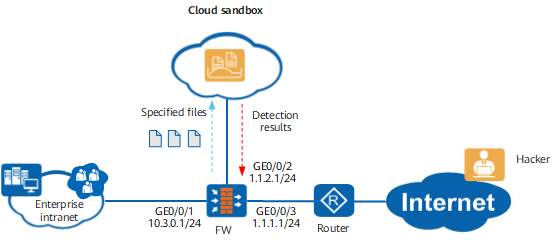
As shown in Figure 1, the enterprise intranet is connected to the Internet through a FW and a router, and a cloud sandbox is deployed. The FW interworks with the cloud sandbox to send risky traffic identified by the FW to the cloud sandbox for detection. The FW periodically obtains detection results from the cloud sandbox and updates the list of malicious files or URLs in the cache based on the detection results. When subsequent traffic with the same features matches the malicious file or URL list, the specified action, such as block, is performed to protect users on the intranet from APT attacks.
Data Planning
Item |
Data |
Description |
|---|---|---|
Cloud sandbox |
Cloud sandbox information:
Maximum sizes of files to be detected:
|
|
FW |
|
- |
Configuration Roadmap
Obtain and activate the license of the cloud sandbox and load the cloud sandbox component.
Set interface IP addresses and assign the interfaces to security zones.
Configure the DNS server and ensure that the FW can correctly resolve domain name sec.huawei.com.
Configure security policies so that the enterprise intranet users, cloud sandbox, and FW can properly communicate.
- Configure the cloud sandbox on the FW.
- Configure an APT defense profile on the FW.
Configure malicious URL detection.
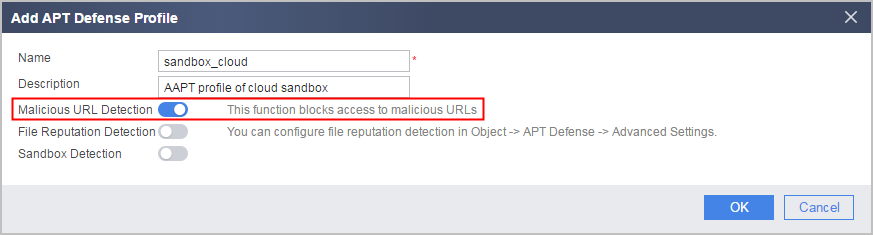
When this function is enabled, the device matches traffic against cached malicious URLs. If the traffic matches a malicious URL, the device blocks the URL, and the traffic does not need to be sent to the sandbox for inspection. If the traffic does not match a malicious URL, the traffic is sent to the sandbox for inspection.
Configure file reputation detection.
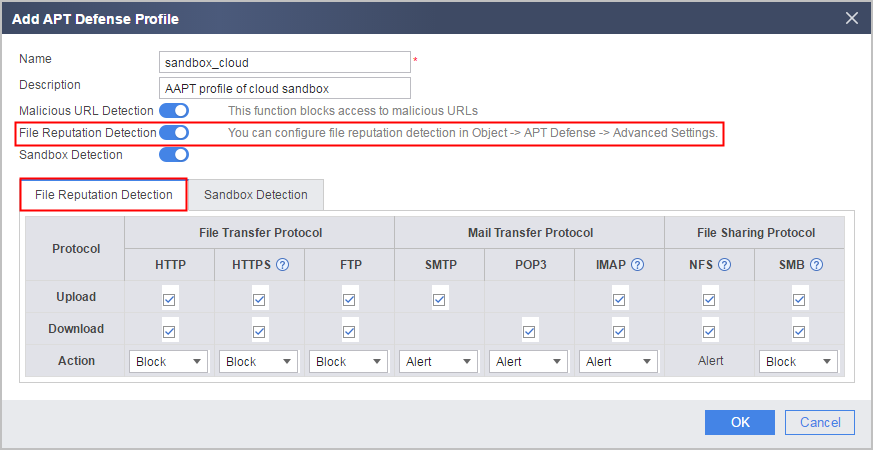
When this function is enabled, the device matches traffic against cached malicious files. If the traffic matches a malicious file, the device performs the specified action, and the traffic does not need to be sent to the sandbox for inspection. If the traffic does not match a malicious file, the traffic is sent to the sandbox for inspection.
-
Configure the protocol type, transfer direction, and type of files sent to the sandbox for inspection.
Procedure
- Obtain and activate the license of the cloud sandbox. For details, see License Management.
- Load the cloud sandbox component. For details, see System Upgrade.
- Apply for cloud account huawei on isecurity.huawei.com. For details, see Huawei Cloud Sandbox Guide.
- Set interface IP addresses and assign the interfaces to security zones.
- Click
 of GE0/0/1 and set the parameters as follows:
IP address
10.3.0.1
Subnet mask
255.255.255.0
Security zone
trust
- Click
- Configure the DNS server and ensure that the FW can correctly resolve domain name sec.huawei.com.
- Configure security policies so that the enterprise intranet users, cloud sandbox, and FW can properly communicate.
- Set the country in which the device resides.
- Set the country in which the device resides.
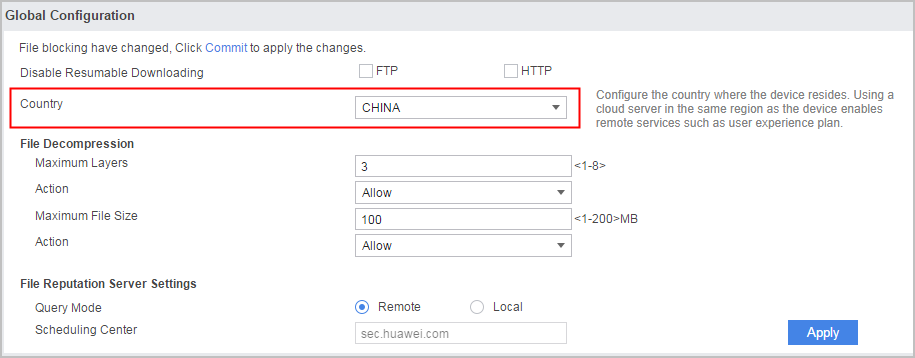
- Set the country in which the device resides.
- Configure the cloud sandbox.
- Choose .
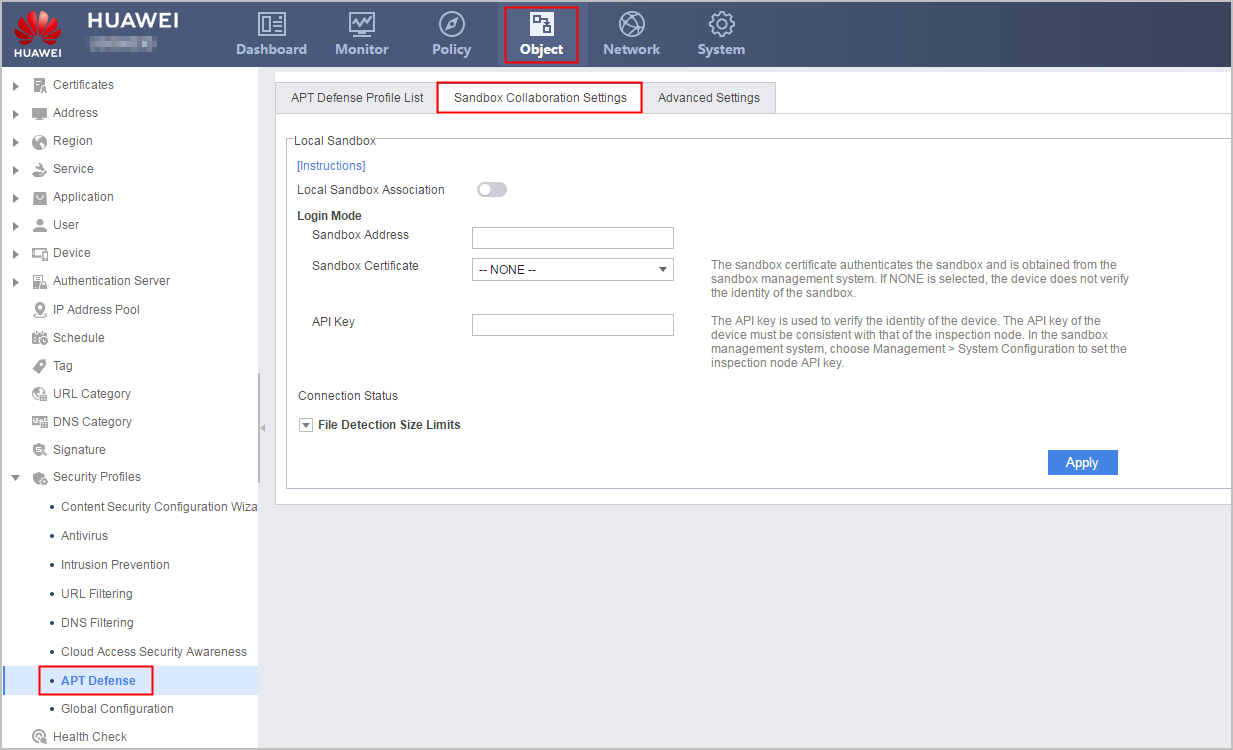
- Configure the cloud sandbox based on the following parameters:
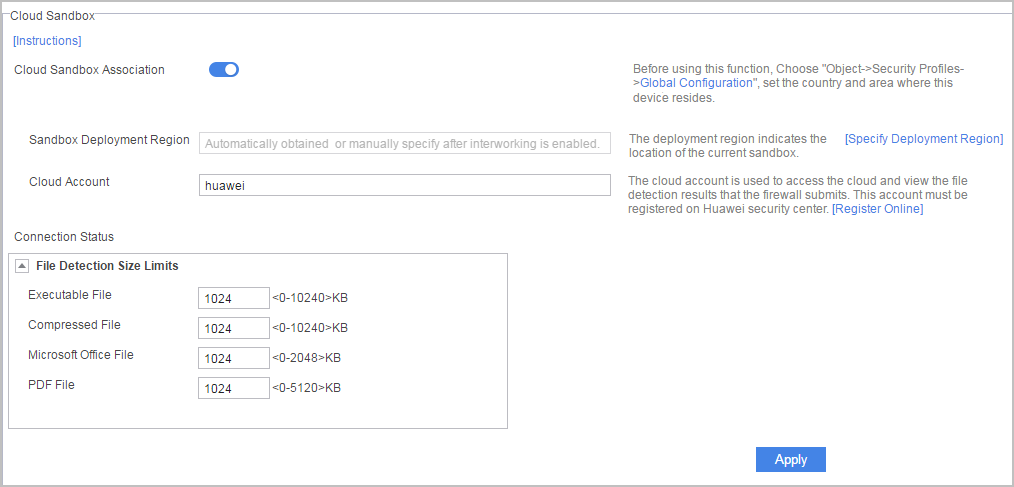
- Choose .
- Configure the APT defense profile.
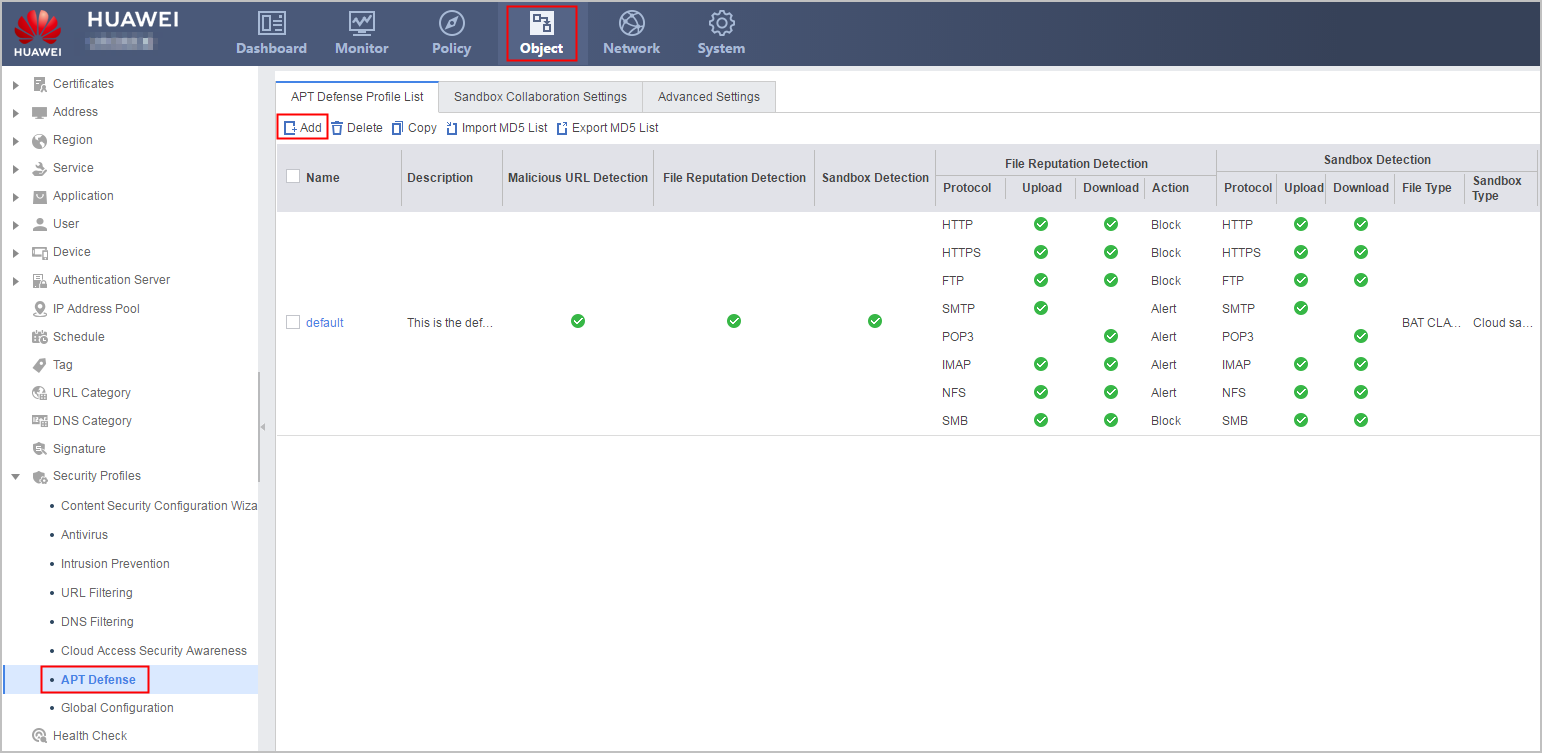
- Click Add in the APT Defense Profile List page.
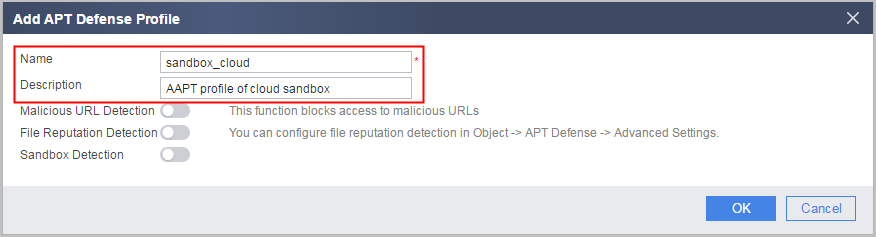
- Configure the name and description of the APT defense profile.
- Enable malicious URL detection.
- Enable file reputation detection and specify the protocol, traffic direction, and action for malicious file detection. The default settings are used in this example.
- Configure sandbox inspection parameters.
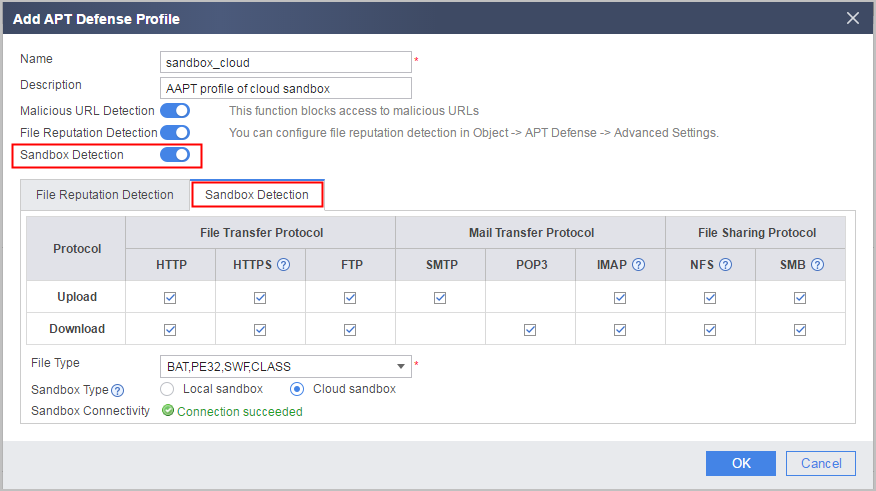
- Click Add in the APT Defense Profile List page.
- Reference the content security profile in security policies.
- In Security Policy List, search for the security policy for the Internet to access the intranet (policy name: policy_to_Enterprise) and click . Choose and select sandbox_cloud.
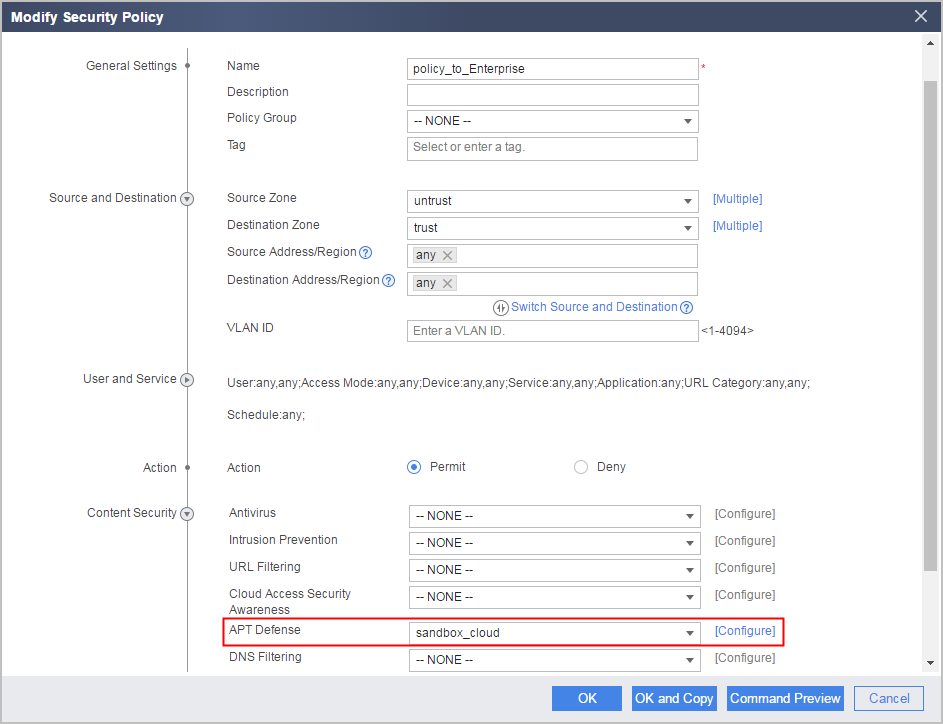
- In Security Policy List, search for the security policy for the Internet to access the intranet (policy name: policy_to_Enterprise) and click
Verification
- Choose . The connection status is Connection succeeded.
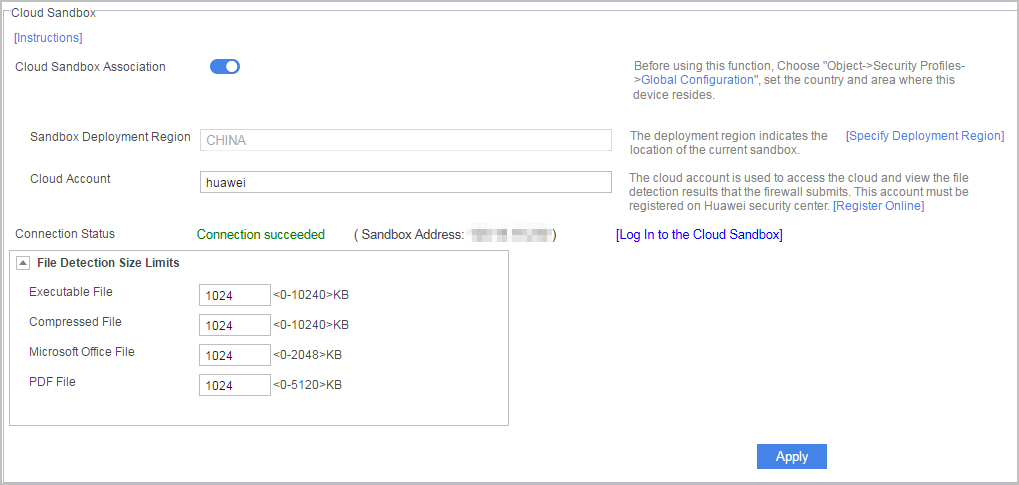
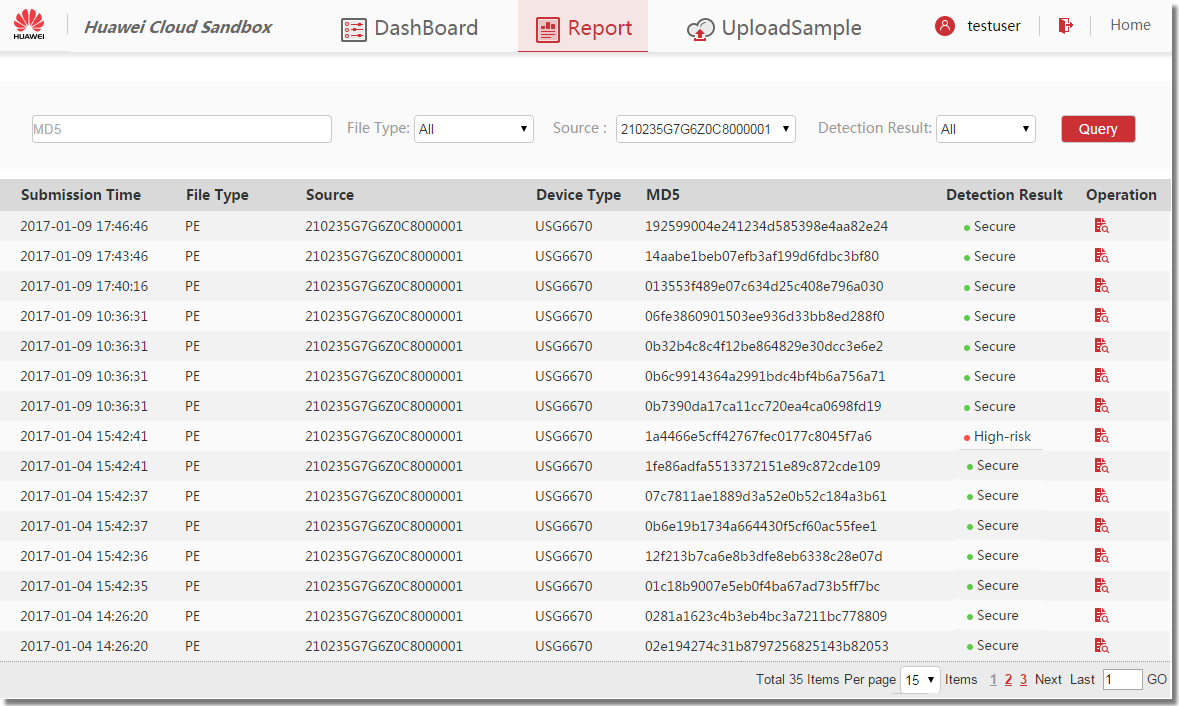
- Log in to isecurity.huawei.com with cloud account huawei and check the detection results of the files sent by the FW to the cloud sandbox.
Configuration Scripts
#
 dns resolve
 dns server 10.2.0.70
#
interface GigabitEthernet0/0/1
 undo shutdown
 ip address 10.3.0.1 255.255.255.0
#
interface GigabitEthernet0/0/2
 undo shutdown
 ip address 1.1.2.1 255.255.255.0
#
interface GigabitEthernet0/0/3
 undo shutdown
 ip address 1.1.1.1 255.255.255.0
#
firewall zone local
 set priority 100
#
firewall zone trust
 set priority 85
 add interface GigabitEthernet0/0/1
#
firewall zone untrust
 set priority 5
 add interface GigabitEthernet0/0/2
 add interface GigabitEthernet0/0/3
#
country CN
#
profile type aapt name sandbox_cloud
 description AAPT profile of cloud sandbox
 file-reputation enable
 malicious-url enable
 file-type BAT CLASS PE32 SWF
 sandbox-type cloud
#
sandbox cloud
 linkage enable
 cloud account-name huawei
 file-set EXE max-size 1024
 file-set GZIP max-size 1024
 file-set OFFICE max-size 1024
 file-set PDF max-size 1024
#
security-policy
 rule name policy_to_sandbox
  source-zone local
  destination-zone untrust
  action permit
 rule name policy_to_Enterprise
  source-zone untrust
  destination-zone trust
  profile aapt sandbox_cloud
  action permit
#
return