Traffic Report
Traffic reports display traffic trends and top rankings in various dimensions. You can effectively learn the traffic status of the current network based on traffic reports and therefore formulate the corresponding traffic measurement measures.
Traffic reports are classified into various types based on functions. You can view traffic reports in each dimension in on the web UI.
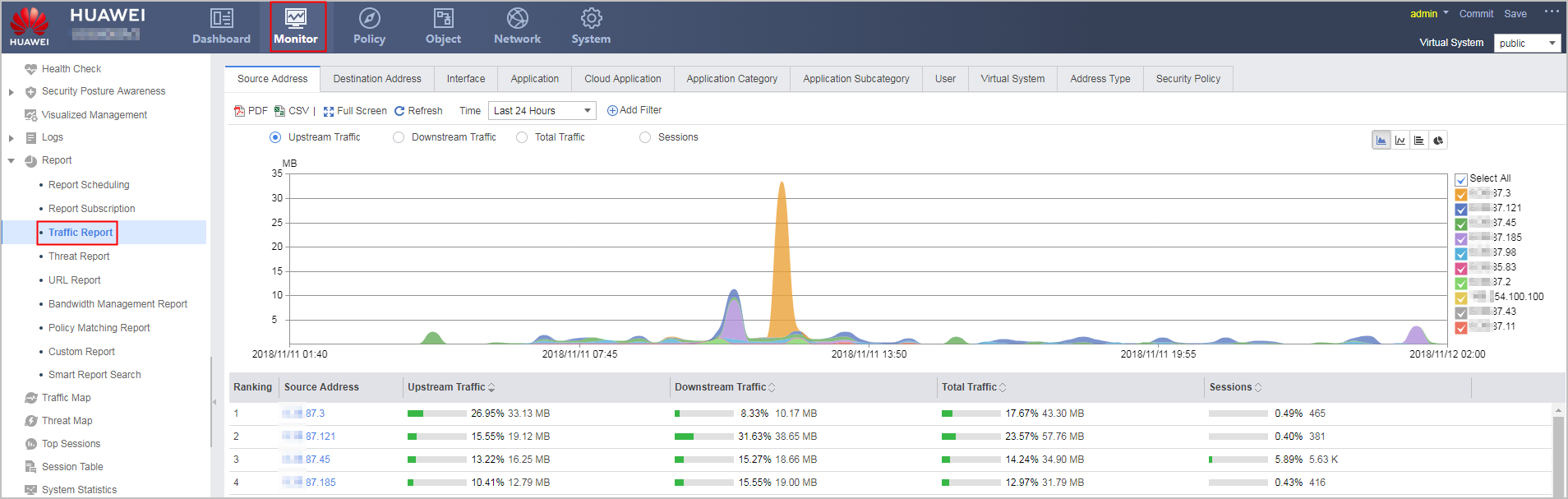
Traffic reports show top rankings in various dimensions, to help you fully understand the traffic status. The ranking dimensions are as follows:
- Upstream Traffic: upstream traffic transmitted based on a certain dimension
- Downstream Traffic: downstream traffic received based on a certain dimension
- Total Traffic: sum of the upstream and downstream traffic
- Session Number: number of aged sessions on the current device
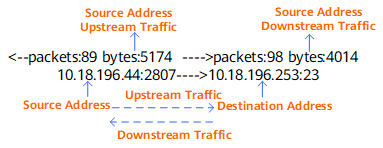
The FW measures the upstream traffic, downstream traffic, total traffic, and number of sessions for each source IP address within the specified time range, and ranks all source IP addresses based on the traffic volume.
- Viewing Traffic Reports in the Source Address or Destination Address Dimension
- This topic describes how to view traffic reports in the source address or destination address dimension.
- Viewing Traffic Reports in the Interface Dimension
- This topic describes how to view traffic reports in the Interface dimension.
- Viewing Traffic Reports in the Application, Application Category or Application Sub-category Dimension
- This section describes how to view traffic reports in the application or application sub-category dimension.
- Viewing Traffic Reports in the Cloud Application Dimension
- This section describes how to view traffic reports in the cloud application dimension.
- Viewing Traffic Reports in the User Dimension
- This topic describes how to view traffic reports in the user dimension.
- Viewing Traffic Reports in the Virtual System Dimension
- This topic describes how to view traffic reports in the virtual system dimension.
- Viewing Traffic Reports by Address Type
- This section describes how to view traffic reports by address type.
- Viewing Traffic Reports by Security Policy
- This section describes how to view traffic reports by security policy.